More users than ever subscribe to on-demand media streaming and engage with live streaming video over the internet, rather than broadcast television. This shift has led the need for highly-specialized technology to support performance-critical media transcoding and OTT streaming functionalities.
We recently launched Accelerated Compute, our new compute solution that provides access to application-specific integrated circuits (ASICs) in the cloud, starting with NETINT Quadra Video Processing Units (VPUs). VPUs are specialized hardware designed to encode and decode media more efficiently and with drastically less power consumption than CPU- or GPU-based transcoding.
In this blog, you’ll learn high-level hardware design concepts that make a VPU perform differently than its well-known CPU and GPU counterparts.
Key Media Application Workflow Terms
- Media Encoding: The process of converting audio, video, and image streams or files from one format to another, while compressing the original file to reduce its size and maintain quality.
- Media Decoding: The process of converting a media file or stream to its playable format.
- Media Transcoding: A comprehensive process of converting media to different file types (including encoding and decoding) combined with custom functions such as downscaling resolution, adjusting bitrates, or changing codec standards to support changing network conditions and playback environments.
Hardware Advancements
As technology evolves, operations that cause specific strain to underlying hardware result in manufacturers using new combinations of materials to add new functionality and performance tiers based on what the hardware can withstand. Hardware innovation, design, and production are driven by optimizing the hardware’s power source and the raw materials used in individual circuits and components.
Two primary elements generally define advances in processor unit design and technology:
- Denser packing of circuit elements onto each chip (or, advancement in use of physical chip space).
- Expanding on the inherent capabilities of the microprocessors implemented on those chips (or, advancement of what the chips themselves can do as out-of-the-box hardware).
Architecture Components
The diagram below illustrates the quantity and ratio of different circuits and engines in a CPU vs. GPU vs. VPU (at a conceptual level). GPUs are designed to be densely packed with arithmetic logic units or ALUs for parallel processing, which makes GPUs more efficient for workloads like graphics rendering and machine learning. In comparison, video processing units or VPUs feature fixed-function circuits programmed to perform specific media-based tasks such as encoding, decoding, scaling, and other features needed for video encoding and processing tasks.
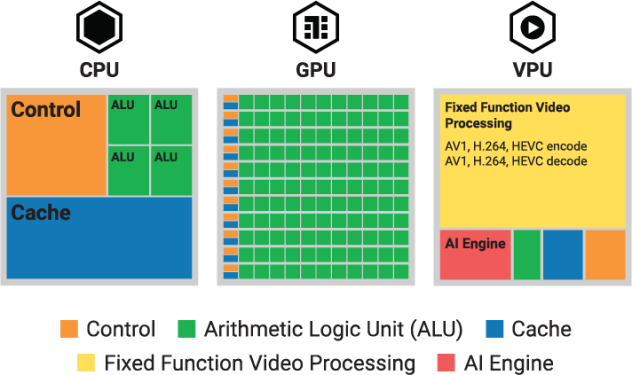
- Control: Synchronous (events are executed in a specified order) digital circuit dedicated to interpreting processor instructions and managing the execution of those instructions.
- Arithmetic Logic Unit (ALU): Combinational (events and logic get applied “as needed”) digital circuit that responds to data input to perform complex logic.
- Cache: Local cache for low-latency data access.
- Fixed Function Video Processing: Circuits dedicated to performing specific, pre-defined tasks with hyper efficiency and low power consumption.
- AI Engine: A specialized compute block dedicated to artificial intelligence (AI) tasks by maximizing matrix and vector processing.
Why It Matters
Aside from pure processing power, transcoding workloads require specialized hardware for maximum efficiency. Based on customer feedback during our beta period, users found that Dedicated CPU plans would max out at 2-4 concurrent streams, compared to achieving 30 concurrent streams on VPU-powered accelerated instances. In addition to overall cost savings, higher density allows media organizations and technical partners to lower their cost per stream.
Accessing VPUs in the cloud also means that you can resize as needed, or add the dedicated processing power you can only get with VPUs as your application scales or during peak times.
Get started with Akamai Cloud accelerated instances by creating an account, or contact our cloud computing consultants to learn more.

Tags