Linode Kubernetes Engine Enterprise (LKE Enterprise) launched in Limited Availability on June 5th, and with this launch, we wanted to highlight three ways you can create your first Enterprise cluster. This blog includes brief instructions for using Cloud Manager, the Linode CLI, and Terraform. If you don’t have access to LKE Enterprise already, you can reach out to your account team to enable the service on your account.
Cloud Manager
- In Cloud Manger, under Kubernetes, select the tier LKE Enterprise.
- Select a region.
- Select a Kubernetes version.
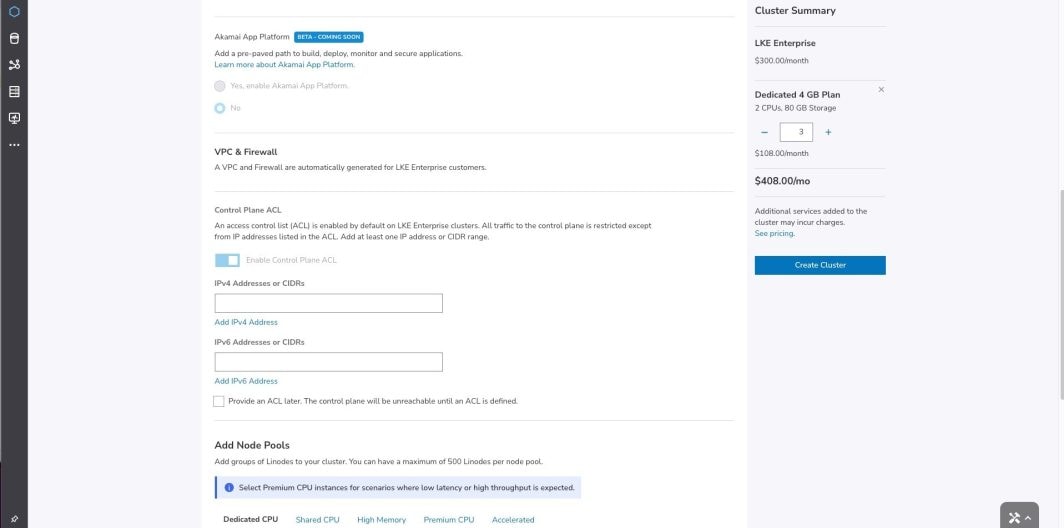
- Unlike traditional LKE, High Availability (HA) is now automatically included with LKE Enterprise, along with VPC, and Firewall.
- An access control list (ACL) is automatically configured, which necessitates both IPV4 or IPv6 addresses in order to maintain access to the cluster.
- Select which nodes you’d like to add to your cluster from the selection of plans.
Linode CLI
- To get started using the Linode command line client (CLI), you need to install the CLI. Once installed, set the CLI to use the “v4beta” API version. To do so, enter the setup command:
linode-cli setup
- Follow the prompts and configure the CLI with your preferences until you are prompted to configure a custom API target.
- When prompted, use the default Linode API host. Enter “v4beta” as the Linode API version. Confirm the default for HTTPS, and your desired API warning settings. You’re now ready to create a cluster.
- Construct your cluster-create CLI command using the new --tier option, specifying “enterprise.” Below is an example command that creates a LKE Enterprise cluster called “my-lke-enterprise-cluster” consisting of 9 nodes in the us-central region:
linode-cli lke cluster-create \
  --label my-lke-enterprise-cluster \
  --region us-sea \
  --k8s_version 1.31.08-lke5 \
  --node_pools.type g6-standard-4 --node_pools.count 6 \
  --node_pools.type g6-standard-8 --node_pools.count 3 \
  --tags production
—-tier enterprise5. In LKE Enterprise, Access Control Lists (ACL) control plane configuration is mandatory.
For details see our Techdocs documentation on control plan ACLs and our API documentation on obtaining an LKE cluster ACL.
Terraform
The Linode Terraform provider now offers a new “tier” option for the LKE cluster resource, which turns on Enterprise capabilities.
To use the tier option, you must configure the Linode provider to use the “v4beta” API version. A fully configured example using the latest version of the Linode provider might look like the following:
terraform {
  required_providers {
    linode = {
      source = "linode/linode"
      version = “2.41.0”
    }
  }
}

provider "linode" {
  token = var.token
  api_version = “v4beta”
}

resource "linode_lke_cluster" "test" {
  label = "lke-e-cluster"
  region = "us-lax"
  K8s_version = "v1.31.1+lke5"
  tags = ["test"]
  tier = "enterprise"

  pool {
    type = "g6-standard-1"
    count = 3
    tags = ["test"]
  }
}For more information, check out our guide on deploying a LKE cluster with Terraform.

Tags