Executive summary
PostgreSQL creates a separate back-end process for every client connection, which consumes significant memory and limits scalability under high load.
PGBouncer is a lightweight connection pooler that sits between your application and your database, enabling a large number of clients to share a smaller set of persistent back-end connections.
Akamai now supports PGBouncer connection pooling for Managed PostgreSQL databases, powered by our partnership with Aiven.
Connection pools can be created and managed through Akamai Cloud Manager or the Akamai API, with support for transaction, session, and statement pooling modes.
Enabling PGBouncer reduces connection overhead, frees up server resources for query execution and disk caching, and improves performance at scale, with no additional infrastructure to manage.
As applications scale, database connections become a hidden bottleneck. No matter how much you optimize your queries and scale your application tier, your PostgreSQL application may still struggle under the load, impacting throughput and memory use.
We're addressing this directly with the introduction of PGBouncer connection pooling for Managed Databases.
What is connection pooling?
Connection pooling is the practice of maintaining a cache of reusable database connections, rather than opening and closing a new connection for each client request. A connection pooler sits between your application and your database, managing a smaller set of persistent back-end connections and efficiently routing client requests through them.
The result: Your application can support a large number of concurrent users without forcing the database to maintain a corresponding number of back-end processes. Server resources stay focused on doing actual work, rather than on connection overhead.
Why PostgreSQL connections are expensive
PostgreSQL handles client connections differently from many other databases. Rather than using lightweight threads, PostgreSQL spawns a separate back-end process for every connection. Each process consumes memory regardless of whether it is actively executing a query.
This model works well at a modest scale. But as your application grows — by adding app servers, microservices, or serverless functions — connection counts multiply. At some point, the memory consumed by idle connections starts crowding out the resources PostgreSQL would rather use for performance-critical tasks.
This problem is especially common in:
Horizontally scaled applications with many app servers each maintaining their own connections
Serverless architectures where functions open and close connections frequently
Microservices environments where multiple services share a single database instance
A useful rule of thumb: A reasonable number of back-end connections is roughly three to five times your CPU core count, since each connection can only use a single core at a time. Beyond that, you're paying a memory cost without getting a performance benefit.
PGBouncer helps by letting a large number of clients share a smaller pool of back-end connections that stays within that range — so your database spends its resources on executing queries rather than on managing connections.
What is PGBouncer?
PGBouncer is a lightweight, open source connection pooler purpose-built for PostgreSQL. It acts as a proxy by accepting connections from your application and multiplexing them across a smaller pool of actual back-end connections to PostgreSQL.
PGBouncer supports three pooling modes:
Transaction mode: A back-end connection is held only for the duration of a transaction, then returned to the pool. This enables the highest degree of connection reuse and is the recommended default for most applications.
Session mode: A client holds a back-end connection for the duration of its session. This mode is more conservative and the right choice for applications that use session-level features like advisory locks or SET commands.
Statement mode: Connections are released after every individual SQL statement. This is best suited for simple, stateless workloads.
Note: Transaction mode is not compatible with all PostgreSQL features. Session-level advisory locks, SET commands, and prepared statements behave unexpectedly or break entirely in this mode. You should review your application's use of these features before enabling transaction pooling.
It's worth noting that many frameworks and Object-Relational Mapping systems (ORMs), such as Django or Rails, already include client-side connection pooling. PGBouncer complements rather than replaces these. Client-side pooling helps a single application manage its own connections, but a server-side pooler like PGBouncer becomes especially valuable when multiple distributed applications or services are all connecting to the same database.
PGBouncer on Akamai Managed Databases
Akamai now supports PGBouncer connection pooling for Managed PostgreSQL databases, powered by our partnership with Aiven. You can create and manage connection pools directly through Cloud Manager (Figure 1) or the Akamai API.
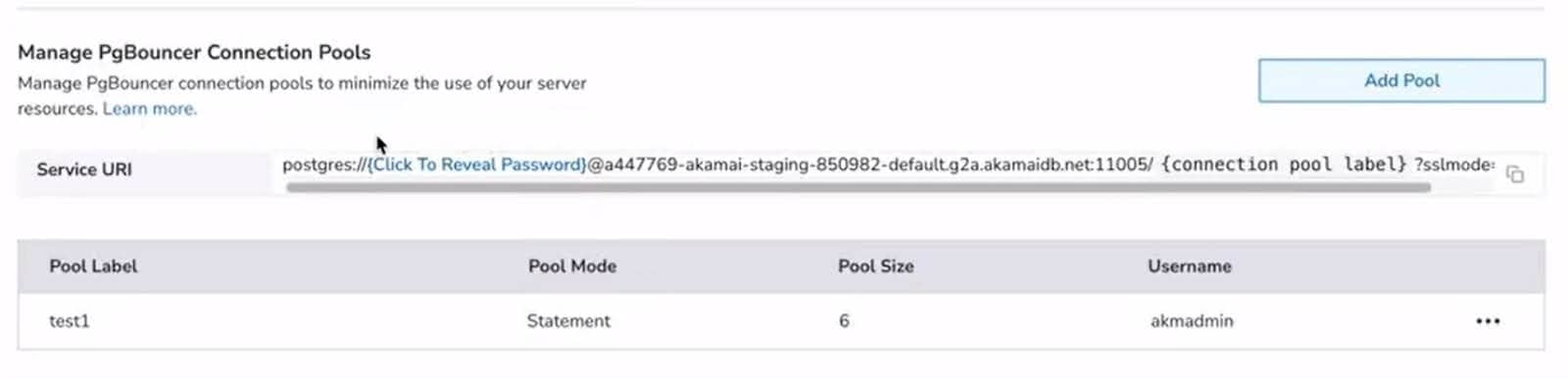 Fig. 1: The connection pool section of the networking tab
For Cloud Manager, you can navigate to the “Networking” tab for one of your database clusters, go to the connection pool section at the bottom, and click “Add Pool” to get a popup (Figure 2).
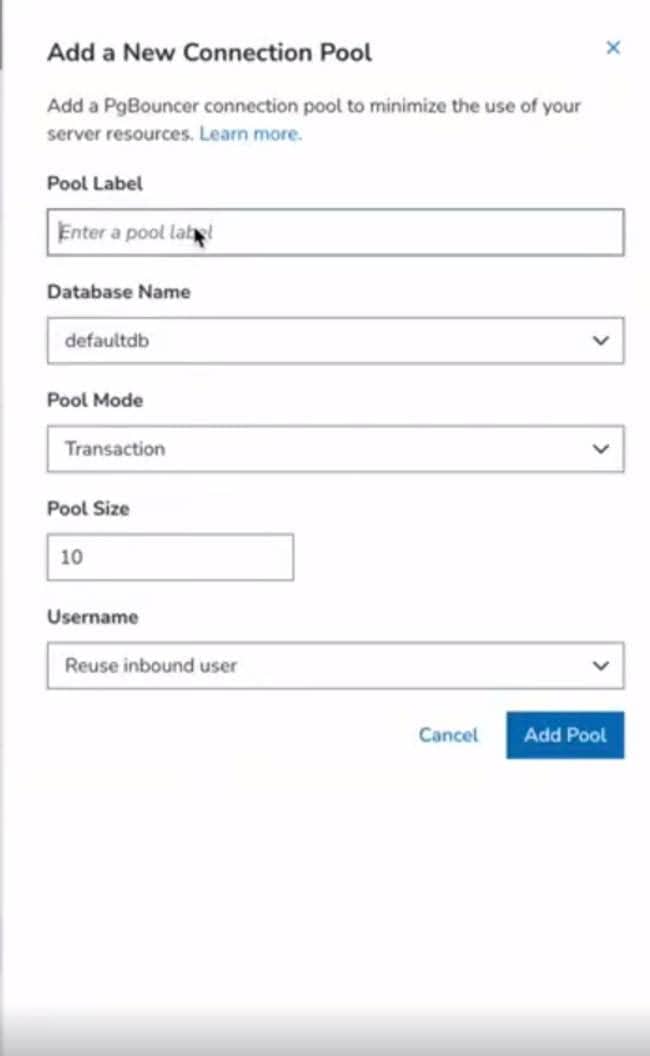 Fig. 2: The “Add Pool” dialog box
Then, you can add the following inputs:
Pool Label: A unique identifier for the pool within your database instance
Database Name: The target database within your cluster
Pool Mode: Transaction, session, or statement (transaction is the default)
Pool Size: The number of back-end connections in the pool, subject to your plan's connection limits
Username: The database user the pool connects as (alternatively, this can be set to “none” to reuse the inbound user)
Once created, you'll receive a dedicated PGBouncer connection URI to point your application at. The pooler handles the rest.
You can check out our TechDocs to see how to connect via the API.
Get started
A few things to keep in mind as you get started:
Plan-based limits apply. Depending on your plan, limits range from 20 to 1,000 connections. Aiven also reserves a portion of available connections for service management, so the number available for pooling will be slightly less than your plan's stated maximum. Pool sizes across all pools on an instance cannot exceed this limit in aggregate.
Multiple pools are supported. You can create multiple pools on the same database instance, which is useful for separating workloads or isolating access by user.
- VPC databases are supported. For VPC-enabled databases, connection pools can optionally be made publicly accessible via advanced configuration.
When to use PGBouncer
PGBouncer is the right choice for most PostgreSQL workloads at scale. Consider enabling PGBouncer if:
Your application runs on multiple servers or containers that each maintain their own database connections
You're seeing connection-related errors or timeouts under load
You're running serverless functions that connect to PostgreSQL directly
- You want to reduce memory pressure on your database instance and free up resources for query performance
Get support
For teams running on Akamai Managed Databases, PGBouncer support is now available with no additional infrastructure to configure or maintain. For more information, check out the Managed Databases TechDocs.

Tags