A network switch typically lasts 5 to 10 years, depending on usage, hardware quality, and operating conditions. Enterprise-grade switches used in business or data center environments may last longer when supported with firmware updates, proper cooling, and manufacturer warranty coverage
A network switch is a technology that allows two or more IT devices such as computers to communicate with each other, forming a communications network. Switches enable devices on the network to share IT resources such as printers, servers, file storage, internet access, and processing. Simple switches connect devices on a single local area network (LAN), while more advanced switches may connect devices from multiple LANs and incorporate data security functions. Switches typically connect to devices via Ethernet cables connected to Ethernet ports on both devices.
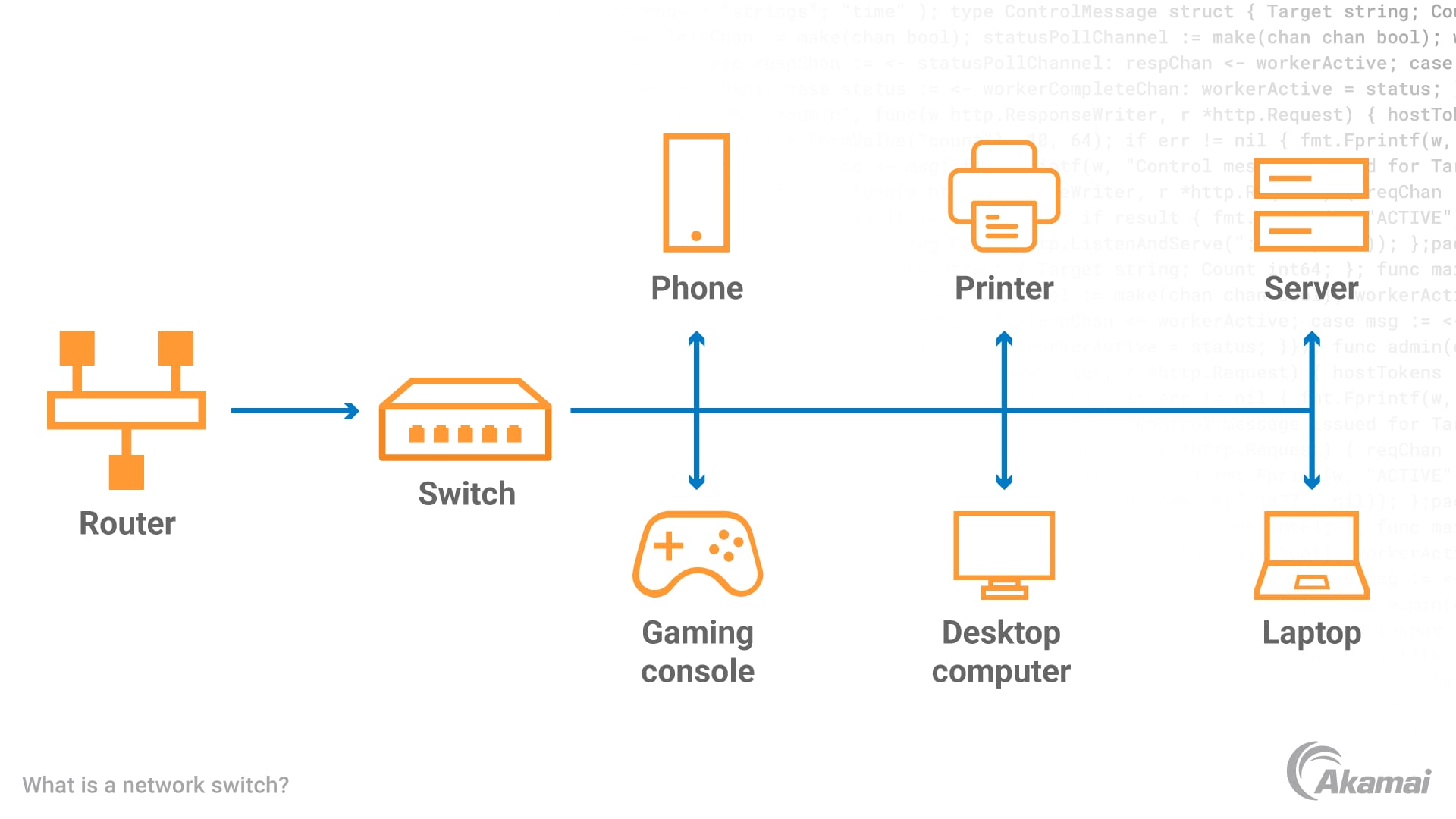
Network switches are commonly used in environments ranging from home networks and small office or small business deployments to large enterprise networks and data center infrastructure. Popular vendors that manufacture switches include companies such as Cisco, Netgear, TP-Link, and D-Link.
How does a network switch work?
IT devices communicate by exchanging packets of data. A switch receives data packets from connected devices and correctly forwards them to other devices connected to the same switch. Switches operate at the Data Link Layer (Layer 2) or the Network Layer (Layer 3) of the Open Systems Interconnection (OSI) model. Switches operating on Layer 2 identify a device by its Media Access Control (MAC) address, a code that’s part of the device’s network interface card (NIC). When a data packet enters the switch, the switch reads the MAC address in the header and sends the packet out through the appropriate port to the right destination. Most switches offer full-duplex functionality, allowing traffic to travel in both directions between a switch and a device at the same time to avoid connectivity issues.
Switches operating at Layer 3 forward data based on a destination IP address .and may perform basic packet routing functions between VLANs. In larger environments, switches may also support advanced capabilities such as link aggregation to combine multiple connections for greater bandwidth, dedicated uplink ports for connecting to other switches, and pluggable modules such as SFP (small form-factor pluggable) transceivers that connect fiber optic cables and optical receivers.
What are the benefits of network switches?
Increased bandwidth. Switches create dedicated connections between devices and increase the available bandwidth for each device.
Improved network performance. Switches provide faster data transfer rates, resulting in better network performance.
Tighter security. Switches can create virtual LANs (VLANs) to isolate network traffic and separate sensitive data, restricting access to approved devices or groups of devices. Managed switches can also support advanced policies such as traffic prioritization and integration with security systems including firewalls.
- Easy scalability. Network administrators can easily add switches to a network to increase the number of devices that can be connected. Switches are often deployed as part of larger types of network architectures, from small local networks to enterprise campus networks and large data center environments.
- Power over Ethernet (POE). Many modern switches support Power over Ethernet (PoE), which supplies electrical power over Ethernet cables. Depending on the PoE standard used (such as PoE, PoE+, or PoE++), switches may deliver from about 15 watts up to 60–100 watts per port. A POE switch can power network devices like security cameras, sensors, outdoor lighting, and VoIP phones, enabling these devices to avoid a separate power supply.
What is a network switch vs. a network router?
Routers forward data packets from one network to another, making them an important part of internet connectivity. Switches are primarily used to connect devices within the same local network or LAN. Some advanced switches, known as multilayer or Layer 3 switches, can also route traffic between VLANs or network segments. Routers operate primarily on Layer 3, while switches operate primarily on Layer 2. Routers may work with both wired and Wi-Fi networks, while switches work only with wired network connections, principally through Ethernet.
What is a network switch vs. a hub?
A hub is a physical device that operates on Layer 1, while a network switch is traditionally a Layer 2 device. Unlike a switch, a hub cannot keep track of the addresses of computers it transfers data and traffic to. Hubs simply connect all the nodes in a network, while an Ethernet switch connects network devices together and transfers data packets between them.
What is an unmanaged switch?
Unmanaged switches are plug-and-play devices that offer no configuration interface or options. Their value is in increasing the number of ports in a LAN, enabling more local devices to access the unit. The form factor for an unmanaged switch may be desktop or rack-mounted. Many small deployments, like home networks or small office and small business environments, use unmanaged switches because they are affordable and easy to install.
What is a managed switch?
A managed switch enables administrators to modify the operation of the switch, making these devices more appropriate for larger networks. Managed switches enable administrators to control how traffic is prioritized and to set up virtual LANs (VLANs) to subdivide a local network into smaller areas.
Advanced managed switches often support network management protocols and monitoring tools, allowing administrators to configure performance settings such as QoS (quality of service) policies that prioritize critical traffic like voice or video. They may also support modular components, firmware upgrades, and enterprise support services such as extended warranty programs.
Smart switches have a more limited set of features than managed switches but can be configured to deliver more control over data transmissions. Enterprise managed switches offer a full set of management features, along with capabilities for manipulating configurations.
How fast is a network switch?
Network switches offer varying speeds. Fast Ethernet switches provide speeds up to 100 Mbps, while a gigabit Ethernet unmanaged switch (often called a port gigabit switch) provides transfers up to 1,000 Mbps, or 1 Gbps. 10-gigabit switches can transmit data at 10,000 Mbps. Higher-performance switches used in enterprise networks and data center environments may support 10-gigabit, 25-gigabit, or even faster connections through fiber interfaces and pluggable SFP modules.
Frequently Asked Questions
Yes, a network switch can connect to a wireless router to expand the number of wired Ethernet connections on a network. This allows additional devices such as desktop computers, printers, servers, and wireless access points to share the same local network.
Most network switches consume relatively little power because they are designed for energy-efficient networking. However, Power over Ethernet (PoE) switches may use more electricity because they deliver both data and electrical power to connected devices such as IP cameras, VoIP phones, and wireless access points.
A network switch does not increase your internet speed, but it can improve local network performance. By creating dedicated connections between devices and reducing network congestion, switches help data move more efficiently across a local area network (LAN).
To troubleshoot a network switch that isn’t working, first check power, Ethernet cables, and port switch status lights. Administrators may also review configuration settings, verify network management logs, and confirm that connected devices and uplink ports are functioning correctly.
Managed switches are not required for most home networks, but they provide advanced control over network traffic. Features such as VLAN segmentation, link aggregation, and QoS (quality of service) allow administrators to optimize performance, security, and traffic prioritization
Why customers choose Akamai
Akamai is the cybersecurity and cloud computing company that powers and protects business online. Our market-leading security solutions, superior threat intelligence, and global operations team provide defense in depth to safeguard enterprise data and applications everywhere. Akamai’s full-stack cloud computing solutions deliver performance and affordability on the world’s most distributed platform. Global enterprises trust Akamai to provide the industry-leading reliability, scale, and expertise they need to grow their business with confidence.