Executive summary
In this research, we examined the use of large language models for finding the root cause of patched vulnerabilities.
We developed a multi-agent system called PatchDiff-AI that autonomously analyzes the root cause of Patch Tuesday vulnerabilities and generates a detailed report.
This kind of analysis can help security teams analyze vulnerabilities almost instantly, for either defensive or offensive purposes.
By using multiple strategies, we were able to fine-tune our system to achieve a more than 80% success rate in fully automated report generation, including attack vector analysis and triggering flow.
Patch Tuesday → Exploit Wednesday
Microsoft’s regular update cycle centers on Patch Tuesdays — the second Tuesday of each month, when the company releases a comprehensive list of CVEs and their corresponding fixes. These fixes are shipped as Microsoft Standalone Update (MSU) files, a packaging format that applies updates by patching or replacing core system files.
Patch Tuesday is often followed by what's known as “Exploit Wednesday,” as attackers race to uncover the vulnerabilities for which Microsoft has created a patch. By performing binary diffing on the updated binaries, attackers can quickly pinpoint the underlying security issues and attempt to exploit them before organizations have widely deployed the patches.
In a similar manner, defenders often rush to analyze these patches to understand the vulnerabilities’ root causes in order to create detections and mitigations.
The current state of patch diffing
Nowadays, patch diffing is a tedious process. To successfully identify the vulnerable piece of code, a researcher would need to:
Identify the file that is suspected to contain the vulnerability
Perform a binary diff to identify the changes
Isolate the security-related changes from other routine code updates
Analyze the suspected parts and understand the root cause
Dynamically examine the call flows to find potential triggering avenues
Evaluate the completion of the patch fix
These steps can sometimes take weeks to perform, a problem that is further amplified by the sheer volume of vulnerabilities that are released simultaneously each month.
We set out to find a better way — one that would allow researchers to rapidly analyze patched vulnerabilities and understand their root cause.
Using LLMs for patch diff analysis
Large language models (LLMs) can statistically generate reasonable and accurate information based on their trained data, alongside user inputs. But there are some limitations, including a limited context window (which affects the amount of data it can process and its operational costs) and the infamous model hallucination.
Many papers on the contribution of LLMs to the field of vulnerability assessment in the security sector have been published over the years. Today, LLMs seem to struggle when analyzing closed source software, and perform much better when it comes to open source and web vulnerability, where the common ground is the presence of human-readable code.
OpenAI’s Aardvark and Claude Code security reviewer are still bound to the readable source code. On the other hand, there is Google Project Zero’s Big Sleep, which aims to discover zero-days. Neither approach analyzes the binary as closed source.
Introducing PatchDiff-AI
Our research takes a different approach by using LLM for root cause analysis (RCA) of security patches. Our theory, which appears to have been validated, was that the additional context provided by the binary “diff” would significantly enhance the LLM’s ability to understand complex, low-level code.
For this task, we have developed a multi-agent system that automates the analysis of Microsoft Knowledge Base (KB) updates for a specific platform (Figure 1). We call it PatchDiff-AI.
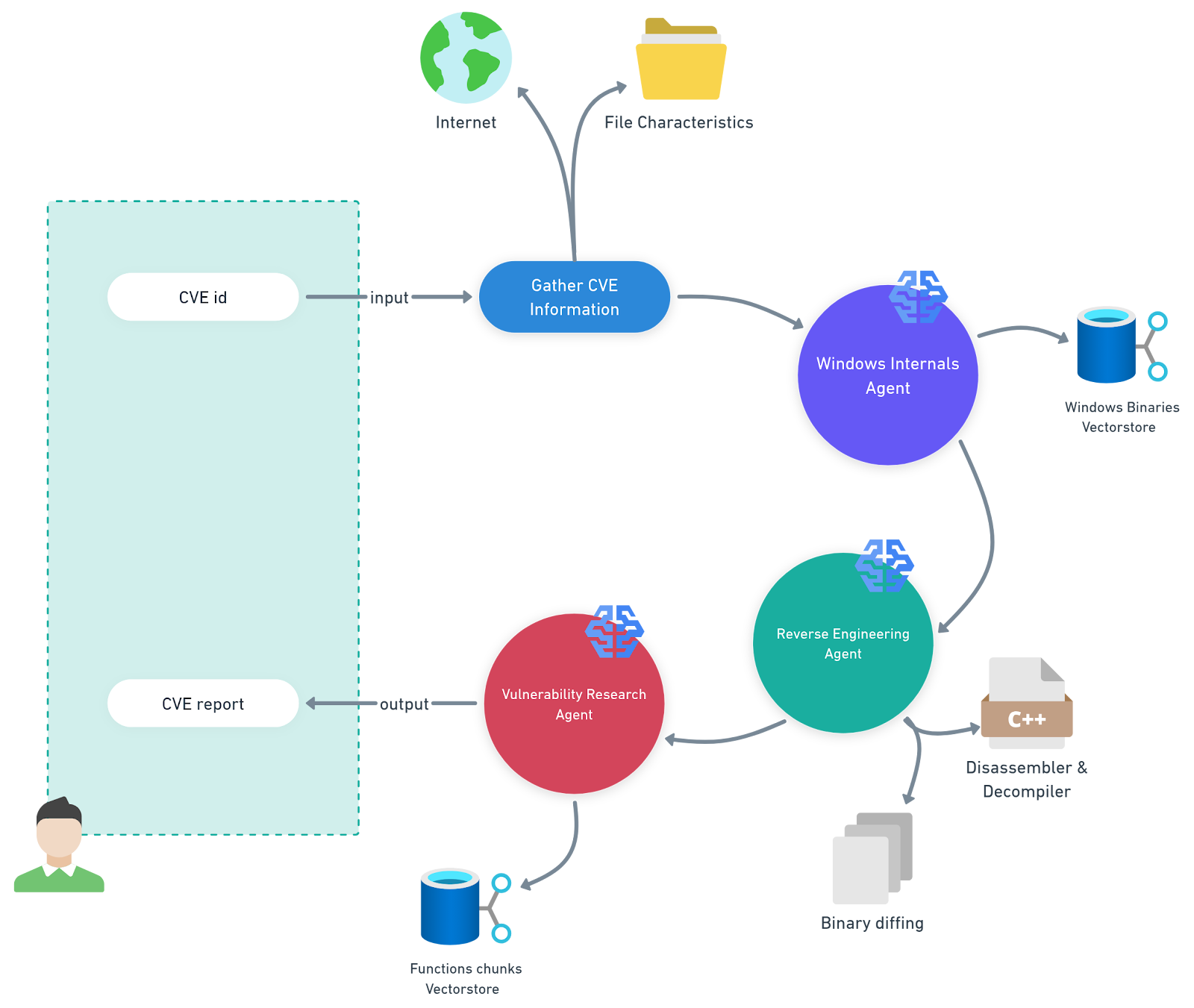 Fig. 1: Illustration of our multi-agent system, PatchDiff-AI
PatchDiff-AI definitions
Windows internals agent — This agent uses a retrieval-augmented generation (RAG) pipeline backed by a vector store containing Windows binaries and their functionality metadata. This enables the agent to significantly narrow the scope of analysis and focus on the most relevant components.
Reverse engineering agent — This agent uses advanced reverse engineering tools for the analysis and diffing of the relevant files. It will append the artifacts it finds to the overall context for other agents to use.
Vulnerability research agent — This agent orchestrates the analysis by gathering all the artifacts and other information that exists in the context, and generating a consistent report.
Methodology
Because of context window limitations and hallucination, it’s crucial to give relevant and concise context to use LLMs as effectively as possible, maintaining high accuracy in the task of isolating vulnerable code components while reducing operational costs.
Divide and conquer
One of the crucial details in our implementation was to divide the analysis into several smaller and focused tasks, which eventually operate as agents:
Retrieve information about the CVE to create a profile
Download the relevant updates and apply the deltas against the base version files
Create a Windows internals AI agent to isolate the relevant files using the vulnerability metadata
Create a reverse engineering AI agent that can:
Disassemble and apply symbols, then export them for binary diffing
Correlate the binaries and identify the changes and call flows
Pinpoint the vulnerable code block
Create a vulnerability research AI agent that iterates through possible vulnerability paths to cross-correlate and find the best possible outcome
One of the main advantages of this division was that it allowed us to use specific models for each task type; OpenAI o4-mini excelled at enrichment of file metadata, while OpenAI o3 was used for the ultimate in-depth analysis of the suspected vulnerable code.
Selecting the right model for the task was beneficial twice — first for accuracy and second for costs.
Context enrichment
LLMs are machines that “remember” a large amount of information. Invoking the LLM with a prompt will adjust it to provide the most relevant information within the context of the prompt.
Every shred of information that we can provide to the LLM about the patched vulnerability will help generate a more accurate response and increase the chances of locating the vulnerable code. However, ambiguous information about the vulnerability will result in poor outcomes, if any.
Enriching the context with the vulnerability metadata during the analysis proved crucial. To achieve that enrichment, we provided the LLM with KB descriptions, system file descriptions, and binary diff data. This approach allowed us to narrow down the number of changes we need to analyze, and therefore, the context length and the number of iterations with the LLM.
Results
To evaluate our framework, we inspected the model’s ability to correctly pinpoint:
The vulnerable executable file corresponding to the CVE
The vulnerable function within the executable
The root cause of the vulnerability and correctly explain it
Based on these parameters, we analyzed the last three Patch Tuesday releases for Windows 11 24H2. After running our tool and generating an automated report, we manually inspected selected results and determined the accuracy of the final model response.
After refining the context and adjusting the various models for the different tasks, we ultimately achieved the following results:
Identified the correct executable that was patched for the CVE in question 88.6% of the time
Found the correct vulnerable function 83.9% of the time
Figured out the correct root cause of the vulnerability 71.4% of the time
If we exclude report-generation failures caused by insufficient context — such as static analysis tool crashes or an inability to apply a delta patch — we can estimate the model’s success rate when it is given the correct code block. In such a case, the LLM success rate is approximately 96% when the correct code block is provided in the context (Figure 2).
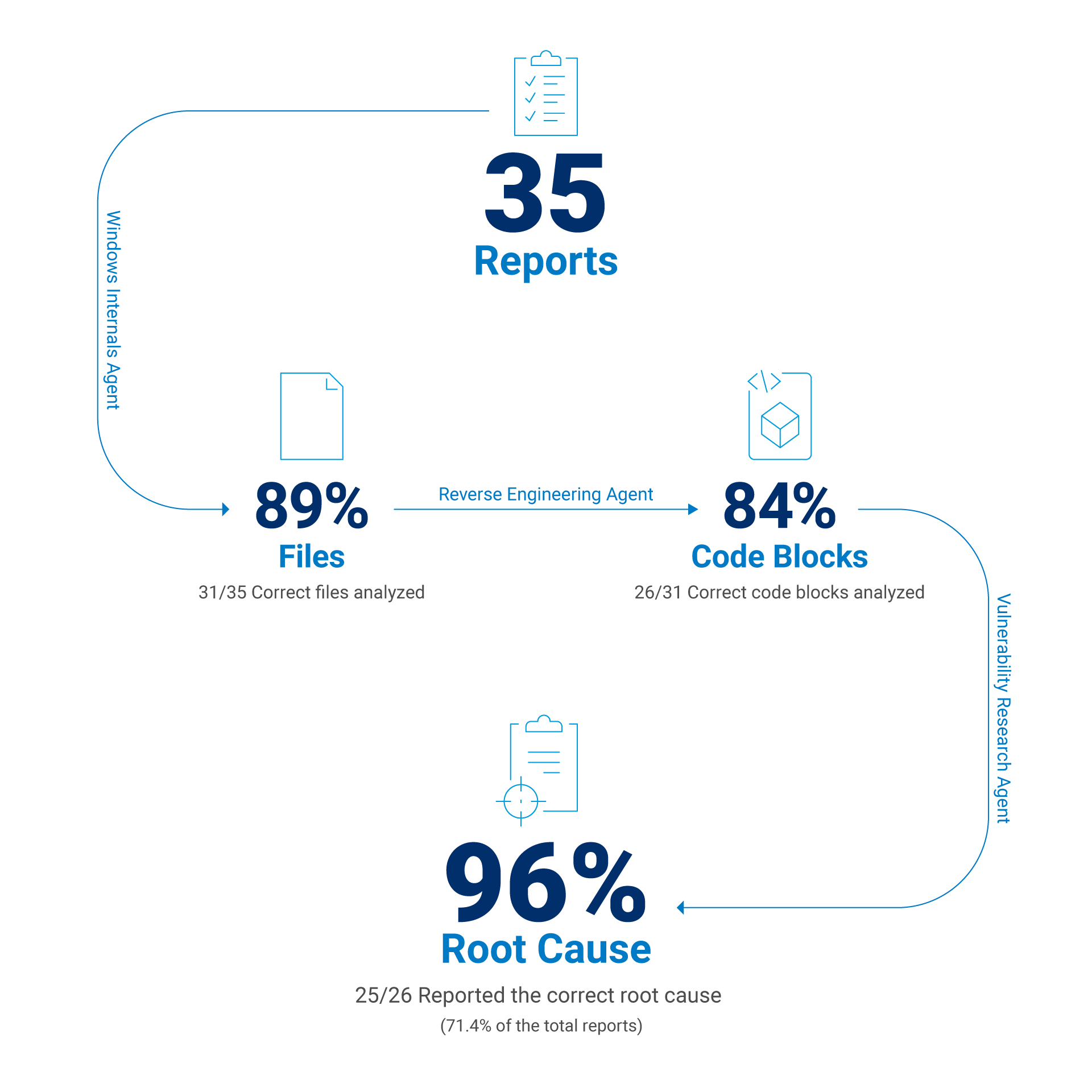 Fig. 2: Evaluation results of selected reports on CVEs
One CVE report, please. Shaken, not stirred.
As a result, we have encountered several interesting use cases that we would like to share and thoroughly investigate. Every use case has the same report structure:
CVE details that construct the report
The RCA — the heart of the report
A code snippet of the patch, before and after
The top-down overview of how the vulnerability may be triggered
A highlighted description of the patch
An attack vector that could exploit the vulnerability
A clear, detailed impact of the vulnerability
Additionally, the last section of every report tries to challenge the patch's effectiveness and review a possible bypass for it.
Case studies
In the following four case studies, we will explore a few interesting cases that highlight where our framework excels, where it struggles, and where it fails completely.
Case #1: Mount and Break
One of the vulnerabilities we analyzed was CVE-2025-24991, an “Out-of-bounds read in Windows NTFS allows an authorized attacker to disclose information locally” bug, according to the Microsoft Security Response Center (MSRC). Another piece of information comes from the FAQ, which states, “An attacker can trick a local user on a vulnerable system into mounting a specially crafted VHD that would then trigger the vulnerability.”
Now, the vulnerability is clearly related to the NTFS component, which can definitely imply the involvement of ntfs.sys.
Another clue is the fact that the vulnerability is triggered by a mounting VHD file. Analyzing the patch manually would likely take us hours at best — but using the PatchDiff-AI tool minimized it to a few minutes. This is further amplified by the fact that our tool works just as well when there isn’t an obvious path to identify the root cause, as was the case here.
In this case, the system claims to have found the root cause within the 17 most relevant changes made to the file in the KB5053598 update. The full report can be found in our GitHub repo, and our evaluation process follows.
First, our tool outputs the relevant component, which is indeed ntfs.sys, and the relevant function ReadRestartTable(). It also outputs a short explanation about what the logic is designed to do (Figure 3).
Microsoft Windows NTFS driver (ntfs.sys)
Affected routines: ReadRestartTable() and its consumer
InitializeRestartState().Next, we have the vulnerability class correlated to the CWE index, which in this case is CWE-125: Out-of-bounds Read. It will help us understand what vulnerability the LLM is looking for when it composed this report.
Figure 4 is the actual output from our tool's RCA. It clearly outlines what went wrong and pinpoints the issue with precision.
ReadRestartTable() processes a restart area that was previously
retrieved from the NTFS transaction log (LFS).  The function first
validates the outer log record with NtfsCheckLogRecord(), then calls
NtfsCheckRestartTable() to validate the embedded restart table.

Buggy offset computation (pre-patch)
1.  v9  = *(QWORD *)(a4 + 72)           // ptr to restart area
2.  offset_to_tbl = *(WORD *)(v9 + 4)   // value comes from log
3.  NtfsCheckRestartTable(v9 + offset_to_tbl, size, cookie)

The code trusts the 16-bit field at offset +4 of the restart area to
locate the first restart table.  If an attacker supplies a crafted
restart record in which this field is smaller than the actual header
size, NtfsCheckRestartTable() will be invoked on a memory range that
starts inside the header instead of at the real table.  Because the
size argument (derived from *(DWORD *)(a4 + 64)) is unchanged, the
routine reads past the caller-supplied buffer, disclosing adjacent
kernel memory.

Additional consequence: the return value (pointer returned to the
caller) is likewise computed from this untrusted field, so callers
such as InitializeRestartState() may later copy the out-of-bounds data
into pageable pool that is accessible to user mode via other
interfaces.

Patched behaviour
The patch discards the header-supplied offset.  Instead it derives the
correct header length from the number of client entries:

    hdr_len = (clients <= 1) ? 40 : (8 * clients + 32);
    NtfsCheckRestartTable(v10 + hdr_len, ...);

If the validation fails, execution now jumps to new corruption
handling code that raises STATUS_DISK_CORRUPT_ERROR before any out-of-
bounds access can occur.Inspection of these findings using IDA and BinDiff reveals that it is indeed the correct place. And we know that because Microsoft is using feature flags to opt out of the vulnerability fix; that way, it can be reverted in case of unexpected behavior (Figure 5).
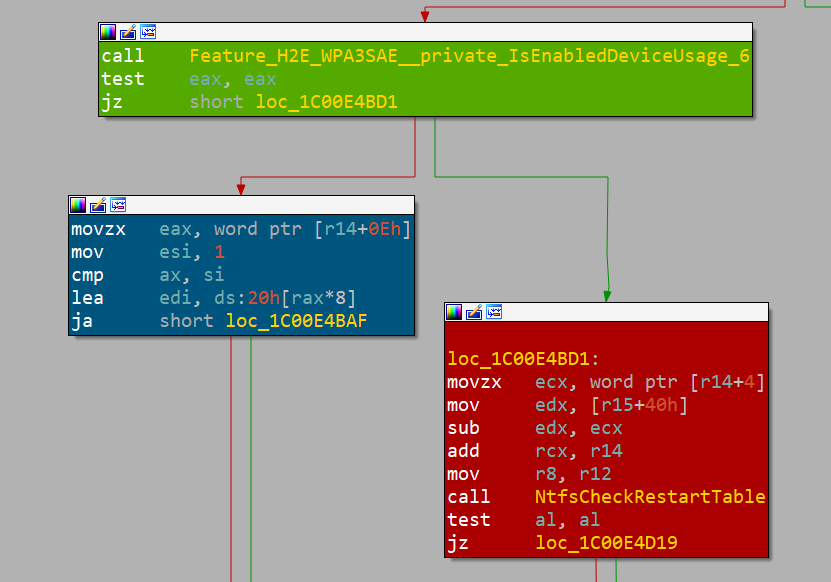 Fig. 5: Microsoft feature flag (green block), fixed path (blue block), and vulnerable path (red block)
In the report, we can find the code snippets of the decompiled vulnerable part of the function, and review the vulnerable code (Figure 6).
```c
// pre-patch (simplified)
WORD offset = *(WORD *)(RestartArea + 4);
if (!NtfsCheckRestartTable(RestartArea + offset,
                           Total - offset, Cookie))
    NtfsRaiseStatus(...);
```

```c
// post-patch
WORD clients = *(WORD *)(RestartArea + 14);
ULONG hdrLen = (clients <= 1) ? 40 : (8 * clients + 32);
if (!NtfsCheckRestartTable(RestartArea + hdrLen,
                           Total - *(WORD *)(RestartArea + 4),
                           Cookie))
    NtfsRaiseStatus(...);
```One of the highlights of the report is the top–down triggering section. In this section, the LLM suggests possible steps that must be taken to trigger the vulnerability, when applicable, going as far as to present practical exploitation details (Figure 7).
1. User mounts or accesses a volume containing a malicious $LogFile.
2. NtfsMountVolume() → NtfsRestartVolume() → InitializeRestartState().
3. InitializeRestartState() reads the first restart area and calls
   ReadRestartTable().
4. ReadRestartTable() uses the untrusted 16-bit offset to pass an
   out-of-range buffer to NtfsCheckRestartTable(), which performs the
   actual out-of-bounds memory read.
5. The leaked data is later copied back into attacker-controlled disk
structures or user-mapped memory, allowing disclosure.When combined with follow-up prompts, our tool further analyzes the decompiled code and uncovers significantly more information and can even suggest a minimal proof of concept (PoC).
Another helpful insight can be found in the attack vector sections, which provide a high-level view of vulnerability exploitation. It gives a sense of the vulnerability’s scope and what an attacker needs to exploit it (Figure 8).
Local attacker crafts an NTFS image (or directly edits $LogFile on an
existing volume) so that the Restart Area field at offset +4 contains
an undersized value.  Mounting or otherwise activating the volume on a
vulnerable system triggers the OOB read in kernel context.The remaining sections provide a more general description of the patch itself and its security impact on the system. However, in the last section, we asked the LLM to try to challenge the patch and see if there was a possible quick win of identifying another vulnerability within the fix. In this case, it evaluated that the patch is complete: “All error paths now raise before any potential out-of-range access.”
Case #2: When the stars align
It is valuable, and often sufficient for teams focused on detection or mitigation, to evaluate the report against the automatically generated IDA database and BinDiff output. However, our approach goes further — and can prove to be useful for offensive purposes as well since, in some cases, the system can move beyond analysis and actually produce a working exploit.
For example, CVE-2025-32713, a vulnerability that was patched in the June 2025 update (KB5060842), was described as: “Heap-based buffer overflow in Windows Common Log File System Driver allows an authorized attacker to elevate privileges locally.” In approximately two minutes, our tool generated a report that traced back the issue to CClfsLogFcbPhysical::ReadLogBlock().
At this point, there are two ways to tackle the challenge of exploitation.
Manually reverse the function and its callers up to the user-mode call
Let the LLM do it for us and autonomously craft a PoC
However, as is often the case, there is a third option: the hybrid approach. Ask the LLM to do the heavy lifting of reverse engineering while you determine the indirect code flows and resolve the complex connections between the binary’s logical parts. This will enable the LLM to come up with better results.
Using this practice, we achieved a blue screen of death (BSOD) exploit in just a few hours (Figure 9).
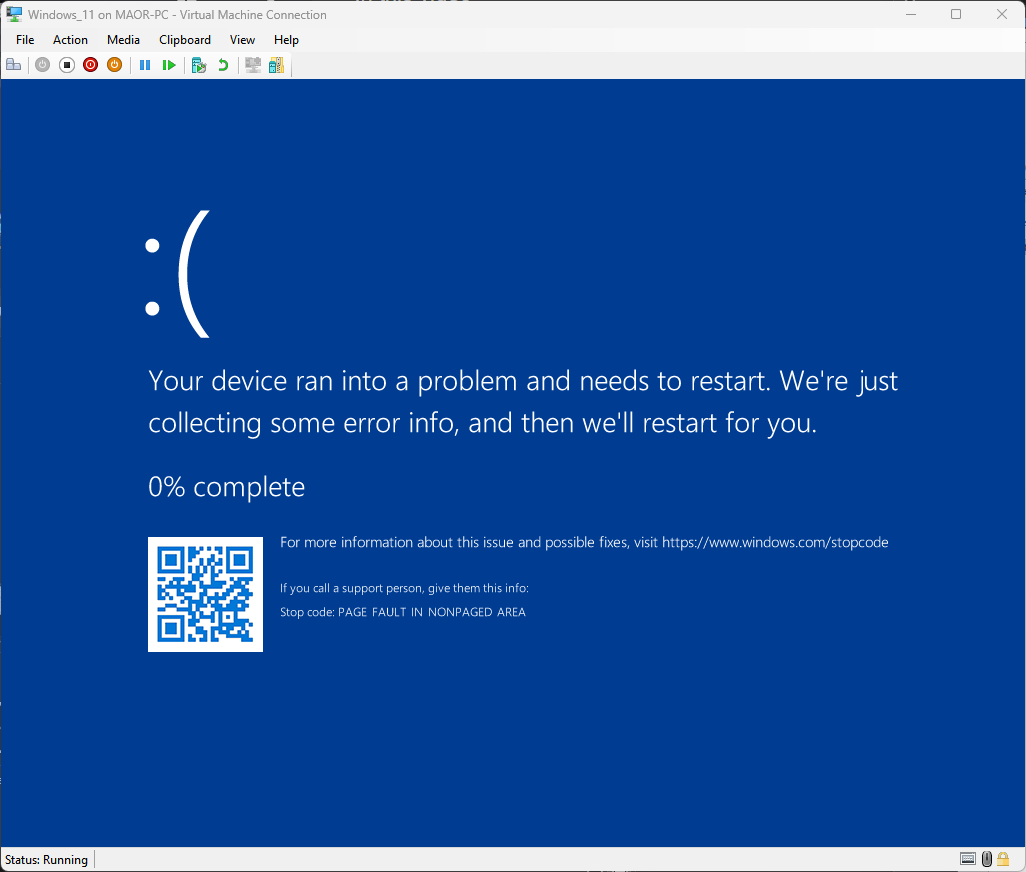 Fig. 9: BSOD during CVE-2025-32713 PoC execution
The journey of understanding the vulnerability trigger flow started with evaluating the suggested vulnerable code as described in the RCA section. After we realized that the patch tries to fix a security flaw, we analyzed the call flow up to the input/output control (IOCTL) 0x80076832.
When looking for the user-mode counterparts, we found two candidates, as clfsw32.dll exports the function ReadLogRecord with a direct path for calling this IOCTL (Figure 10).
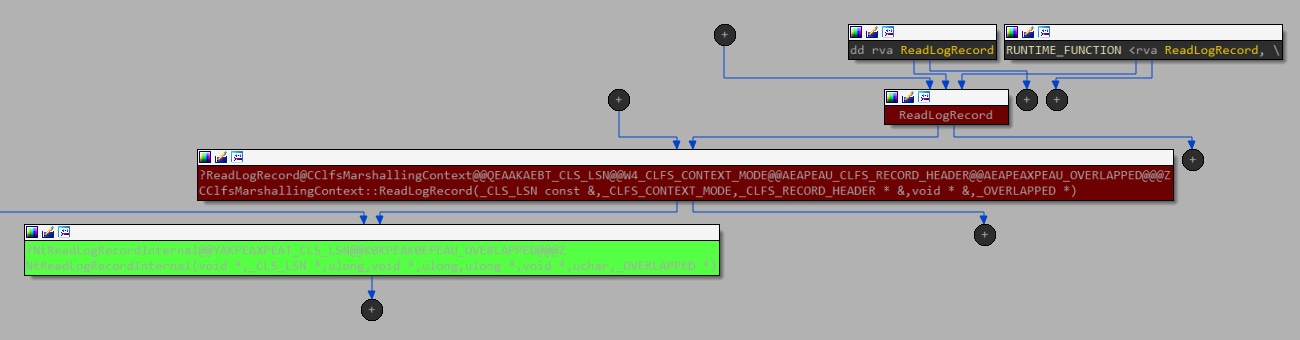 Fig. 10: Call flow graph, starting with an exported method from the user mode all the way down to the kernel driver (using the IOCTL call)
At every step, we evaluated how the LLM can assist in reversing and analyzing the logic, considering that it was trained on parts of this knowledge. Figure 11 shows how it could solve the condition requirement for v4, which is the size of the buffer we provide.
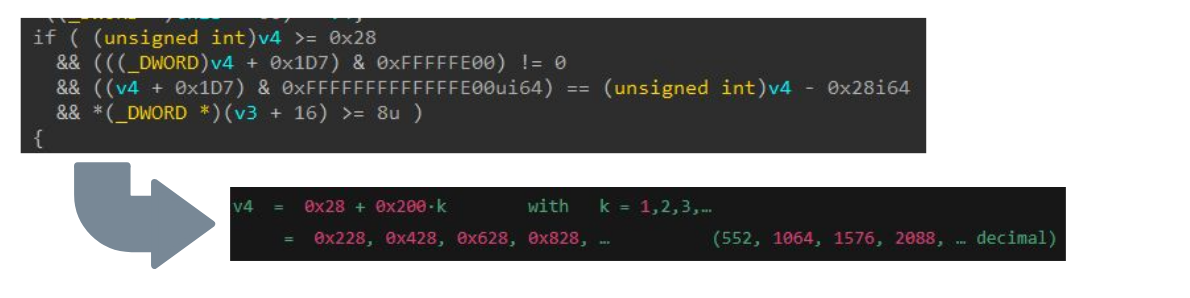 Fig. 11: Using LLM to analyze a validation check
Although we have witnessed some excellent observations that the LLM could find, there were a few cases in which the results were misleading. Returning to CVE-2025-32713, in one of its responses, our report contained the quote shown in Figure 12.
“crafts the log header so that the page size (v48) exceeds the supplied buffer”This response was quite confusing and ultimately steered us away from understanding how to trigger the vulnerable code. In fact, it led us down an entirely irrelevant research path (we attempted to manipulate the .blf file structure that already had mitigations in place). We later created virtual disks with varying physical and logical bytes per sector, and analyzed their behavior through debugging.
It’s fair to say that the LLM handled the majority of the work, but it required close supervision from an experienced researcher. LLMs are a tool to assist humans, as long as the assistance is provided correctly.
The model can occasionally veer off into unproductive directions, and human guidance was essential to keep it on track. That said, the results speak for themselves: The LLM correctly identified the vulnerable code, accurately traced the call flow, and explained how the faulty assignment of v27 led to the overflow in CcCopyRead().
Case #3: A needle in a haystack
There are cases where you need to take the LLM output with caution. Hallucinations aren’t the only risk with LLMs; this is reiterated repeatedly in the various LLM interfaces (for example, “ChatGPT can make mistakes. Check important info.”)
The same caution applies here, although the system attempts to validate its input and output, and examine multiple paths to identify the root cause. There are times when it is almost impossible, since the conditions are too broad and ambiguous.
Let’s take CVE-2025-29974 from May’s KB5058411 update. The MSRC information page about the vulnerability states, “Integer underflow (wrap or wraparound) in Windows Kernel allows an unauthorized attacker to disclose information over an adjacent network,” which can be somewhat obscure.
Next, we see that the MSRC page mentions the attacker must be nearby; that is, the attacker must be in range to receive radio transmissions. It’s clearly talking about air gap exfiltration of information. However, what is unclear is how, or through what hardware. Such a missing context reduces the chances of getting a valid report, if any.
Regarding CVE-2025-29974, we executed our tool and received a report about two unnamed functions: sub_1408E6D3C and sub_1408FAD58. We’ll refer to them as primary() and secondary(), for the sake of convenience. Figure 13 is a BinDiff view of those functions, and it’s easy to see that they are pretty different… too different, if you ask me.
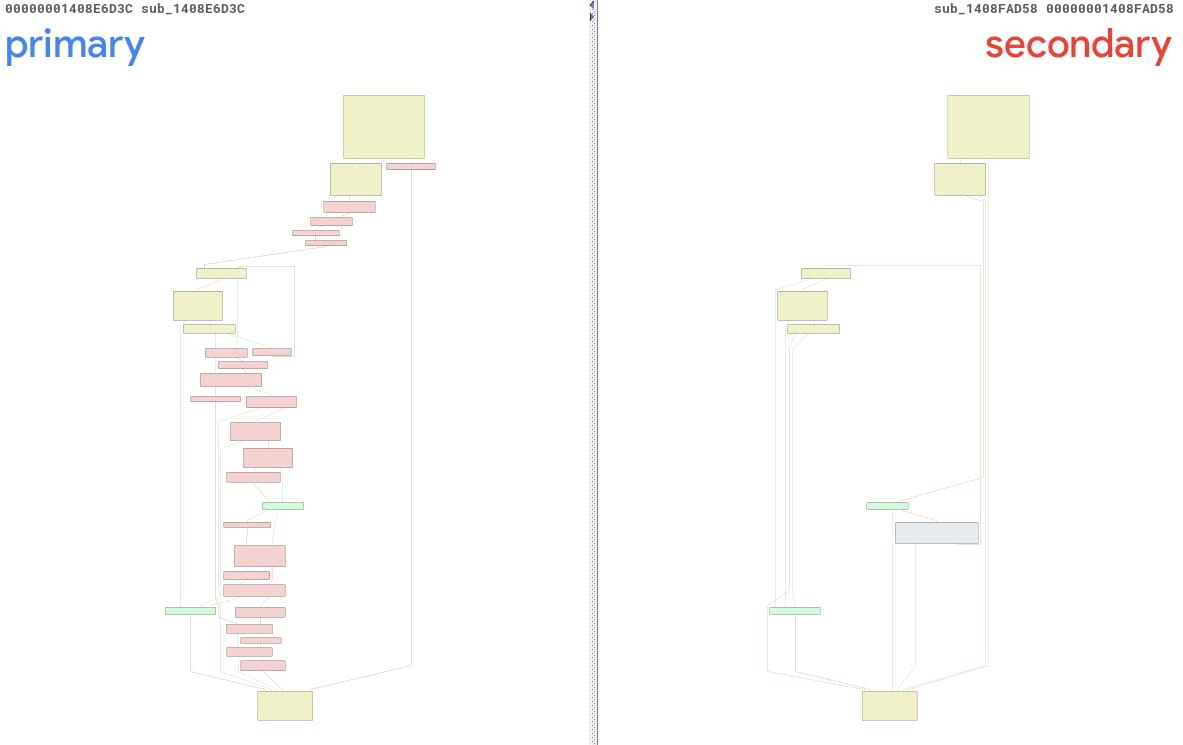 Fig. 13: Automatically created BinDiff view of the changes using PatchDiff-AI
Upon closer examination, we can identify the correct primary function as sub_1408E7738, a completely different method, located at a different address. The main reason for this mix-up is the fact that ntoskrnl.exe has been highly modified via this update. There were 3,791 functions modified, which caused the probability of finding the right before-and-after pairs to drop dramatically.
The confidence level provided alongside the report for this case, was 0.2, indicating a 20% confidence that the report located the correct vulnerability. This confidence level, along with the high number of code blocks modifications, corresponds with the poor results.
Case #4: Too vulnerable
There are cases in which the component has multiple vulnerabilities that are addressed by the update. This is not uncommon, since a single logic flaw can contain a chain of vulnerabilities with different classes.
If we take a look at the KB5055523 (April 2025) update, we can find a set of bugs dubbed CVE-2025-24058, CVE-2025-24060, CVE-2025-24062, CVE-2025-24073, and CVE-2025-24074 (Figure 14). All of them are related to the desktop window manager (DWM) and all are the result of “CWE-20: Improper Input Validation,” which makes them indistinct and ambiguous to the model.
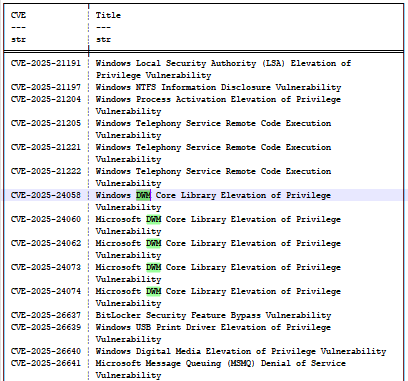 Fig. 14: Partial list of the April 2025 update bugs
Using LLMs comes with trade-offs. The common ground for all of them is the cost factor. The LLM will attempt to complete the task in one iteration, even if the required context isn’t aligned. To obtain more accurate results, we must evaluate the results through heuristics and refine the context so that it can create a better mutation of it.
We used the reports of the April 2025 update bugs to evaluate the outcome of such a use case. By comparing the root cause and the additional information, we were able to understand how the multiple vulnerabilities can affect the LLM through its analysis (Table).
CVE | Primary faulty function(s) | Bug class | Root cause |
|---|---|---|---|
CVE-2025-24074 | COcclusionContext::PreSubgraph CDDisplaySwapChain::PresentMPO CLegacySwapChain::Present | Heap-based memory corruption caused by improper input validation / integer-overflow during dynamic array growth (CWE-20, leads to CWE-787). | The same PreSubgraph integer wrap triggers the occlusion-info buffer overflow |
CVE-2025-24073 | COcclusionContext::PreSubgraph | Heap-based buffer overflow / integer-overflow owing to improper input validation (CWE-20, leads to memory corruption) | The same PreSubgraph integer wrap triggers the occlusion-info buffer overflow |
CVE-2025-24060 | COcclusionContext::PreSubgraph COverlayContext::ComputeOverlayConfiguration | Improper input/bounds validation leading to out-of-bounds heap write | The same PreSubgraph integer wrap triggers the occlusion-info buffer overflow, and another overflow |
CVE-2025-24058 (dwmcorei.dll) | CLocalAppRenderTarget::EnsureRenderSurface | Use-after-free / Type-confusion resulting from passing a freed object pointer as the implicit this-pointer (CWE-416, CWE-843) | Freed CD3DDevice pointer reused as CDeviceManager this |
CVE-2025-24058 (dwmcore.dll) | CLegacyRenderTarget::CollectOverlayCandidates COverlayContext::ComputeOverlayConfiguration | Heap-based buffer overflow arising from improper input validation of caller-supplied list lengths (CWE-20, leads to CWE-122) | Heap overflow using CollectOverlayCandidates |
CVE-2025-24062 | CCompositionSurfaceBitmap::AddOcclusionInformation CSurfaceBrush::AddOcclusionInformation | Pointer-truncation / improper input validation leading to use-after- free / elevation of privilege (CWE-20, related to CWE-704) | Arguments widened to __int64; added IsOverlayCandidateCollectionEnabled() |
Multiple vulnerabilities and their RCA determined through the LLM
The table is merely a reflection of the content of the reports. Evaluation of the April 2025 update bugs uncovers the duplication of CVE-2025-24074, CVE-2025-24073, and CVE-2025-24060. All three refer to the same functions with minor changes or additions.
CVE-2025-24058 (dwmcore.dll) seems to overlap with CVE-2025-24060’s consideration of ComputeOverlayConfiguration. CVE-2025-24058 (dwmcorei.dll) and CVE-2025-24062, however, appear to address entirely different root causes.
Since the LLM is not a deterministic system, the output can vary even with an identical input. We can observe how changes in the input context, no matter how slight, can impact the LLM’s output and result in two different reports.
The price tag
PatchDiff-AI is based on a supervised multi-agent architecture, with different LLM models, to reduce costs while maintaining high accuracy. The cost breakdown of generating one report using OpenAI models results in a maximum cost of US$1.43.
In practice, we have generated 131 reports from March, April, and May updates, filtered only for Windows 11 24H2 x64. The average cost was approximately US$0.14 per report. When considering how many vulnerabilities are being fought on a daily (if not hourly) basis, these costs can be significant when scaled.
When fully autonomous features are enabled, such as extended refinement in the Windows internals and vulnerability research agents, the calculation for the price can be capped; however, it cannot have a mean value because of the indeterministic nature of the system.
Conclusion
The future of using AI, and specifically LLMs, in the cybersecurity domain is bright. LLMs can easily transform a very complicated but methodological process into a simple workflow and can be integrated into various security teams’ pipelines.
Our research demonstrates that a fully automated RCA of vulnerabilities is not only possible, but also practical — with meaningful accuracy and reasonable cost.
By fragmenting the problem into micro tasks, and adjusting it to a specialized multi-agent architecture that combines Windows internals reasoning, reverse engineering workflows, and vulnerability-specific analysis, we enabled LLMs to overcome their traditional limitation. This practice (and the PatchDiff-AI companion tool) can also be generalized for other products and platforms.
Using our system, security teams can create comprehensive detections, effectively mitigate vulnerabilities, and create penetration and regression tests for their systems. Additionally, our system can help shorten the process of triggering known vulnerabilities, enabling further research and variant discovery in the vulnerable shared code base.

Tags