In this blog post, we’ll walk through the process of building serverless applications using the power of WebAssembly with Fermyon Spin and htmx. For demonstration purposes, we will build a simple shopping list. We’ll implement the serverless back end in Rust. For building the front end, we’ll start with a simple HTML page, which we will enhance using htmx.
Before we dive into implementing the sample application, we will ensure that everybody is on track and quickly recap what Fermyon Spin and htmx actually are.
What is htmx?
htmx is a lightweight JavaScript library built for developers, facilitating progressive enhancements in web applications. By seamlessly updating specific parts of a web page without necessitating a complete reload, htmx empowers us to effortlessly create dynamic and interactive user experiences. Its simplicity and performance-oriented approach, utilizing HTML attributes for defining behavior, make it a valuable tool for augmenting existing projects or crafting new front ends.
The sample application
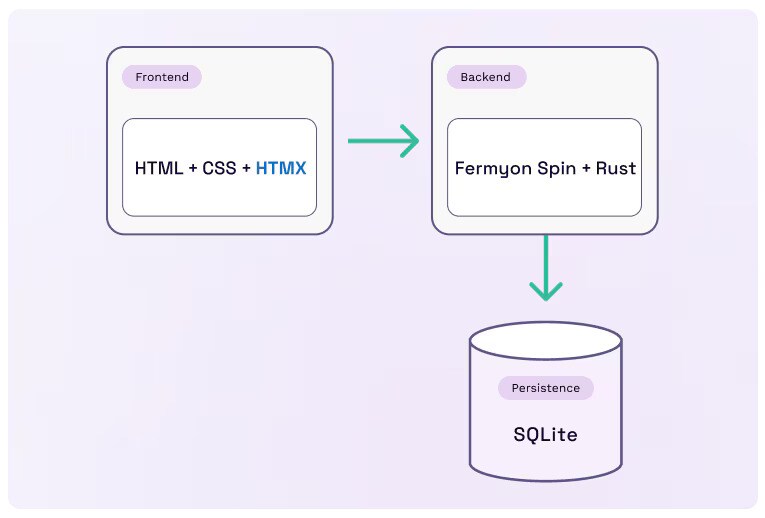
For demonstration purposes, we will create a simple shopping list to illustrate how Spin and a simple front end crafted with htmx could be integrated. From an architectural point of view, our shopping list consists of three major components, as shown in the diagram below:
- Persistence: We use SQLite as a database to persist the items of our shopping list.
- Back end: We will build an HTTP API using Rust and Spin.
- Front end: The front end consists of HTML, CSS, and progressive enhancements provided by htmx.
You can find the sample application on GitHub.
Prerequisites
To follow along with the sample explained in this article, you need to have the following tools installed on your machine:
- Rust: See installation instructions for Rust (I am currently using Rust version 1.75.0)
- The wasm32-wasi compilation target: You can install it using the rustup target add wasm32-wasi command
- The spin CLI: See installation instructions for Spin (I am currently using spin version 2.1.0)
Creating the app skeleton
First, we will use the spin CLI to create our Spin application and add the following components to it:
app: A Spin component based on the static-fileserver template, which will serve our front end
api: A Spin component based on the http-rust template, which will serve the HTTP API
Because the spin CLI is built with productivity in mind, generating the entire boilerplate is quite easy, as you can see in this snippet:
# Create an empty Spin app called shopping-list
spin new -t http-empty shopping-list
Description: A shopping list built with Spin and htmx

# Move into the app directory
cd shopping-list

# Create the app component
spin add -t static-fileserver app
HTTP path: /...
Directory containing the files to serve: assets

# Create the frontend-asset folder
mkdir assets

# Create the API component
spin add -t http-rust api
Description: Shopping list API
HTTP path: /api/...When our Spin app is bootstrapped and all necessary components are added, we can move on and take care of the database.
Preparing the database
Although Spin takes care of running the database behind the scenes, we must ensure that the desired component(s) can interact with the database. This is necessary because Wasm is secure by default, and Wasm modules must explicitly request permissions to use or interact with different resources and capabilities.
This might sound like a complicated task, but Spin makes this super easy. All we have to do is update the application manifest (spin.toml) and add the sqlite_databases configuration property to the desired component(s). In our case, the api component is the only one that should be able to interact with the database. That said, update the [component.api] section in spin.toml to look like this:
[component.api]
source = "api/target/wasm32-wasi/release/api.wasm"
allowed_outbound_hosts = []
sqlite_databases = ["default"]
Next, we have to lay out our database using a simple DDL script. We create a new file called migration.sql in the root folder of our application and add the following content to it:
CREATE TABLE IF NOT EXISTS ITEMS (
  ID INTEGER PRIMARY KEY AUTOINCREMENT,
  VALUE TEXT NOT NULL
)
With the update to spin.toml and our custom migration.sql file, we have prepared everything regarding the database. We can move on and take care of the serverless Back end.
Implementing the serverless back end
Our serverless back end exposes three different endpoints that we’ll use later from within the front end:
HTTP GET at /api/items: to retrieve all items of the shopping list
HTTP POST at /api/items: to add a new item to the shopping list by providing a proper JSON payload as the request body
HTTP DELETE at /api/items/:id: to delete an existing item from the shopping list using its identifier
The Spin SDK for Rust comes with batteries included to create full-fledged HTTP APIs. We use the Router structure to layout our API and handle incoming requests as part of the function decorated with the #[http_component] macro:
use spin_sdk::http_component;
use spin_sdk::http::{IntoResponse, Request, Router};

#[http_component]
fn handle_api(req: Request) -> anyhow::Result<impl IntoResponse> {
  let mut r = Router::default();
  r.post("/api/items", add_new);
  r.get("/api/items", get_all);
  r.delete("/api/items/:id", delete_one);
  Ok(r.handle(req))
}
Before we dive into implementing the handlers, we add some third-party crates to simplify working with JSON and creating HTML fragments:
# Move into the API folder
cd api

# Add serde and serde_json
cargo add serde -F derive
cargo add serde_json

# Add build_html
cargo add build_html
Those commands will download the third-party dependencies and add them to the Cargo.toml file.
Implementing the POST endpoint
To add a new item to the shopping list, we want to issue POST requests from the front end to the API and send the new item as JSON payload using the following structure:
{ "value": "Buy milk"}First, we create the corresponding API model as a simple struct and decorate it with Deserialize from the serde crate:
use serde::{Deserialize};

#[derive(Deserialize)]
pub struct Item {
  pub value: String,
}Having our model in place, we can implement the add_new handler. We can offload the act of deserializing the payload to the http crate by specifying the request type (here http::Request<Json<Item>>). Additionally, we use Connection and Value from spin_sdk::sqlite to securely construct the TSQL command for storing the new item in the database. Finally, we return an HTTP 200 along with a HX-Trigger header.
Later, when implementing the front end, we’ll use the value of the HX-Trigger header, when implementing the front end:
use spin_sdk::sqlite::{Connection, Value};
use spin_sdk::http::{Json, Params};

fn add_new(req: http::Request<Json<Item>>, _params: Params) -> anyhow::Result<impl IntoResponse> {
  let item = req.into_body().0;
  let connection = Connection::open_default()?;
  let parameters = &[Value::Text(item.value)];
  connection.execute("INSERT INTO ITEMS (VALUE) VALUES (?)", parameters)?;
  Ok(Response::builder()
    .status(200)
    .header("HX-Trigger", "newItem")
    .body(())?)
}
Implementing the GET endpoint
Next on our list is implementing the handler to retrieve all shopping list items from the database. Before we dive into the implementation of the handler, let’s revisit our Item struct and extend it to match the following:
#[derive(Debug, Deserialize, Serialize)]
struct Item {
  #[serde(skip_deserializing)]
  id: i64,
  value: String,
}
Instead of returning plain values as JSON, our API will create response bodies as HTML fragments (Content-Type: text/html) with htmx enhancements.
To achieve this, we must specify how a single item (an instance of the Item structure) is represented as HTML. The build_html create provides the Html trait, which we can use to lay out how an item should look in HTML. Let’s implement the Html trait for our custom type Item as shown here:
use build_html::{Container, ContainerType, Html, HtmlContainer};

impl Html for Item {
  fn to_html_string(&self) -> String {
    Container::new(ContainerType::Div)
      .with_attributes(vec![
        ("class", "item"),
        ("id", format!("item-{}", &self.id).as_str()),
      ])
      .with_container(
        Container::new(ContainerType::Div)
          .with_attributes(vec![("class", "value")])
          .with_raw(&self.value),
      )
      .with_container(
        Container::new(ContainerType::Div)
          .with_attributes(vec![
            ("class", "delete-item"),
            ("hx-delete", format!("/api/items/{}", &self.id).as_str()),
          ])
          .with_raw("❌"),
      )
      .to_html_string()
  }}
On top of creating an HTML representation of the actual item, the snippet also contains a hx-delete attribute. We add this attribute to the delete-icon, to allow users to delete a particular item directly from the shopping list.
The handler implementation (get_all) reads all items from the database, constructs a new instance of Item for every record retrieved, and transforms every instance into an HTML string by invoking to_html_string. Finally, we join all HTML representations together into a bigger HTML fragment and construct a proper HTTP response:
fn get_all(_r: Request, _p: Params) -> anyhow::Result<impl IntoResponse> {
  let connection = Connection::open_default()?;
  let row_set = connection.execute("SELECT ID, VALUE FROM ITEMS ORDER BY ID DESC", &[])?;

  let items = row_set
    .rows()
    .map(|row| Item {
      id: row.get::<i64>("ID").unwrap(),
      value: row.get::<&str>("VALUE").unwrap().to_owned(),
    })
    .map(|item| item.to_html_string())
    .reduce(|acc, e| format!("{} {}", acc, e))
    .unwrap_or(String::from(""));

  Ok(Response::builder()
    .status(200)
    .header("Content-Type", "text/html")
    .body(items)?)
}
Implementing the DELETE endpoint
The last endpoint we have to implement is responsible for deleting an item based on its identifier. We do some housekeeping here to ensure that requests contain an identifier and ensure that the identifier provided is a valid i64. If that’s the case, we delete the corresponding record from the database and return an empty response with status code 200 (which is done via Response::default()):
fn delete_one(_req: Request, params: Params) -> anyhow::Result<impl IntoResponse> {
  let Some(id) = params.get("id") else {
    return Ok(Response::builder().status(404).body("Missing identifier")?);
  };
  let Ok(id) = id.parse::<i64>() else {
    return Ok(Response::builder()
      .status(400)
      .body("Unexpected identifier format")?);
  };
  let connection = Connection::open_default()?;
  let parameters = &[Value::Integer(id)];

  match connection.execute("DELETE FROM ITEMS WHERE ID = ?", parameters) {
    Ok(_) => Ok(Response::default()),
    Err(e) => {
      println!("Error while deleting item: {}", e);
      Ok(Response::builder()
        .status(500)
        .body("Error while deleting item")?)
    }
  }}
With that, our serverless back end is done and we can move on and take care of the front end.
Implementing the front end
We’ll keep the front end as simple as possible. All sources will remain in the assets folder (specified as the source for the static-fileserver component when creating the Spin app at the very beginning).
First, let’s create all necessary files and bring in our third-party dependencies (htmx and the json-enc extension):
fn delete_one(_req: Request, params: Params) -> anyhow::Result<impl IntoResponse> {
  let Some(id) = params.get("id") else {
    return Ok(Response::builder().status(404).body("Missing identifier")?);
  };
  let Ok(id) = id.parse::<i64>() else {
    return Ok(Response::builder()
      .status(400)
      .body("Unexpected identifier format")?);
  };
  let connection = Connection::open_default()?;
  let parameters = &[Value::Integer(id)];

  match connection.execute("DELETE FROM ITEMS WHERE ID = ?", parameters) {
    Ok(_) => Ok(Response::default()),
    Err(e) => {
      println!("Error while deleting item: {}", e);
      Ok(Response::builder()
        .status(500)
        .body("Error while deleting item")?)
    }
  }}
As a starting point, we use a fairly simple HTML page. Please note that the page is already linking the style sheet (<link rel=...>) as part of the <head> tag:
<!DOCTYPE html>
<html lang="en">
<head>
<meta charset="UTF-8">
<meta name="viewport" content="width=device-width, initial-scale=1.0">
<title>Shopping List</title>
<link rel="stylesheet" href="/style.css">
</head>
<body>
<header>
<h1>Shopping List | <small>powered by Spin & htmx</small></h1>
<p class="slug">This is a simple shopping list for demonstrating the combination of
<a href="https://htmx.org/" target="_blank">htmx</a> and
<a href="https://developer.fermyon.com" target="_blank">Fermyon Spin</a>.
</p>
</header>
<main>
<div id="all-items">
</div>
</main>
<aside>
<h2>Add a new item to the shopping list</h2>
<form>
<input type="text" name="value" placeholder="Add Item" maxlength="36">
<button type="submit">Add</button>
</form>
</aside>
<footer>
<span>Made with 💜 by</span>
<a href="https://www.fermyon.com" target="_blank">Fermyon</a>
<span>Find the code on</span>
<a href="xxx" target="_blank">GitHub</a>
</footer>
</body>
</html>
Adding htmx to the app
First, we have to ensure htmx and the json-enc extension are brought into context correctly. Update the index.html file and add the following <script> tags before the closing </body> tag:
<!-- ... -->
    <script src="/htmx.min.js"></script>
    <script src="json-enc.js"></script>
  </body>
</html>
Loading and displaying items
Let’s have a look at loading and displaying the items on our shopping list now.
We can use the hx-get attribute to issue an HTTP GET request to /api/items for loading all items. Using the hx-target attribute, we specify where the received HTML fragment should be placed. We control how the HTML fragment is treated with the hx-swap attribute.
Last, but not least, we use the hx-trigger attribute to determine when htmx should issue the HTTP GET request. We update the HTML, and modify the <main> node to match the following:
<main hx-get="/api/items"
      hx-target="#all-items"
      hx-swap="innerHtml"
      hx-trigger="load">
    <!-- ... -->
</main>Deleting an item
The HTML fragment for every item contains an icon and an hx-delete attribute. Users can press the delete icon to delete the corresponding item. Although we could issue the HTTP DELETE request immediately, we can prevent users from accidentally deleting items by adding a confirmation dialog. (Although there are fancier UI representations possible, we’ll keep it simple here and use the standard confirmation dialog provided by the browser.)
Because we place all items inside of #all-items, we can add hx- attributes on that particular container to control the actual delete behavior. We customize the message shown in the confirmation dialog, using the hx-confirm attribute. To specify which child node should be manipulated when the delete operation is confirmed, we use the hx-target attribute. Again, we use hx-swap to specify that we want to remove the corresponding .item.
Let’s update the <div id="all-items"> node as shown in the following snippet:
<div id="all-items"
     hx-confirm="Do you really want to delete this item?"
     hx-target="closest .item"
     hx-swap="outerHTML swap:1s">
</div>Adding a new item
Our front end contains a simple <form> which allows users to add new items to the shopping list. Upon submitting the form, we want to issue an HTTP POST request to /api/items and send the provided text as JSON to our serverless back end. Once an item has been added, we want our UI to refresh and display the updated shopping list.
Our serverless back end expects to receive the payload for adding new items as JSON. Because of this, we have added the JSON extension for htmx (json-enc.js) to our front-end project.
We can alter the default behavior of htmx (because it normally sends the data from HTML forms as form-data) by adding the hx-ext="json-enc" attribute to the <form> node.
Additionally, we will update the <form> definition by adding the hx-post and hx-swap attributes. We specify the hx-on::after-request attribute, to control what should happen after the request has been processed. Modify the <form> node to look like shown here:
<form hx-post="/api/items"
     hx-ext="json-enc"
     hx-swap="none"
     hx-on::after-request="this.reset()">
    <!-- ... -->
</form>By adding those four attributes to the <form> tag, we control how and where the form data is sent. On top of that, the form is reset after the request has been processed. Finally, we have to reload the shopping list once the request has finished.
Do you remember the response that we sent from the back end when a new item has been added to the database? As part of the response, we sent an HTTP header called HX-Trigger with the value newItem. We use this value and instruct htmx to reload the list of all items. All we have to do in the front end is alter the hx-trigger attribute on <main> and add our “custom event” as a trigger. Update the <main> tag to match the following:
<form hx-post="/api/items"
     hx-ext="json-enc"
     hx-swap="none"
     hx-on::after-request="this.reset()">
    <!-- ... -->
</form>Running the application locally
Now that we have implemented everything, we can test our app. To do so, we move into the project folder (the folder containing the spin.toml file) and use the spin CLI for compiling and running both components (front end and back end):
# Build the application
# Actually, only the backend has to be compiled...
# Spin is smart enough to recognize that
spin build

Building component api with `cargo build --target wasm32-wasi --release`
Working directory: "./api"
# ...
# ...

# Start the app on your local machine
# by specifying the --sqlite option, we tell Spin to execute the migration.sql
# upon starting
spin up --sqlite @migration.sql

Logging component stdio to ".spin/logs/"
Storing default SQLite data to ".spin/sqlite_db.db"
Serving http://127.0.0.1:3000
Available Routes:
 api: http://127.0.0.1:3000/api (wildcard)
 app: http://127.0.0.1:3000 (wildcard)
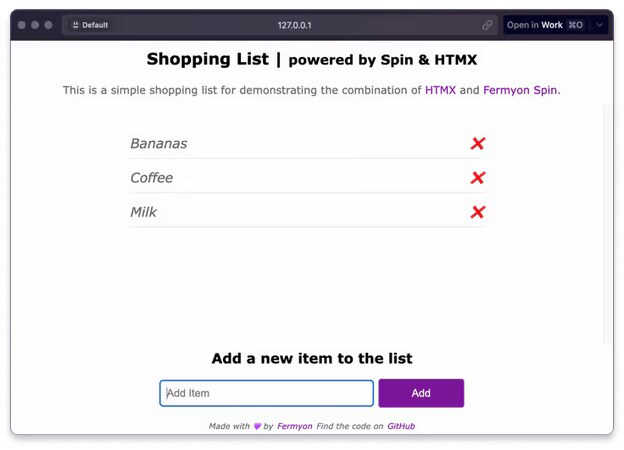
As the output of spin up outlines, we can access the shopping list by browsing to http://127.0.0.1:3000, which should display the serverless shopping list like this:
Deploying to Fermyon Cloud is as simple as running the spin cloud deploy command from within the root folder of our project. Because our app relies on a SQLite database, we must provide a unique name for the database inside of our Fermyon Cloud account:
# Deploy to Fermyon Cloud
spin cloud deploy

Uploading shopping-list version 0.1.0 to Fermyon Cloud...
Deploying...
App "shopping-list" accesses a database labeled "default"
Would you like to link an existing database or create a new database?:
Create a new database and link the app to it

What would you like to name your database?
Note: This name is used when managing your database at the account level.
The app "shopping-list" will refer to this database by the label "default".
Other apps can use different labels to refer to the same database.: shopping

Waiting for application to become ready........
ready

Available Routes:
 api: https://shopping-list-1jcjqxxq.fermyon.app/api (wildcard)
app: https://shopping-list-1jcjqxxq.fermyon.app (wildcard)Once the initial deployment has been finished, we must ensure that our ITEMS table is created in the database that was created by Fermyon Cloud. To do so, we can use the spin cloud sqlite execute command as shown in the next snippet:
# List all SQLite databases in your Fermyon Cloud account
spin cloud sqlite list
+-------------------------------+
| App       Label      Database |
+===============================+
| shopping  default    shopping |
+-------------------------------+

# Apply migration.sql to the shopping database
spin cloud sqlite execute --database shopping @migration.sql
Fermyon Cloud automatically assigns a unique domain to our application, we can customize the domain and even bring a custom domain using the Fermyon Cloud portal.
Conclusion
In this article, we walked through building a truly serverless application based on Fermyon Spin and htmx. Although our shopping list is quite simple, it demonstrates how we can combine both to build a real app. Looking at both, Fermyon Spin and htmx have at least one thing in common:
They reduce complexity.
With htmx, we can build dynamic front ends without having to learn the idioms and patterns of full-blown, big single-page application (SPA) frameworks such as Angular. We can declare our intentions directly in HTML by adding a set of htmx attributes to HTML tags.
With Fermyon Spin, we can focus on solving functional requirements and choose from a wide variety of programming languages to do so. Integration with services like databases, key-value stores, message brokers, or even large language models (LLMs) is amazingly smooth and requires no ops at all.
On top of that, the spin CLI and the language-specific SDKs provide amazing developer productivity that is unmatched in the context of WebAssembly.

Tags