We previously published an article demonstrating how you could run Spin apps as cron job using the cron trigger for Spin. Although this works great when using Spin as a runtime, it falls short when using Kubernetes with SpinKube as runtime for your WebAssembly apps. In this article, we’ll use the Spin command trigger, and explore a distributed application that uses the command trigger for Spin to run several parts of an distributed application either once (as Kubernetes Job) or on a schedule (as Kubernetes CronJob).
Prerequisites
To follow along the code and samples show as part of this article, you need the following:
The canary release of Spin installed on your machine
Either follow these installation instructions or use the version manager plugin for Spin (verman)
Access to a Kubernetes cluster with SpinKube deployed to it (You can find detailed installation instructions for deploying SpinKube to a wide range of different Kubernetes distributions)
kubectl version 1.31.2 or later
docker (for running a PostgreSQL when testing the sample app on your local machine)
Rust (version 1.80.1 or later) with the wasm32-wasi target
Run rustup target list --installed to see which targets are installed on your machine
You can add the wasm32-wasi target to your local Rust installation using rustup target add wasm32-wasi
Cargo Component (version 0.18.0 or later)
curl (for sending requests to the HTTP API of the sample app)
Jobs and CronJobs in Kubernetes
In Kubernetes, Jobs and CronJobs are resources for running tasks automatically. A Job executes a one-time task until completion, while a CronJob schedules recurring tasks, similar to Unix cron jobs. Kubernetes manages the scheduling and orchestration, ensuring tasks start, run reliably, and restart if needed. This allows developers to focus on application logic with Kubernetes handling task management behind the scenes.
Knowing that Kubernetes itself takes care about scheduling and orchestration, we can also understand why the previously mentioned ron trigger for Spin does not work for running those types of workloads on Kubernetes with SpinKube.
The Spin command trigger
Spin command trigger (https://github.com/fermyon/spin-trigger-command) is implemented as a Spin plugin and can be added to any Spin CLI installation. The command trigger is designed to run a WebAssembly component that exports the run function of the wasi:cli world to completion. Upon completion, the runtime itself is also terminated, which makes the command trigger the perfect candidate for building Kubernetes Jobs and CronJobs.
Installing the Spin command trigger plugin
For the sake of this article, we’ll use the canary version of the command trigger plugin for Spin. Installing the plugin is as easy as executing the following command on your system:
# Install canary of the command trigger plugin
spin plugins install --yes \
  --url https://github.com/fermyon/spin-trigger-command/releases/download/canary/trigger-command.json
Installing the command-rust template
The command-rust template is also available, which streamlines the experience for creating new Spin apps using the command trigger. You can install the template using the spin templates install command. To upgrade an existing installation of the template, add the --upgrade flag:
# Install or Upgrade the command-rust template
spin templates install --upgrade \
 --git https://github.com/fermyon/spin-trigger-command

Copying remote template source
Installing template command-rust...
Installed 1 template(s)

+-------------------------------------------+
| Name           Description                |
+===========================================+
| command-rust   Command handler using Rust |
+-------------------------------------------+
Testing the command trigger for Spin
You can verify the integrity of your Spin installation, the command Trigger plugin, and its template by simply creating a new Spin app based on the command-rust template, build it with spin build, and run it with spin up:
# Create a new Spin App using the command-rust template
spin new -t command-rust -a hello-command-trigger

cd hello-command-trigger

# Build the Spin App
spin build

Building component hello-command-trigger with `cargo component build --target wasm32-wasi --release`
# ... snip ...
Finished building all Spin components

# Run the Spin App
spin up
Logging component stdio to ".spin/logs/"
Hello, Fermyon!
Now that you’ve installed the command trigger plugin, its template, and verified your local installation is working as expected, we can move on and explore a more realistic example app that will use the command trigger to build Jobs and CronJobs for Kubernetes with WebAssembly.
Exploring the sample application
The sample application is a distributed variant of a fairly simple ToDo application.
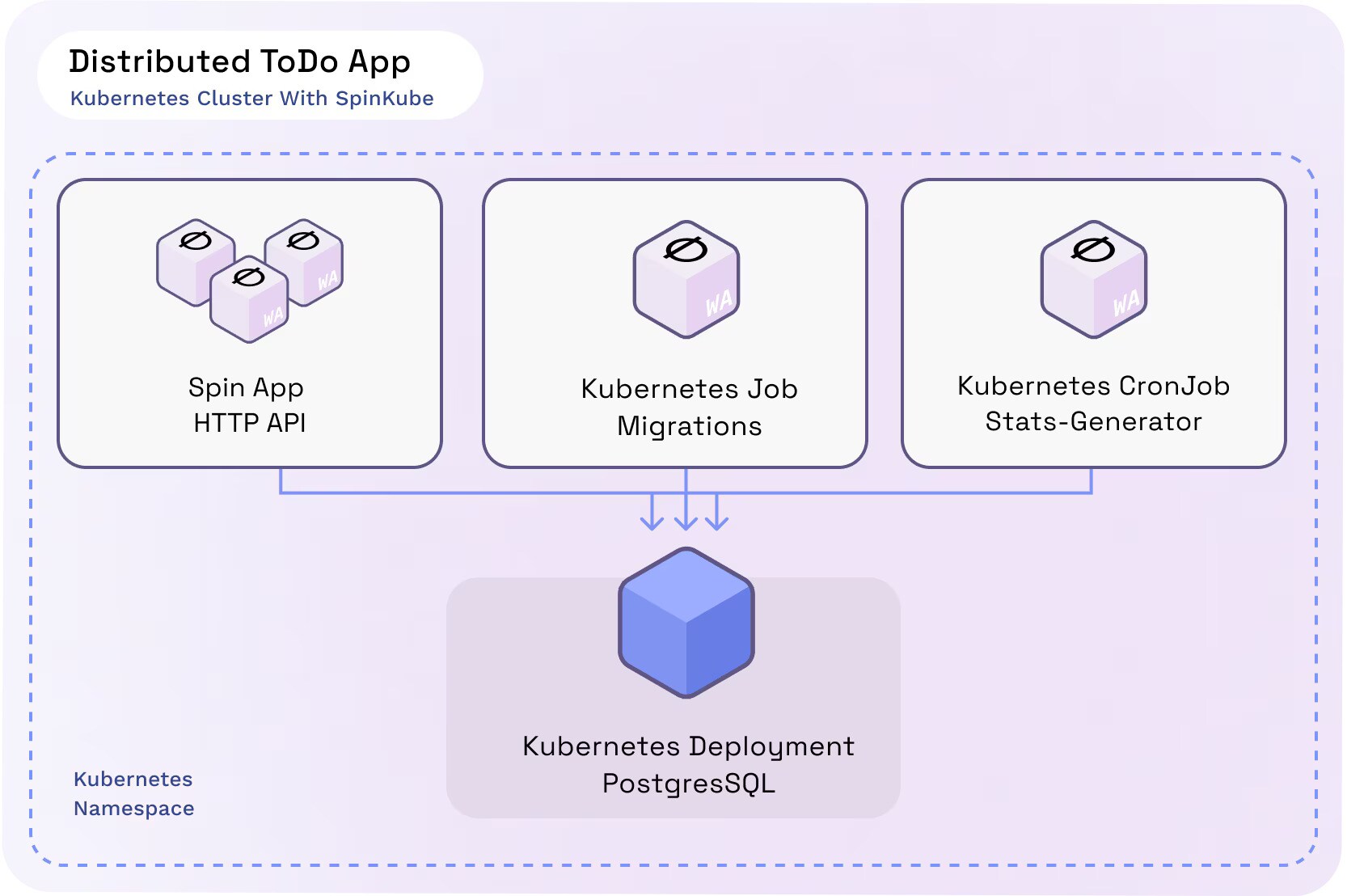
The app consists of four major components. Each component, its technology, and purpose is explained in the following table:
Component | Kind | Purpose |
PostgreSQL | Docker container | Persistence layer for tasks and stats. Used from all other application components |
HTTP API | Spin app with HTTP trigger | Exposing tasks and stats through HTTP API endpoints |
Migrations | Spin app with command trigger | Executed once after the deployment (Kubernetes Job) to provision the database schema and seed sample data |
Stats-Generator | Spin app with command trigger | Executed on a configurable interval (Kubernetes CronJob) to create stats based on tasks stored in the database |
On top of those major components, you’ll discover a Secret and a ConfigMap. Both are used to share sensitive and non-sensitive configuration data across all application components depending on their needs.
The source code of the distributed ToDo app is located at github.com/fermyon/enterprise-architectures-and-patterns/tree/main/distributed-todo-app
Inspecting the Spin manifests
You configure all aspects of your Spin apps within the Spin manifest (spin.toml), and trigger configuration is no exception. The following snippet shows the Spin manifest of the Migrations Spin app (which will be deployed as a Kubernetes Job).
Notice the [[trigger.command]] section, which tells the underlying Spin runtime to instantiate and invoke the migrations component at application startup.
# ./src/migrations/spin.toml
spin_manifest_version = 2

[application]
name = "migrations"
version = "0.1.0"
authors = ["Fermyon Engineering <engineering@fermyon.com>"]
description = ""

[variables]
db_host = { default = "localhost" }
db_connection_string = { default = "postgres://timmy:secret@localhost/todo" }

[[trigger.command]]
component = "migrations"

[component.migrations]
source = "target/wasm32-wasi/release/migrations.wasm"
allowed_outbound_hosts = ["postgres://{{ db_host }}"]

[component.migrations.variables]
connection_string = "{{ db_connection_string }}"

[component.migrations.build]
command = "cargo component build --target wasm32-wasi --release"
watch = ["src/**/*.rs", "Cargo.toml"]
Reviewing the Stats-Generator implementation
Revisiting the implementation of the Stats-Generator shows that implementing a Spin app that leverages the command trigger is almost identical to building Spin apps using other triggers.
In the case of Rust, we use the regular main function as the entry point of our application because it contains the business logic. By changing the return type of the main function to std::result::Result<T,E> or, in this example, anyhow::Result<()> (provided by the anyhow crate), we can simply use the question mark operator (?) to terminate processing early, if our app runs into an error.
The underlying Spin runtime will automatically turn errors received from the guest into a non-zero exit code.
// ./src/stats-generator/src/main.rs
use anyhow::{Context, Result};
use spin_sdk::{
pg::{Connection, Decode, ParameterValue},
variables,
};
const SQL_INSERT_STATS: &str = "INSERT INTO Stats (open, done) VALUES ($1, $2)";
const SQL_GET_TASK_STATS: &str = "SELECT done FROM Tasks";
pub struct Stats {
pub open: i64,
pub done: i64,
}
fn get_connection() -> Result<Connection> {
let connection_string = variables::get("connection_string")?;
Connection::open(&connection_string)
.with_context(|| "Error establishing connection to PostgreSQL database")
}
fn main() -> Result<()> {
println!("Generating stats");
let connection = get_connection()?;
let row_set = connection.query(SQL_GET_TASK_STATS, &[])?;
let stats = row_set
.rows
.iter()
.fold(Stats { open: 0, done: 0 }, |mut acc, stat| {
if bool::decode(&stat[0]).unwrap() {
acc.done += 1;
} else {
acc.open += 1;
}
acc
});
let parameters = [
ParameterValue::Int64(stats.open),
ParameterValue::Int64(stats.done),
];
connection
.execute(SQL_INSERT_STATS, ¶meters)
.with_context(|| "Error while writing stats")?;
println!("Done.");
Ok(())
}
Kubernetes deployment manifests
There is one thing we must take care of when defining Kubernetes Jobs and CronJobs that should run Spin apps built with the command trigger.
We have to instruct Kubernetes to spawn WebAssembly modules instead of traditional containers. We can do so by specifying the corresponding RuntimeClass as part of the manifest. To be more precise, we must set runtimeClassName to wasmtime-spin-v2, as shown in the following deployment manifests for Migrations and Stats-Generator:
Migrations job deployment manifest
# ./kubernetes/migrations.yaml
apiVersion: batch/v1
kind: Job
metadata:
  name: todo-migrations
spec:
  ttlSecondsAfterFinished: 600
  template:
    spec:
      runtimeClassName: wasmtime-spin-v2
      containers:
        - name: migrations
          image: ttl.sh/spin-todo-migrations:24h
          command:
            - /
          env:
            - name: "SPIN_VARIABLE_DB_HOST"
              value: "todo-db"
            - name: "SPIN_VARIABLE_DB_CONNECTION_STRING"
              valueFrom:
                secretKeyRef:
                  name: db-config
                  key: connectionstring
      restartPolicy: Never
Stats-Generator deployment manifest
If you’re already familiar with Kubernetes, you may know that CronJob and Job share most of its configuration aspects. However, the most prominent difference is that we must specify a schedule when creating deployment manifests for a CronJob.
For the sake of demonstration, the schedule property of the Stats-Generator is set to */2 * * * *, which instructs Kubernetes to run our CronJob every other minute:
# ./kubernetes/stats-generator.yaml
apiVersion: batch/v1
kind: CronJob
metadata:
  name: stats-generator
spec:
  schedule: "*/2 * * * *"
  jobTemplate:
    spec:
      template:
        spec:
          runtimeClassName: wasmtime-spin-v2
          containers:
            - name: cron
              image: ttl.sh/spin-todo-cron:24h
              command:
                - /
              env:
                - name: "SPIN_VARIABLE_DB_HOST"
                  value: "todo-db"
                - name: "SPIN_VARIABLE_DB_CONNECTION_STRING"
                  valueFrom:
                    secretKeyRef:
                      name: db-config
                      key: connectionstring
          restartPolicy: OnFailure
Deploying the ToDo app to Kubernetes
You can use different techniques, such as kubectl, Helm charts or GitOps, to deploy the distributed ToDo app and all its components to a Kubernetes cluster. For the sake of simplicity, we will deploy everything using good old kubectl:
# Deploy the PostgreSQL database
kubectl apply -f kubernetes/db.yaml

# Wait for the database pod to become ready
kubectl wait --for=condition=Ready pod -l app=postgres

# Deploy the Migrations Job
kubectl apply -f kubernetes/migrations.yaml

# Deploy the HTTP API
kubectl apply -f kubernetes/api.yaml

# Deploy the CronJob
kubectl apply -f kubernetes/stats-generator.yaml
Testing the ToDo app
To test the application, we use Kubernetes port forwarding to forward requests from port 8080 on your local machine to port 80 of the Kubernetes Service, that has been created for our Spin app:
# Setup port-forwarding from localhost to the todo-api service
kubectl port-forward svc/todo-api 8080:80

Forwarding from 127.0.0.1:8080 -> 80
Forwarding from [::1]:8080 -> 80With port forwarding in place, we can send HTTP requests to the ToDo application using curl.
First, we will send a GET request to localhost:8080/tasks, which will return a list of tasks,indicating that our API is working as expected and that the Migrations Job was executed successfully:
# Send GET request to /tasks
curl localhost:8080/tasks
[
  {
    "id": "ba6f77a2-73a7-4948-891a-73532b941cbf",
    "content": "Arrange books on the shelf",
    "done": false
  },
  // ...
]Next, we’ll send a GET request to localhost:8080/stats, which will return some fundamental statistics based on tasks stored in the ToDo application. (Keep in mind that the Stats-Generator has been configured to run every other minute. If the CronJob hasn’t executed yet, you can either wait until it has finished its first execution, or run it manually using the kubectl create job --from=cronjob/stats-generator once-manual command).
# Send GET request to /stats
curl localhost:8080/stats
[
  {
    "date": "2024-11-04 10:22:00",
    "open_tasks": 12,
    "done_tasks": 13
  }
]
If we wait for another two minutes and send the request to /stats again, we will see a different result being returned.
We will see a second object being part of the result array, indicating that our Stats-Generator CronJob has been executed again:
curl localhost:8080/stats
[
  {
    "date": "2024-11-04 10:24:00",
    "open_tasks": 12,
    "done_tasks": 13
  },
  {
    "date": "2024-11-04 10:22:00",
    "open_tasks": 12,
    "done_tasks": 13
  }
]Additional resources
If you want to dive deeper into the command trigger plugin for Spin, check out our Exploring the Spin Command Trigger video.
Conclusion
By leveraging the Spin command trigger, we can seamlessly integrate WebAssembly-based workloads into Kubernetes, enabling the creation of Jobs and CronJobs that fit naturally into the Kubernetes ecosystem. This approach simplifies the orchestration of scheduled and one-time tasks while taking full advantage of Kubernetes’ robust scheduling and management capabilities.
Through the distributed ToDo application, we explored how to configure and deploy these components, showing the potential of WebAssembly in modern cloud native environments. Whether running jobs once, serving HTTP APIs, or executing recurring tasks, the combination of Spin, Kubernetes, and SpinKube offers a powerful and efficient way to build and manage distributed applications.
Now it’s your turn to dive in. Start experimenting with Spin and SpinKube and unlock the full potential of WebAssembly for your workloads.

Tags