Executive summary
Akamai researchers identified that an incomplete patch for CVE-2026-21510 (an APT28 exploit) created a new zero-click vulnerability: CVE-2026-32202.
While Microsoft's fix successfully prevented the initial remote code execution (RCE) and SmartScreen bypass, it left behind a zero-click authentication coercion vulnerability (which is now classified as CVE-2026-32202).
We detected the APT28 (also known as Fancy Bear) exploit in January 2026 and Microsoft patched it on February's Patch Tuesday.
CVE-2026-21513 and CVE-2026-21510 were exploited in the same LNK file and were a crucial part of the exploitation chain.
We then found an incomplete patch and disclosed it to Microsoft. The new vulnerability, CVE-2026-32202, caused the victim to authenticate the attacker's server without user interaction (zero click).
Fancy exploit: Inside APT28’s SmartScreen bypass
According to CERT-UA, the APT28 threat actor (also known as Fancy Bear) launched a cyberattack targeting Ukraine and several EU countries in December 2025. As detailed in our February 2026 Inside the Fix blog post, this campaign leveraged a weaponized LNK file to exploit CVE-2026-21513. To ensure responsible disclosure, we deliberately withheld details of a second exploit in the chain that wasn't completely patched.
The second vulnerability (CVE-2026-21510) bypasses security features such as the Microsoft Defender SmartScreen and executes attacker-controlled code, which is stored on the attacker's remote server.
APT28 leverages the Windows shell namespace parsing mechanism to load a dynamic link library (DLL) from a remote server using a UNC path. The DLL is loaded as part of the Control Panel (CPL) objects without proper network zone validation.
Getting technical: An analysis of the LinkTargetIDList structure
To put it simply, the malicious LNK file contains a LinkTargetIDList that contains a path that can be parsed by shell32.dll and presented in Windows Explorer, much like the Control Panel. The IDList is a simple structure of binary data that contains the object information.
The first IDList item is a CLSID that represents the Control Panel Component Object Model (COM) object, the second represents “all control panel items,” and the third is an _IDCONTROLW structure. This internal shell32 format embeds the CPL module path (in this case, a UNC path to the attacker's server) directly within the binary IDList data.
Figure 1 illustrates the original exploit and highlights the LNK file structure. As we can see, there is no ordinary Windows path as we know it, but only the LNK header with the LinkTargetIDList structure. It includes the Control Panel CLSID in IDList #0, while the second object represents “all control panel items,” and the third is the UNC path to the attacker payload.
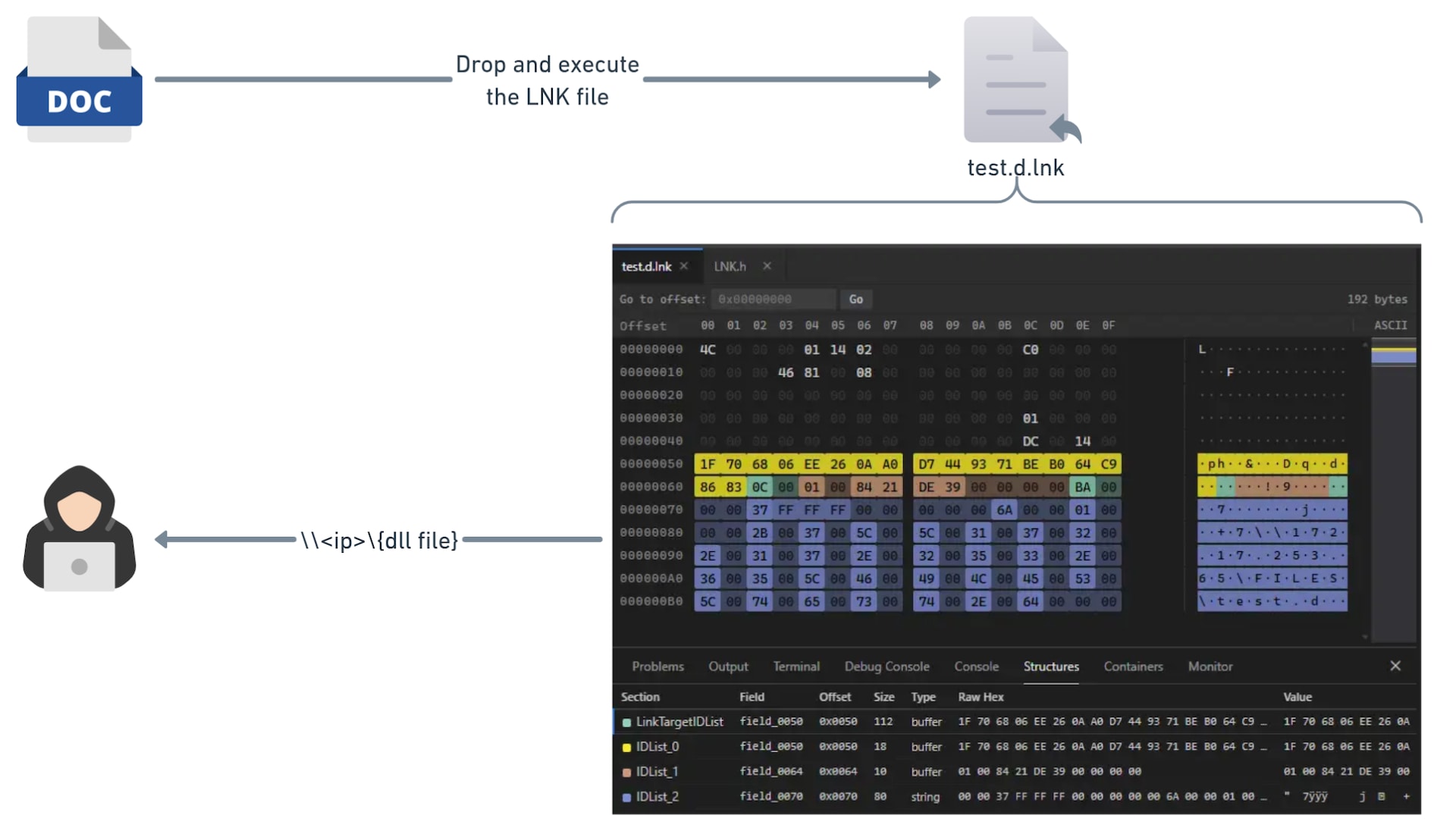 Fig. 1: Conceptual flow of the original CVE-2026-21510 exploitation
This leads to the following path:
::{26EE0668-A00A-44D7-9371-BEB064C98683}\0\{GENERATED GUID OF THE UNC PATH}
This is how explorer.exe contacts the attacker server to load the allegedly CPL component, and by doing so, loads a DLL without any verification by SmartScreen or validation of the Mark of the Web (MotW).
Patching the Bear: Analyzing and addressing the APT28 exploit
Microsoft fixed those vulnerabilities in February 2026’s Patch Tuesday. When we used PatchDiff-AI to analyze the security update, we got a detailed root cause of CVE-2026-21510, which helped us understand the vulnerable code and, above all, how it was patched. The root cause of the vulnerability is essentially improper validation of the supplied input. When the explorer process tries to parse the LNK file, it automatically executes the configured flow for representing CPL files.
The main approach that we took to patch the vulnerability was to enable SmartScreen to scan it. To understand what that entailed, we need to examine the internal call chain that shell32.dll uses when launching a Control Panel applet. Figure 2 illustrates what the chain looks like in the vulnerable version.
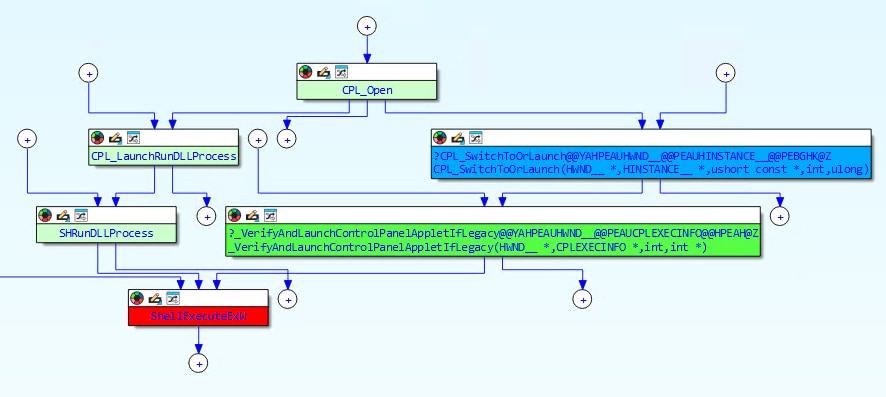 Fig. 2: CVE-2026-21510 vulnerable code paths
The ShellExecute pipeline supports trust verification via the SmartScreen, but the CPL launch path never requested it.
The ControlPanelLinkSite
The patch introduces a new COM object called ControlPanelLinkSite that acts as a bridge between the CPL launch path and ShellExecute's trust verification mechanism. This object implements two interfaces: IServiceProvider and IVerifyingTrust. When constructed, it stores a copy of the CPL file path that is about to be launched. Figure 3 shows the new patched call chain.
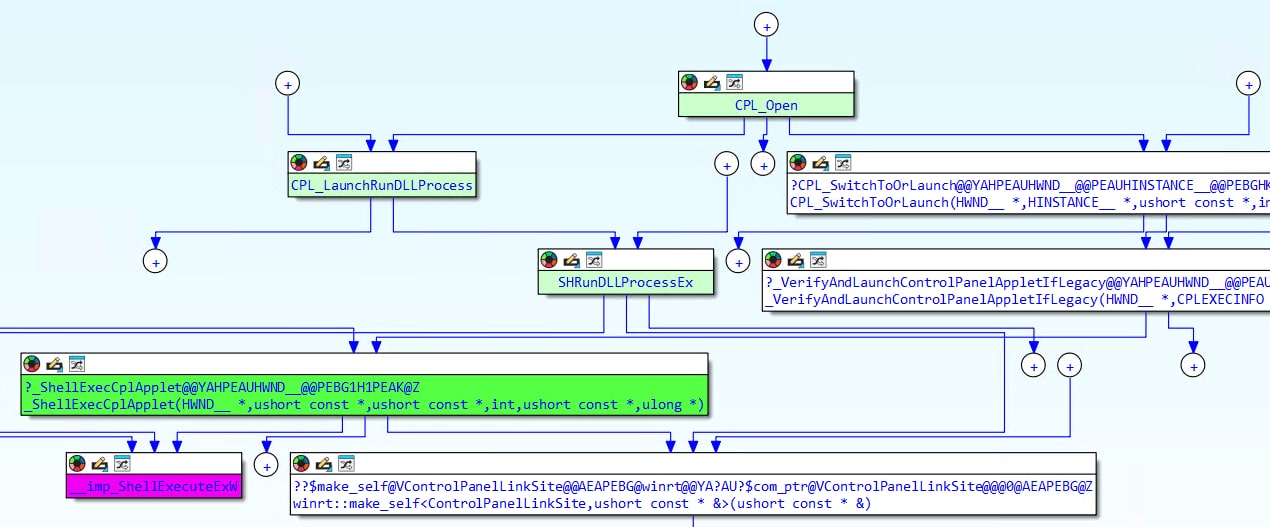 Fig. 3: Patched version code paths, using ControlPanelLinkSite to verify the CPL path
The key mechanism is a new fMask bit (0x08000000) that signals the ShellExecute pipeline to look for a trust verification object. The object is passed through the hInstApp field of SHELLEXECUTEINFOW, a field that was previously unused in these code paths.
When ShellExecute encounters this flag, it queries the object via QueryService(IID_IVerifyingTrust) and calls OnVerifyingTrust, which triggers the actual SmartScreen/MotW verification:
HRESULT ControlPanelLinkSite::OnVerifyingTrust(
        ControlPanelLinkSite *this,
        IVerifyingTrustInputs *pVerifyInputs)
{
    if (!this->trustString)
        // No CPL path → allow (backward compatibility)
        return S_OK;
    if (!pVerifyInputs)
        // No inputs → allow
        return S_OK;

    // Delegate to the ShellExecute pipeline's trust check
    return pVerifyInputs->Verify(pVerifyInputs);
}This is the function that actually closes the vulnerability: The Verify call triggers SmartScreen to check the CPL file's digital signature and origin zone before allowing execution.
All these changes are gated behind a Windows Implementation Libraries (WIL) feature flag. When the feature is disabled, the code falls back to the original behavior without trust verification, and this is Microsoft's standard staged rollout mechanism.
Something is missing: Why the initial patch failed
With the patch in place, the RCE is effectively mitigated and SmartScreen now blocks unsigned or untrusted CPLs from executing. However, while testing the patch, we noticed something interesting: The victim machine was still authenticating to the attacker's server.
The trust verification that Microsoft added only fires during the ShellExecuteExW call, at the very end of the launch chain. But there is an earlier stage in the chain where the damage is already done.
Let’s look at CControlPanelFolder::GetUIObjectOf, which is called before any ShellExecute trust verification takes place:
The zero-click path: Icon extraction
The most dangerous path requires no user interaction beyond navigating to a folder. When Windows Explorer renders the contents of a folder containing the malicious LNK, it asks shell32 to extract an icon for the CPL IDList item. This triggers the call chain inside CControlPanelFolder::GetUIObjectOf seen in Figure 4.
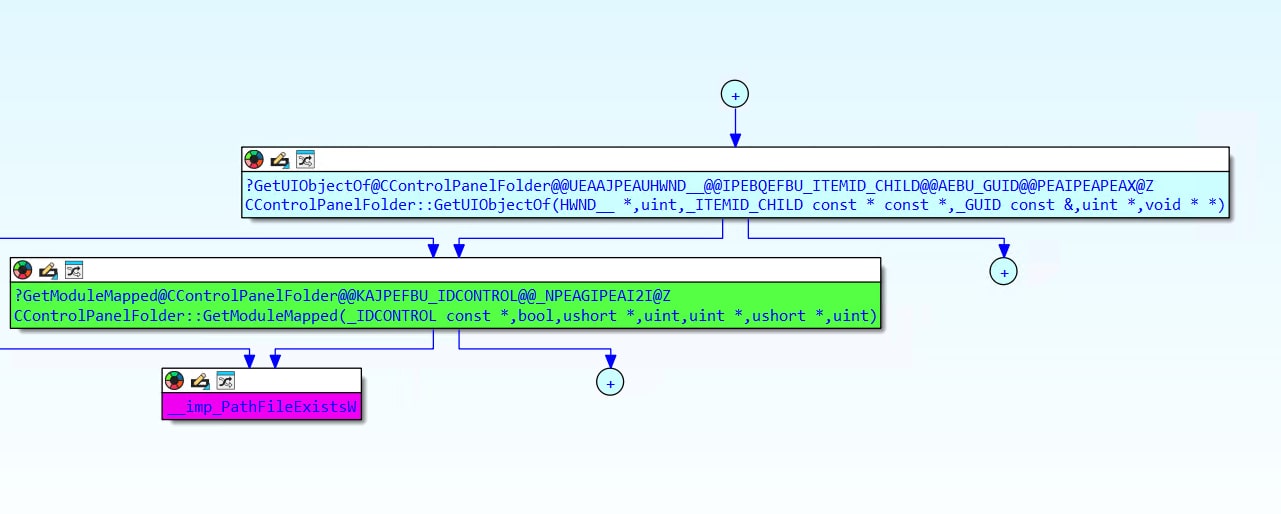 Fig. 4: The code path for automatically fetching the UI resource from UNC path
The PathFileExistsW call inside GetModuleMapped is the earliest trigger, which causes Windows to resolve the UNC path and initiate an SMB connection. This happens the moment Explorer renders the folder contents, without any user click (Figure 5).
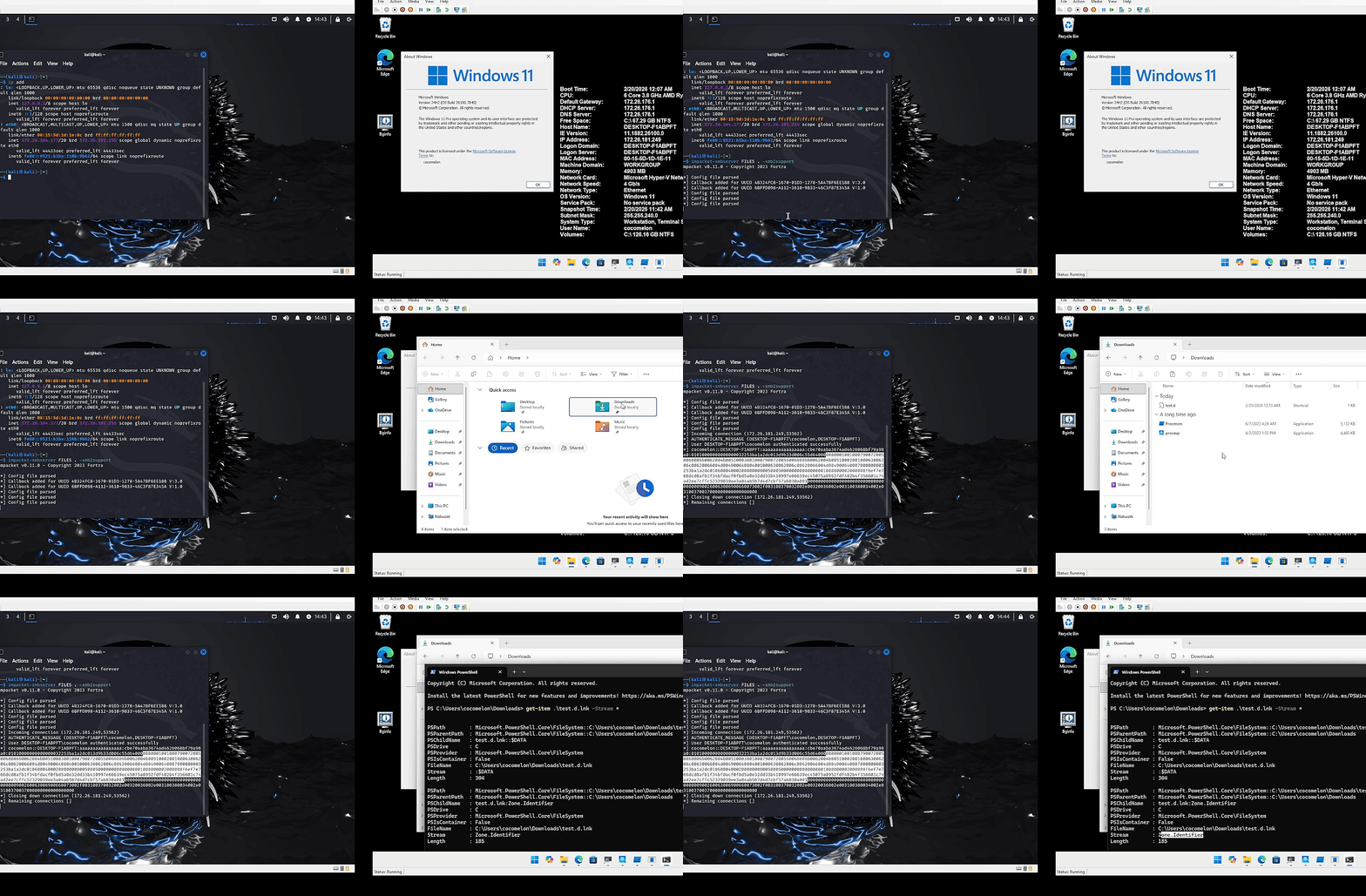 Fig. 5: Demonstration of zero-click authentication coercion via a malicious LNK file
When that path is a UNC path (like \\attacker.com\share\payload.cpl), Windows initiates an SMB connection to the attacker's server. This server message block (SMB) connection triggers an automatic NTLM authentication handshake, sending the victim's Net-NTLMv2 hash to the attacker, which can later be used for NTLM relay attacks and offline cracking.
Wrapping up
Our vulnerability triage highlights the danger of incomplete patches. While Microsoft fixed the initial RCE (CVE-2026-21510), an authentication coercion flaw (CVE-2026-32202) remained. This gap between path resolution and trust verification left a zero-click credential theft vector via auto-parsed LNK files.
We thank Microsoft Security Response Center (MSRC) for their collaboration in resolving CVE-2026-32202.

Tags