Managing networking in the cloud shouldn’t require guesswork, reboots, or hidden configuration layers.
Linode Interfaces and Default Firewalls are now generally available on Akamai Cloud — bringing a simpler, more predictable, and secure way to manage your infrastructure.
Linode Interfaces
Linode Interfaces introduces a modern approach to network management by letting you configure networking directly at the instance level. Instead of relying on configuration profiles, you can now:
Attach and manage VPC, public, and VLAN interfaces directly
See exactly what’s deployed
Apply changes dynamically, often without reboots
Default Firewalls
Default Firewalls ensure that every new resource is protected automatically. As an account admin, you can:
Define a Default Firewall policy
Apply it automatically to:
Compute instances
VPC and public interfaces
Require users to explicitly opt out if they don’t want protection
This shift allows network configuration and interface changes to be applied consistently and dynamically, without requiring reboots or ongoing profile management.
Why this matters
This update simplifies networking by removing unnecessary abstraction layers and giving you direct control at the instance level. The result is a more intuitive experience with clearer visibility into your network configuration, reduced operational complexity, and security applied by default.
Better VPC management
Linode Interfaces makes VPC connectivity easier to understand and control. You can now:
See exactly which interfaces connect to your VPC
Apply firewall rules at the interface level
Define routing between public and private networks with full visibility
With VPC support across core Akamai Cloud services, including compute (shared and dedicated CPU), LKE-Enterprise, database as a service (DBaaS), and NodeBalancers you can build complete application stacks that communicate entirely over private networks.
Transparent configuration
Your API now reflects your actual network state in real time. No more rebooting to confirm changes No hidden configuration layers. What you see is exactly what’s deployed.
Granular security control
Security is now built in from the start. You can:
Apply Cloud Firewalls at the interface level instead of the entire instance
Configure Default Firewalls to automatically protect new resources
Customize firewall settings during instance creation
Optimizing infrastructure for high-throughput AI inference
Scaling distributed AI applications demands more than just raw GPU compute power; it requires a highly responsive, low-latency networking foundation. When serving distributed models across the agentic web, data pipelines must continuously route real-time context and retrieval-augmented generation (RAG) embeddings between public application endpoints and isolated back-end vector databases.
Traditional centralized cloud setups force complex network configuration reboots that disrupt active model operations. By configuring networking endpoints natively at the instance level with these new interfaces, AI infrastructure teams can attach secure VPC networks dynamically. This means you can scale database nodes, add memory-intensive execution instances, or modify cluster topologies under heavy real-time inferencing loads without incurring reboots, cold starts, or performance degradation.
Getting started with Linode Interfaces
Linode Interfaces is the recommended networking model for new deployments. When creating a compute instance in Cloud Manager or via the API, simply select Linode Interfaces as your network configuration method (Figure 1).
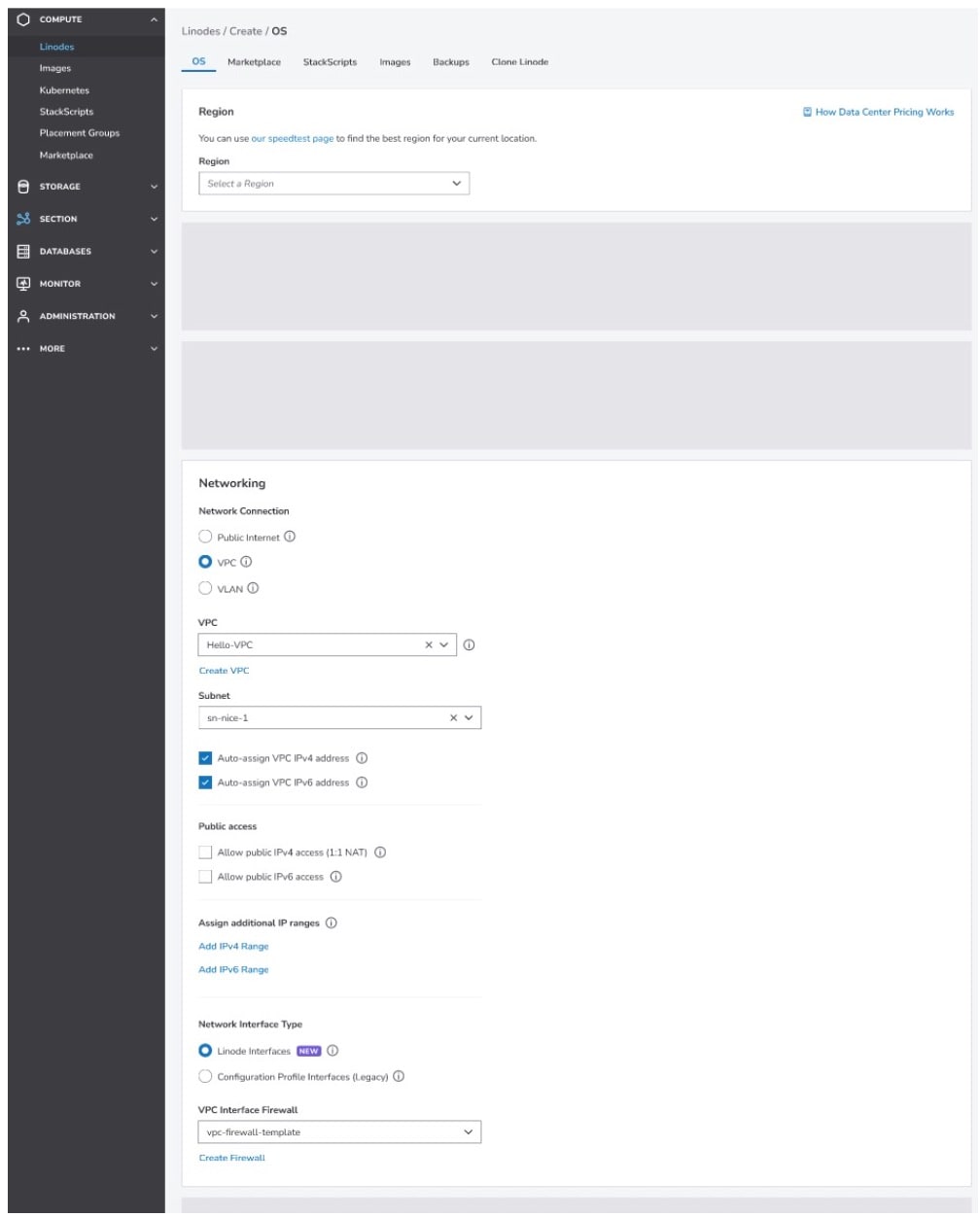 Fig. 1: When provisioning a VM in Cloud Manager, select Linode Interfaces as your network configuration method
Existing instances
Transitioning your active workloads to the new networking model is a straightforward process managed directly within your dashboard or developer tools:
Upgrade through Cloud Manager or the API using the upgrade endpoint
Use the dry-run feature to preview changes before committing
Note: Upgrades cannot be reversed
Account settings
You can control the default networking model for your account (Figure 2):
Linode Interfaces (recommended for new workloads)
Configuration profile interface (for existing compatibility with automation)
Allow choice (select per-instance during provisioning)
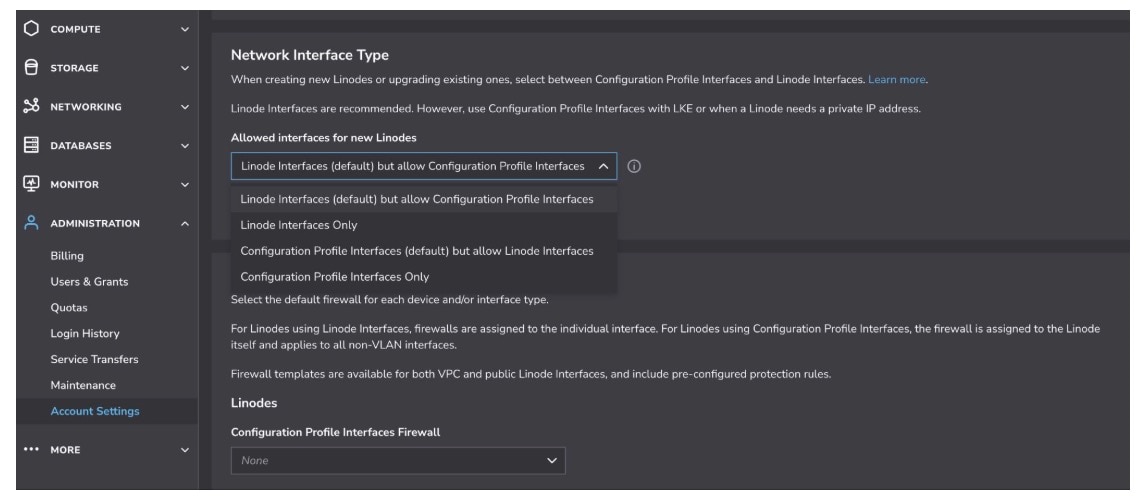 Fig. 2: Easily control the default networking model
Secure by default
Automated protection is natively woven into the architecture, helping to safeguard your infrastructure from the moment it’s created.
If a Default Firewall is configured, it is automatically applied to new resources (Figure 3)
If no firewall is specified and no default exists:
Linode Interfaces deployments will fail unless a firewall is provided or explicitly disabled
Note: For instances using legacy configuration profiles, creation will not fail if no firewall is specified and no default is configured
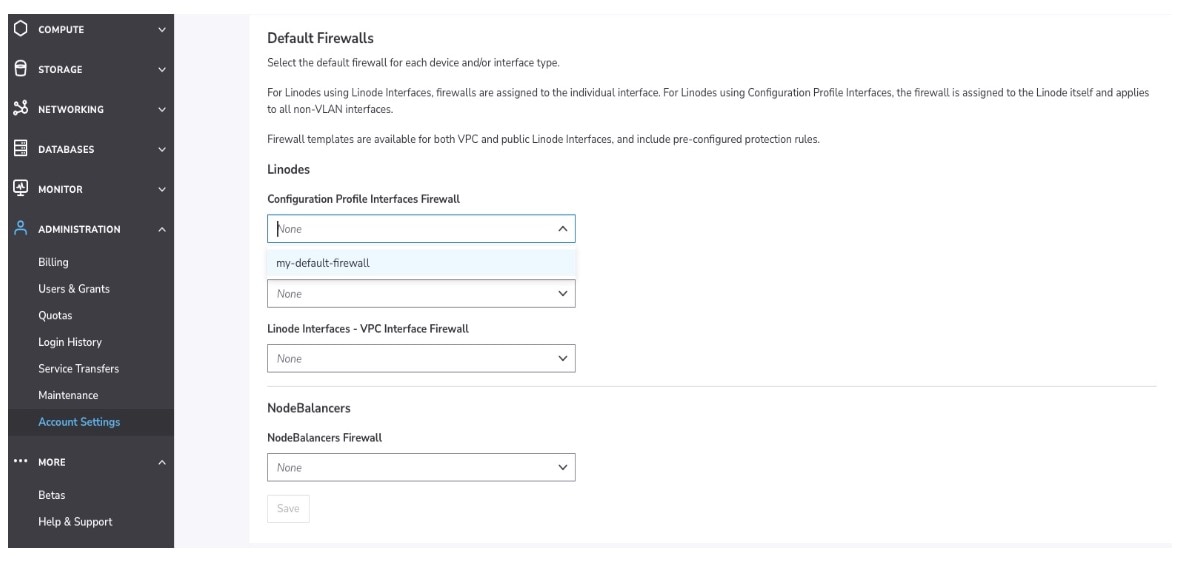 Fig. 3: If a Default Firewall is configured, it is automatically applied to new resources
Important notes
Before you begin deploying new instances or initiating a migration, keep in mind these essential guardrails, requirements, and system behaviors:
Power requirements: Most interface changes require instances to be powered off when Network Helper is enabled.
Migration flexibility: Existing configuration profile-based setups will continue to work. You can migrate to Linode Interfaces at your own pace.
Default Firewall enforcement: If an account admin configures a Default Firewall, users must explicitly opt out if they do not want firewall protection.
Availability: Linode Interfaces is now available for both new and existing compute instances.
Additional resources

Tags