Managing access to cloud resources shouldn’t be complex or risky. The new role-based access control (RBAC) in Akamai Cloud gives an Admin a clearer, more predictable way to manage access to cloud resources securely and efficiently within Akamai Cloud Manager. It also secures access to the Compute public APIs, improving control and visibility across your infrastructure.
RBAC replaces the legacy, coarse-grained access control system with an industry standard approach to identity and access management. Within the Identity & Access section of Cloud Manager, Admins can now access the new roles and role types, view and understand the granular permissions included in each of the roles, use predefined roles that represent job functions (for example, account_billing_viewer), and assign those roles to users (Figure).
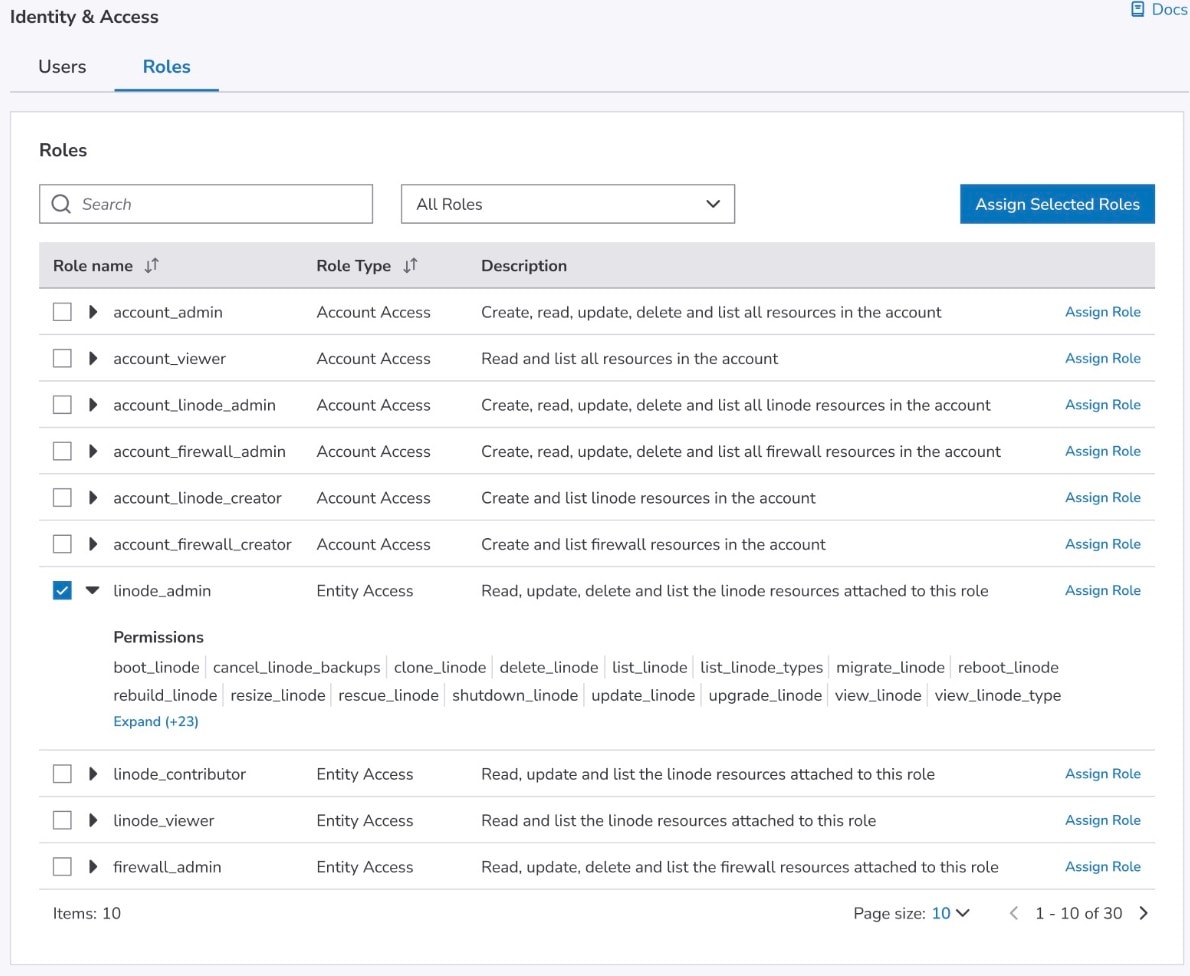 The user experience after the introduction of Identity & Access in Cloud Manager
Whether you are managing a small DevOps team or a global enterprise deployment, RBAC simplifies day-to-day administration and reduces the risk of configuration drift or over-permissioned accounts. This clarity helps you ensure that users have the right level of access — no more, no less.
This release is part of a broader effort to modernize access management across Akamai Cloud and bring it in line with standard IAM practices. RBAC helps you keep permissions tight, collaboration smooth, and your focus on what’s important — building and deploying great cloud applications.
How your existing permissions are migrated to RBAC
When RBAC is enabled for your account, all existing user grants are automatically migrated to their closest matching roles. This ensures that your users retain the right level of access without any manual setup.
Here’s how the old permissions map to the new roles:
Legacy full account access → account_admin role
Legacy general permissions → account access roles (for example, account_linode_creator)
Legacy specific permissions → entity access roles with three access tiers:
*_viewer — can view entities
*_contributor — can view and update entities
*_admin — can perform all operations on entities
(Where * is a specific entity type, for example: linode_contributor, firewall_viewer)
Admins can manage and assign these roles directly in Cloud Manager in two ways:
From the Roles tab: View all available roles, review their descriptions and permissions, and assign a role or a set of roles to a user
From a user’s page: Assign or update roles for a single user, which is a faster option if you already know which roles they need
For a full list of roles and detailed permission mappings, see TechDocs.
The 4 key benefits of RBAC for Akamai Cloud customers
The four key benefits of RBAC for Akamai Cloud customers include:
Simplified access management
Stronger security and compliance
Faster onboarding and offboarding
Better visibility
Simplified access management
The primary benefit of RBAC is the use of functional role definitions to control access and authorization for the users. RBAC lets you assign users to predefined roles — such as Viewer, Contributor, or Admin — based on your needs.
Stronger security and compliance
With RBAC, you can enforce the principle of least privilege, ensuring users have access only to the resources they need. This reduces the risk of unauthorized access, misconfigurations, and data exposure — all common issues in growing cloud environments.
For customers in regulated industries, RBAC simplifies compliance by providing a clear, auditable structure for permissions. During reviews or audits, you can easily show who has access to what.
Faster onboarding and offboarding
When a new employee joins your team, you can simply assign them the appropriate role and they’re ready to go. When someone leaves, removing that assignment instantly revokes the respective access, helping you maintain clean and secure user management.
Better visibility
The new Identity & Access gives you a clear view into which users have what roles and permissions. This transparency helps Admins by reducing confusion and improving operational efficiency.
Why this release matters for you
The migration to the RBAC model is more than a new feature — it’s a foundation for secure, scalable, and efficient access management across your cloud resources.
With RBAC, you can:
Save time when managing users and roles
Enhance security through the least-privilege principle
Simplify audits with transparency and traceability
RBAC helps you focus not only on managing permissions but also on building and deploying great cloud applications.

Tags