

Natalie Zagarov
Natalie Zargarov is a Security Researcher with more than 10 years of experience in cybersecurity as a malware reverser and cyber intelligence researcher.
Akamai acquired LayerX. This previously published blog post reflects the product and feature names on the original date of publication.
LayerX security researchers have uncovered a campaign of at least 12 interrelated browser extensions that masquerade as TikTok video downloaders but in reality track user activity and collect data. The extensions share a common codebase and are all clones or lightly modified versions of each other, indicating that this is a long-standing and persistent campaign by the same threat actors.
The extensions also implement a mechanism for dynamic remote configuration, which allows them to bypass marketplace review processes. This enables the malicious extensions to modify their behavior and functionality after installation, without users or marketplaces being aware. According to LayerX research, the extensions typically operate legitimately for 6–12 months before introducing malicious features.
As a result, even when some of these extensions are flagged and removed, it is easy to spin up new clones and upload them to extension stores. Some have even appeared as “Featured” in extension stores, extending their reach and the trust users place in them.
To date, over 130,000 users have been compromised as part of this campaign.
A large-scale campaign involving at least 12 browser extensions masquerading as TikTok video downloaders has been identified across the Chrome and Microsoft Edge marketplaces. While these extensions provide the advertised functionality (downloading TikTok videos, often without watermarks), they simultaneously implement covert tracking, remote configuration capabilities, and data collection mechanisms.
The campaign has impacted over 130,000 users, with approximately 12,500 active installations at the time of analysis. All samples belong to a single code family, indicating a coordinated operation leveraging cloned, rebranded, and slightly modified extensions to maximize reach and persistence.
Beyond privacy concerns, the use of remote configuration endpoints introduces a significant security risk, enabling post-installation behavior changes that bypass marketplace review mechanisms.
Key Takeaways
This campaign thrives on repetition and variation.
Instead of building new tools from scratch, the operator maintains a core extension architecture and spins off multiple versions:
From the outside, these appear as separate products: TikTok Video Downloader,””Mass TikTok Downloader,””No Watermark Saver.” Under the hood, they are the same.
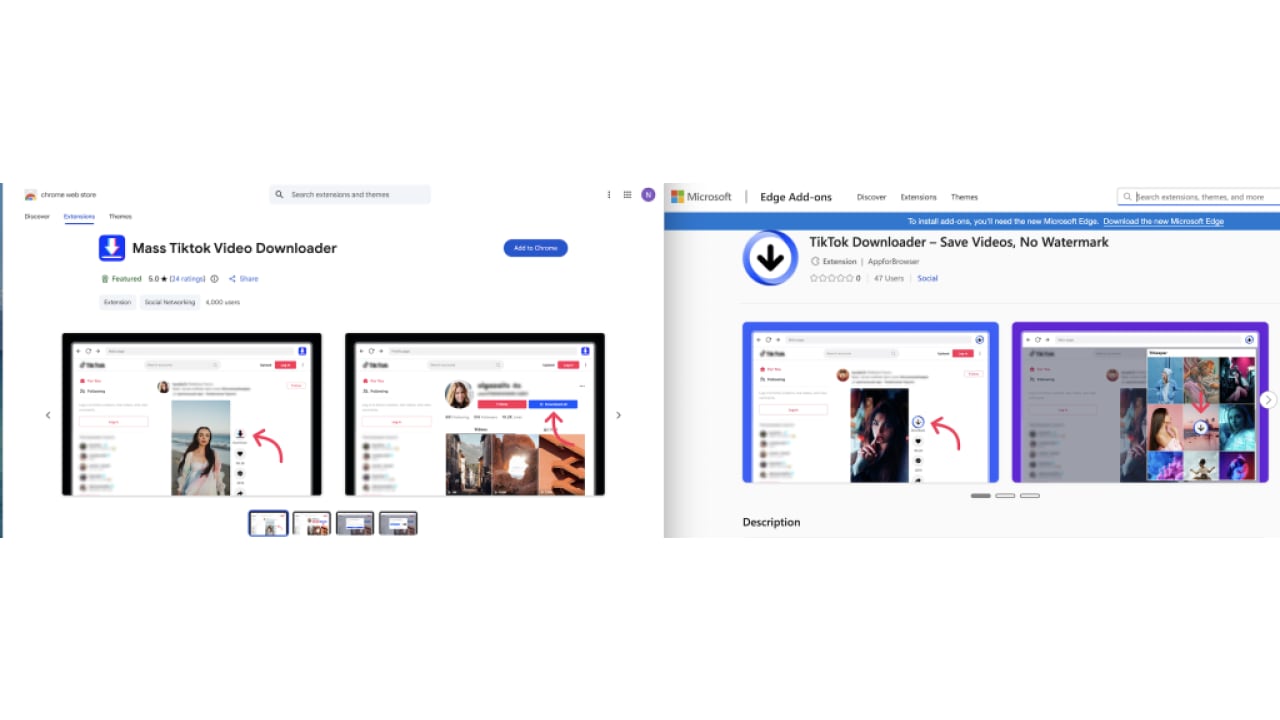
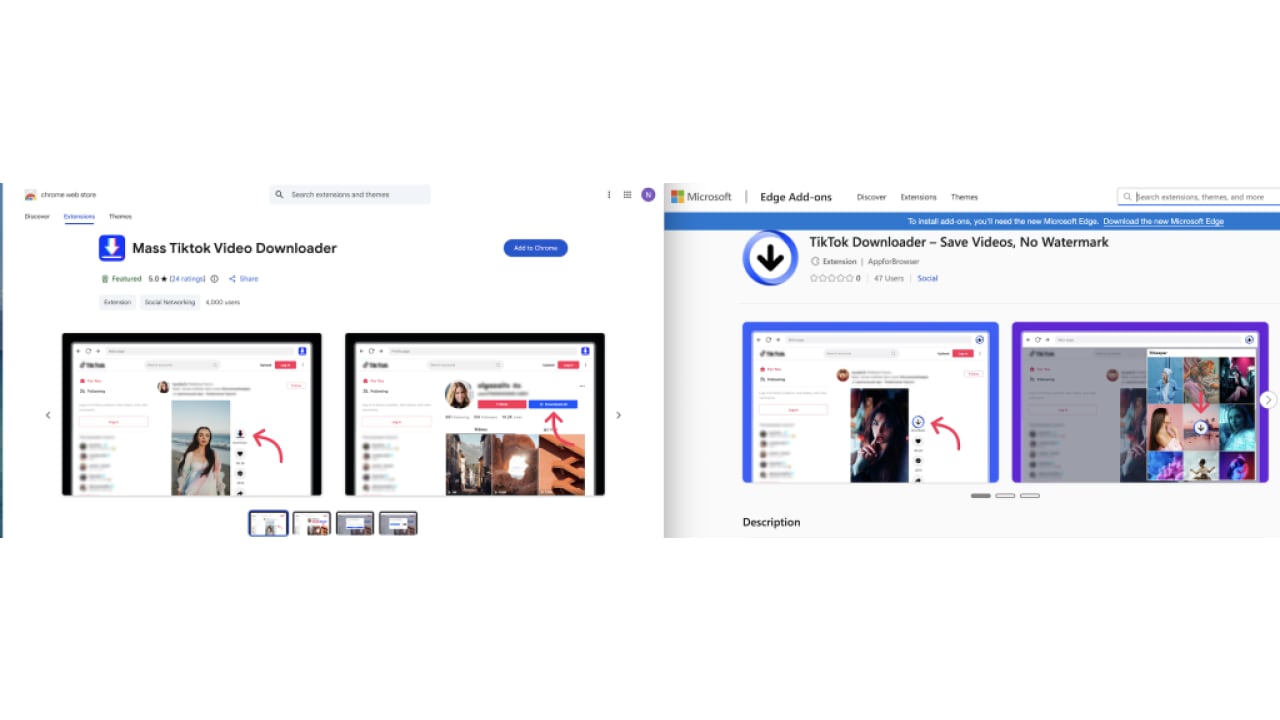
Notably, many of these extensions carried a “Featured” badge in the store, an indicator typically associated with vetted, high-quality extensions, significantly increasing user trust and adoption despite the underlying risks.
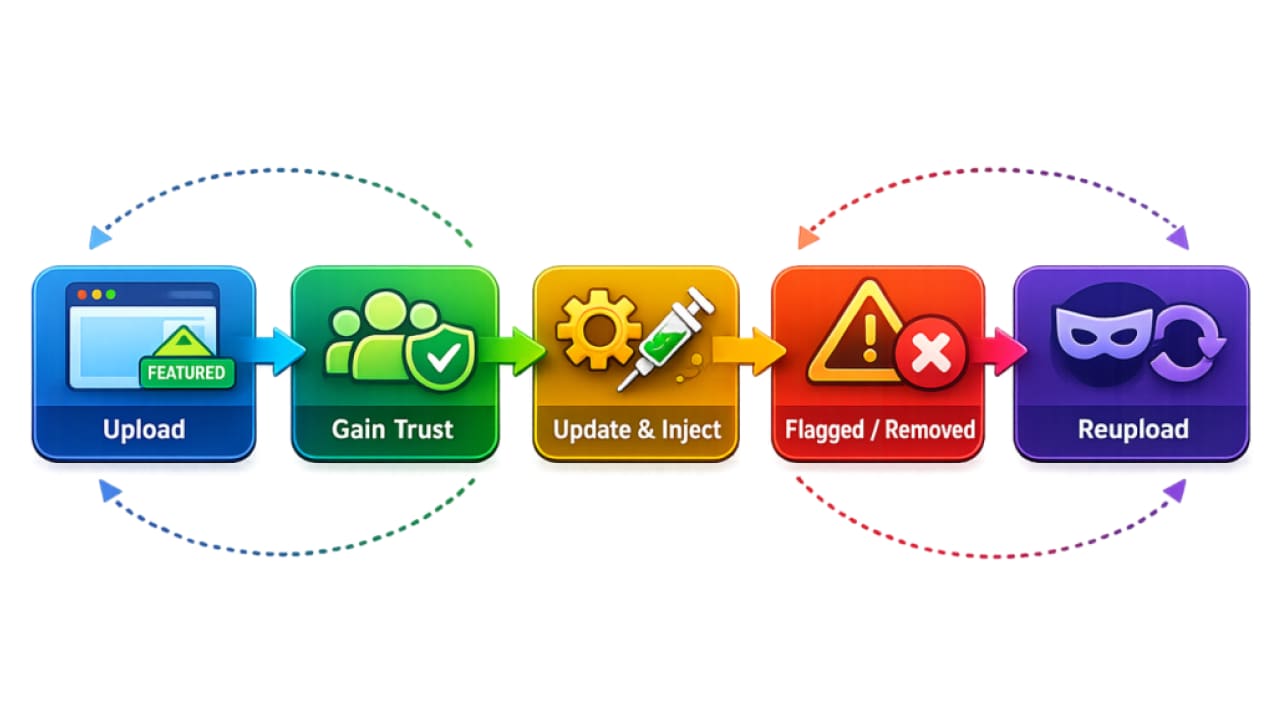
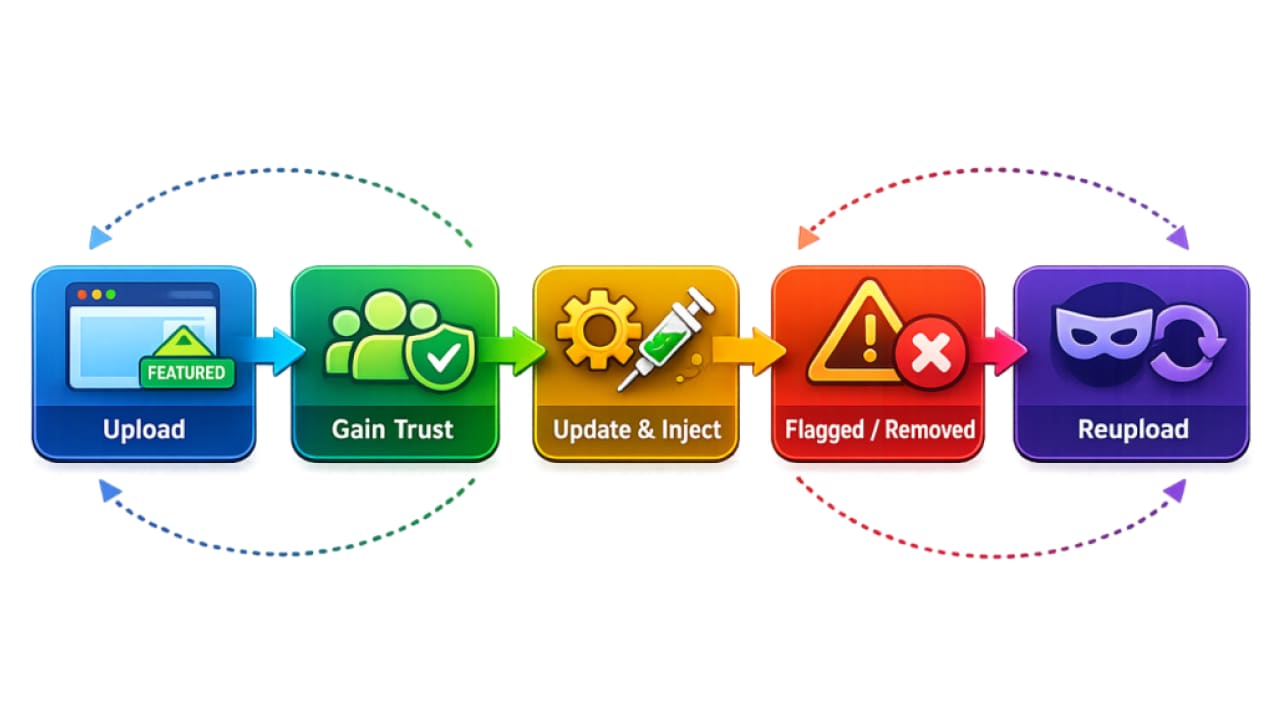
This creates a resilient ecosystem. When one extension is flagged or removed, others remain active. New ones can be uploaded quickly, often with the same screenshots, descriptions, and functionality.
The result is a continuous cycle:
This is not just a malware campaign – it’s an operational model, where persistence is achieved through duplication, rebranding, and rapid redeployment.
All extensions share a consistent Manifest V3 (MV3) architecture, with almost identical permissions and host permissions. Notably, many of these extensions carried a “Featured” badge in the store. This designation is typically associated with vetted, high-quality extensions, and is prominently displayed to users as a mark of trust. As a result, it significantly lowers user suspicion and increases installation likelihood, even when the underlying extension shares code and behavior with less visible variants.
They also had similar screenshots uploaded to the extension’s store page.
While all extensions maintain their legitimate capabilities like extracting TikTok video metadata and download videos, they also include both declared and undeclared capabilities.
Extensions fetch configuration from attacker-controlled servers. This allows the extensions to
Receiving remote configurations means the extension’s behavior is not fixed or fully visible, and could have been altered remotely at any time bypassing store review and enabling unseen data flows or capabilities.
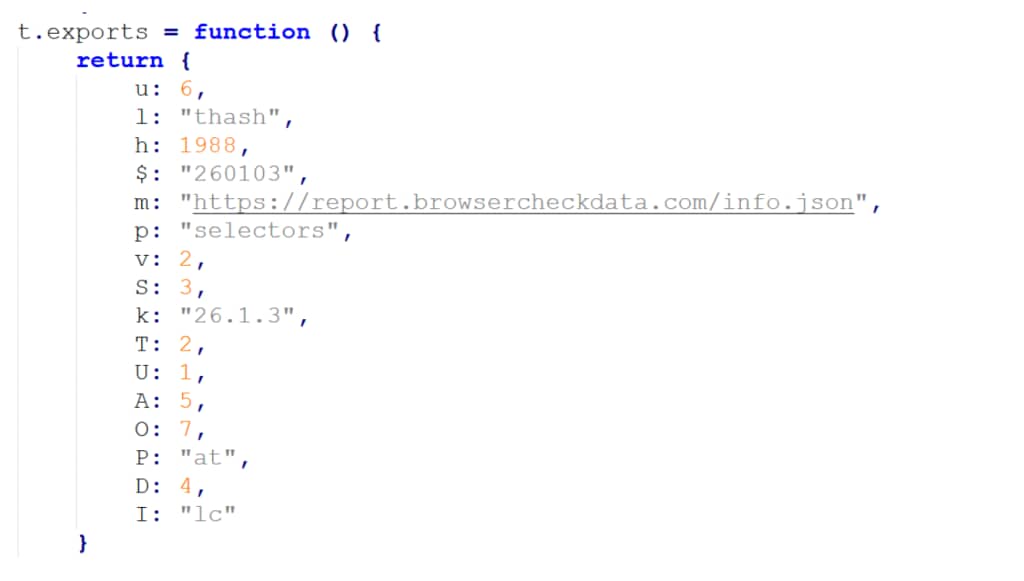
A notable pattern across samples is delayed capability injection, malicious features were introduced 6–12 months after initial publication, allowing extensions to first build reputation and evade early scrutiny.
User Fingerprinting
These extensions collect detailed telemetry about users, including how often they use the tool, what content they interact with, and various device characteristics such as language, timezone, and user agent. Even battery status is captured, an unusual but valuable signal for device fingerprinting.
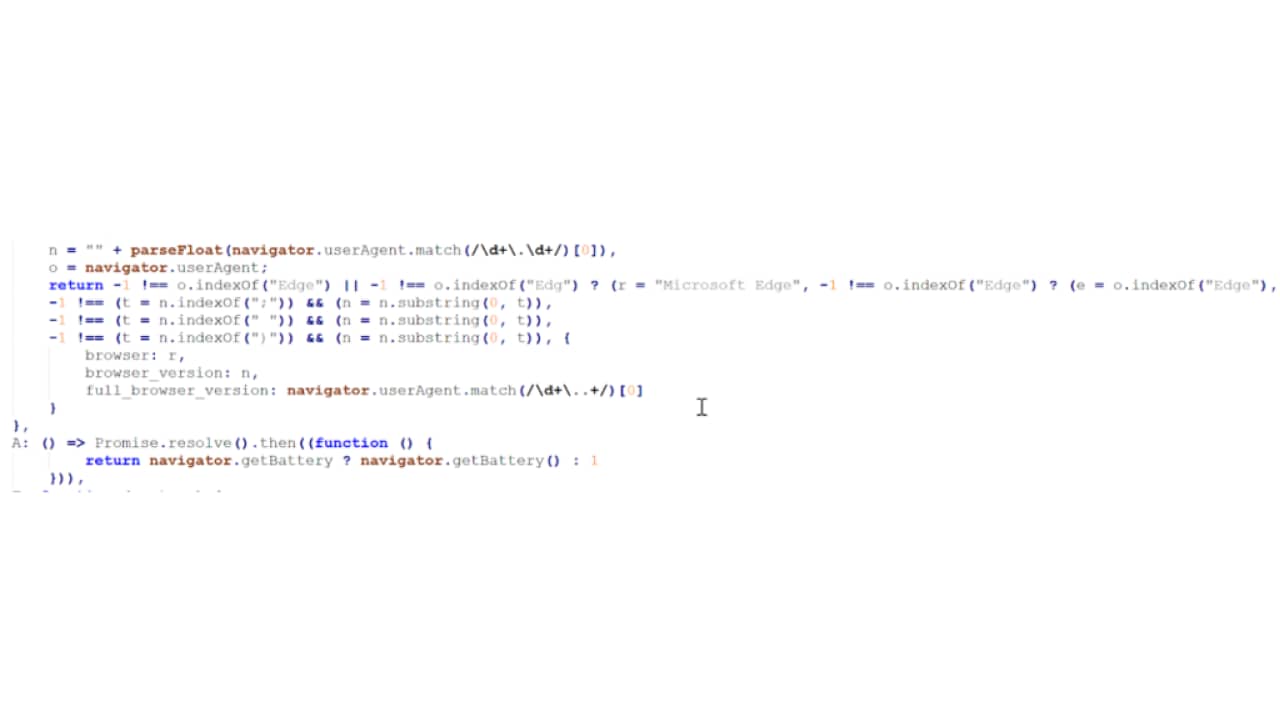
A defining characteristic of this campaign is its reliance on external configuration servers. Rather than hardcoding behavior, several variants fetch JSON configuration files from attacker-controlled domains:
Some of these domains exhibit clear signs of deception, including typosquatting patterns such as “trafficreqort” instead of “trafficreport” or “tiktak” instead of “tiktok.” These subtle inconsistencies are often used to evade casual inspection while maintaining plausible legitimacy.
While no direct attribution can be made, the consistency in code, infrastructure patterns, and operational behavior strongly indicates a single actor or a tightly coordinated group.
This campaign exemplifies a broader shift in how browser extensions can be abused. Rather than deploying overtly malicious code, the operator leverages legitimate functionality as a delivery mechanism for long-term access and control.
The real risk lies not in what the extensions do today, but in what they are capable of doing tomorrow. Remote configuration transforms them into adaptable tools that can evolve after installation, while their access to authenticated sessions and browsing context makes them particularly valuable for data collection and potential exploitation.
Even in their current state, these extensions enable detailed user profiling. They collect information about usage patterns, downloaded content, device characteristics, and environmental data such as timezone and language. Combined, this creates a fingerprint that can be used to track users across sessions and potentially across services.
In a worst-case scenario, the same mechanisms could be repurposed for broader data exfiltration, abuse of authenticated requests, or integration into larger proxy or botnet-like infrastructures.
What makes this campaign particularly difficult to detect is its operational model:
This highlights a fundamental gap in current defenses: most security tools focus on installation-time validation, while the real risk emerges at runtime.
Addressing this requires a shift toward continuous, behavior-based monitoring of browser extensions capabilities that can detect changes in network activity, DOM interaction, and permission usage after installation. LayerX’s latest technology is designed to close this gap by providing real-time visibility and enforcement at the browser level, enabling organizations to identify and block malicious extension behavior even when it originates from seemingly legitimate or previously trusted extensions.
In this model, the browser extension is no longer a static tool,it is a living foothold, controlled remotely and evolving over time.
ID | Name | Installs | Browser | Status |
|---|---|---|---|---|
injnjbcogjhcjhnhcbmlahgikemedbko |
TikTok Downloader – Save Videos, No Watermark | 3,000 | Google Chrome | Active |
ehdkeonoccndeaggbnolijnmmeohkbpf | TikTok Video Downloader – Bulk Save
| 1,000 | Google Chrome | Active |
pfpijacnpangmkfdpgodlbokpkhpkeka | Tiktok Downloader
| 353 | Google Chrome | Active |
cfbgdmiobbicgjnaegnenlcgbdabkcli | TikTok Video Downloader – Save Without Watermark
| 4,000 | Google Chrome | Active |
mpalaahimeigibehbocnjipjfakekfia | Mass Tiktok Video Downloader
| 77 | Microsoft Edge | Active |
kkhjihaeddnhknninbekkhaklnailngh | TikTok Video Downloader – Save Without Watermark
| 9 | Microsoft Edge | Active |
kbifpojhlkdoidmndacedmkbjopeekgl | TikTok Downloader – Save Videos, No Watermark
| 47 | Microsoft Edge | Active |
jacilgchggenbmgbfnehcegalhlgpnhf | Mass Tiktok Video | 4,000 | Google Chrome | Active |
oaceepljpkcbcgccnmlepeofkhplkbih | Mass Tiktok Video Downloader | 30,000 | Google Chrome | Removed |
ilcjgmjecbhpgpipmkfkibjopafpbcag | TikTok Downloader – Save Videos, No Watermark | 10,000 | Google Chrome | Removed |
kmobjdioiclamniofdnngmafbhgcniok | TikTok Video Keeper
| 60,000 | Google Chrome | Removed |
cgnbfcoeopaehocfdnkkjecibafichje | Video Downloader for Tiktok | 20,000 | Google Chrome | Removed |
| Tactic | Technique |
|---|---|
Reconnaissance | LX1.001(T1589) – Gather Identity Information |
Reconnaissance | LX1.003 – Patterns Data Gathering |
Initial Access | LX3.003 (T1199) – Trusted Relationship |
Credential Access | LX8.008 – Network Tampering |
Discovery | LX9.011 – Hardware Discovery |
Security professionals, enterprise defenders, and browser developers should take the following actions:

© 2026 Akamai Technologies