

Natalie Zagarov
Natalie Zargarov is a Security Researcher with more than 10 years of experience in cybersecurity as a malware reverser and cyber intelligence researcher.
LayerX security researchers (now part of Akamai) uncovered a campaign of nearly 30 malicious browser extensions designed to scam cryptocurrency investors by masquerading as legitimate, high-profile financial and/or cryptocurrency investors such as Warren Buffett, Andy Kreiger, Thomas Bulkowski, and others.
While the extensions all claim to be distinct, with different names, domains, and developers, they often share the same underlying infrastructure — and, in some cases, they even look identical.
Technical investigation reveals that each extension contains separate flows within it: one designed for casual users and reviewers, which appears completely benign, and one for targeted users, which leads them to external redirects and phishing pages intended to steal financial information.
Although the campaign currently has only a few hundred installs across approximately 30 extensions, the sheer number of parallel extensions and the complexity of the technical infrastructure behind it are indicative of a sophisticated and concerted effort to trick cryptocurrency users.
If you came across a browser extension published by Warren Buffett, would you install it?
Many users probably would. Not because they understand what the extension does. Not because they reviewed the permissions. And almost certainly not because they audited the source code. They would install it because they recognize the name.
Trust is one of the most powerful shortcuts humans use when making decisions. Cybercriminals understand this well. For years, attackers have impersonated banks, software vendors, cryptocurrency companies, and social media platforms. In a campaign uncovered by LayerX (now part of Akamai), threat actors tried something slightly different:
They impersonated people.
Beginning in March 2026, LayerX security researchers identified a browser extension campaign consisting of 30 extensions. The extensions presented themselves as productivity tools, privacy utilities, and cryptocurrency-related services. At first glance, they appeared unrelated. Yet many shared one unusual characteristic.
Their publishers carried the names of famous investors, traders, hedge fund managers, and financial personalities, including Warren Buffett, John Paulson, Andy Krieger, and others.
To be clear: None of these individuals had anything to do with the extensions. Their names were simply borrowed. The fact that these extensions were published under names matching well-known financial figures also highlights an important reality of the Chrome Web Store ecosystem: Publisher names are not verified against the real-world identities they claim to represent, allowing threat actors to abuse familiar names as a trust-building mechanism.
Behind the various brands, publisher identities, and websites sat a single operation built on a common framework. The extensions shared nearly identical code, infrastructure, redirect mechanisms, and anti-analysis logic.
Several ultimately redirected victims to cryptocurrency wallet phishing pages designed to steal recovery phrases.
The phishing pages were malicious. The browser extensions were malicious.
But the most interesting part of the campaign was neither. The most interesting part was the realization that the attackers weren’t primarily selling software. They were selling credibility.
Most malicious browser extensions try to look like something users already know: a privacy utility, an AI assistant, a cryptocurrency wallet, or a productivity tool.
This campaign took a different approach. Instead of impersonating products, it impersonated credibility.
Across multiple extensions, LayerX researchers observed publisher identities matching prominent figures from the worlds of investing, trading, hedge funds, and financial markets.
The strategy is deceptively simple.
When users browse an extension marketplace, they typically have very little information available to them. Few users evaluate source code. Most don’t perform detailed permission reviews. Decisions are often made within seconds.
A familiar publisher name creates confidence. A respected publisher's name creates trust. The operators behind this campaign appear to have understood exactly that. The extension itself became the delivery mechanism. The publisher's identity became the lure.
However, the social engineering component was only one layer of the operation. Once LayerX researchers moved beyond the branding and publisher names, a much larger pattern emerged. Behind 21 seemingly unrelated extensions sat the same underlying framework:
Different names
Different websites
Different themes
Nearly identical code
This level of reuse strongly suggests centralized development and operation rather than independent actors coincidentally arriving at the same implementation.
Traditional phishing campaigns attempt to steal trust by impersonating organizations. This campaign borrowed trust from individuals.
Unlike fake login pages or spoofed emails, the deception occurred before the victim ever encountered malicious infrastructure. Trust was established at the point of installation.
In effect, the attackers moved social engineering one step earlier in the attack chain. The extension store became the phishing page.
Although the extensions appeared unrelated, analysis revealed a remarkably consistent execution flow across samples.
After installation, the extensions follow a six-stage process (Figure 1).
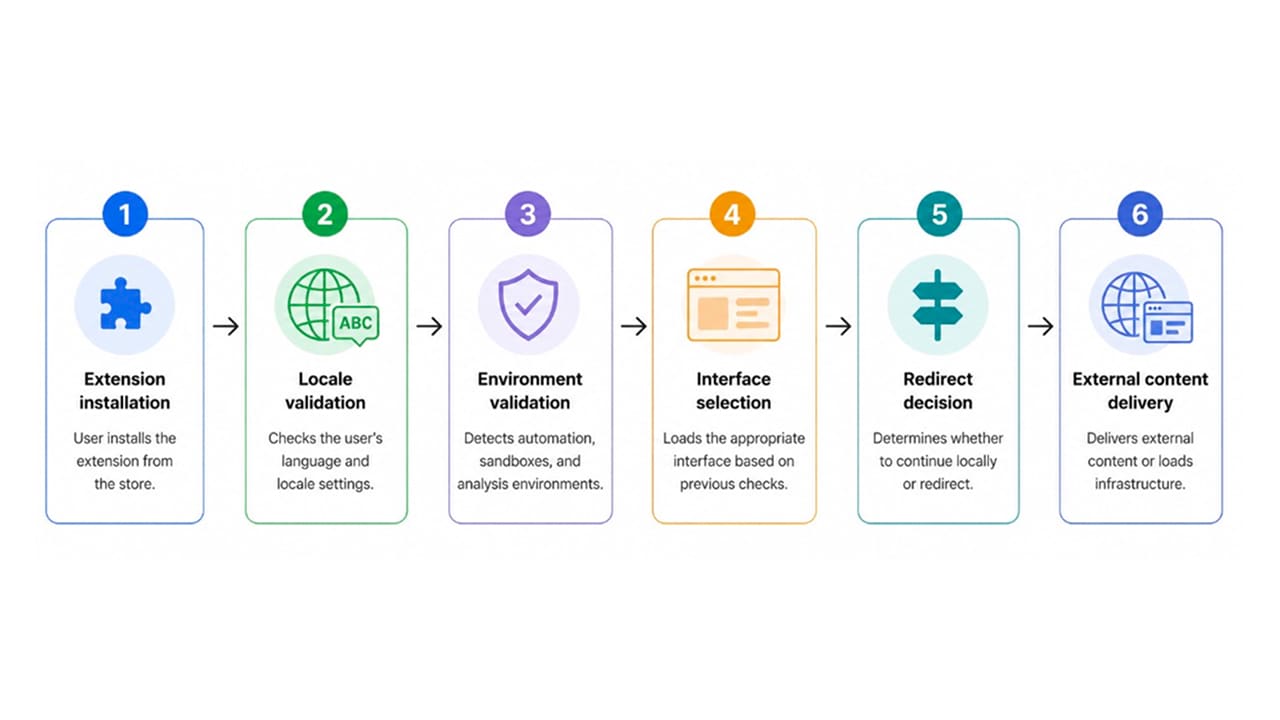
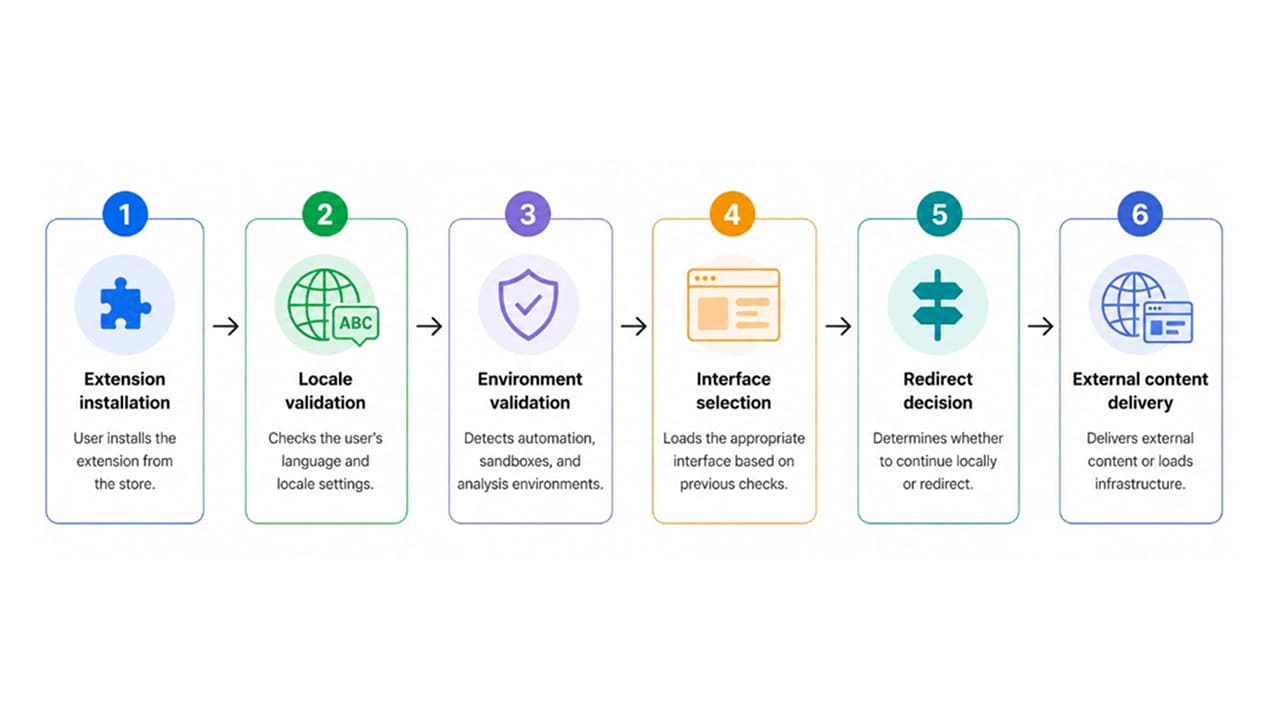
Different brands, different publisher names, different websites, yet the underlying logic remained almost identical.
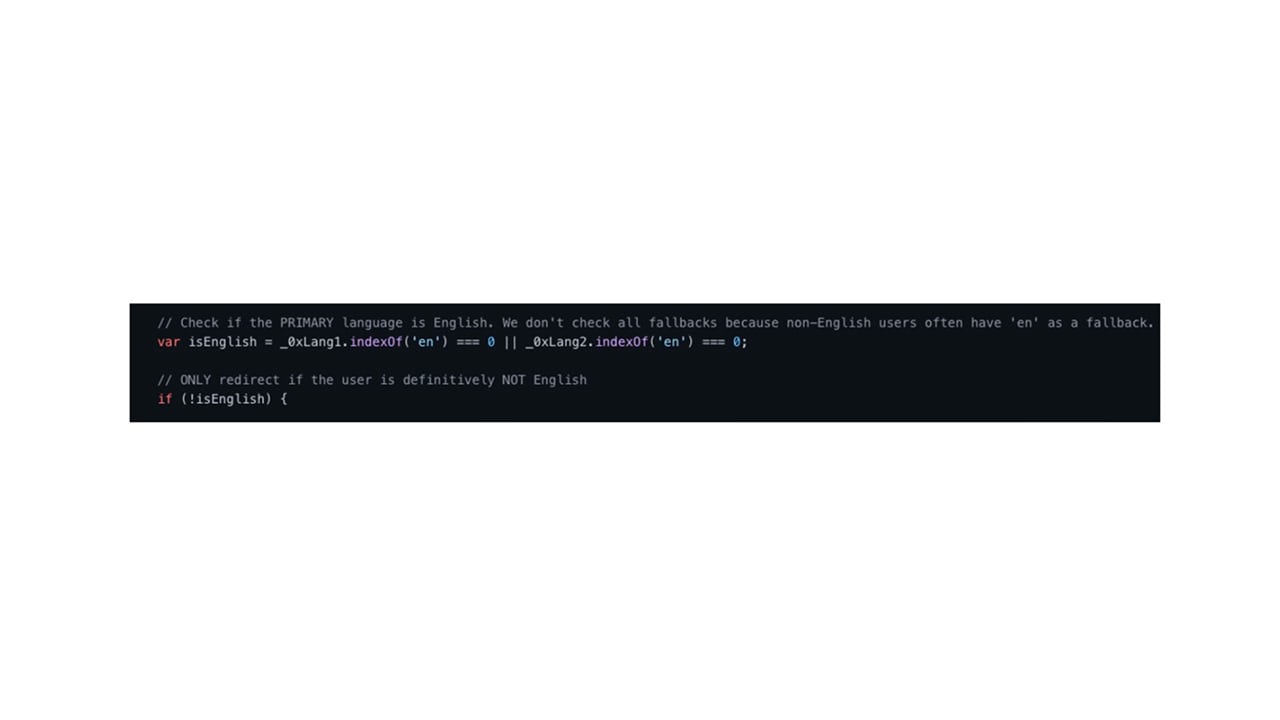
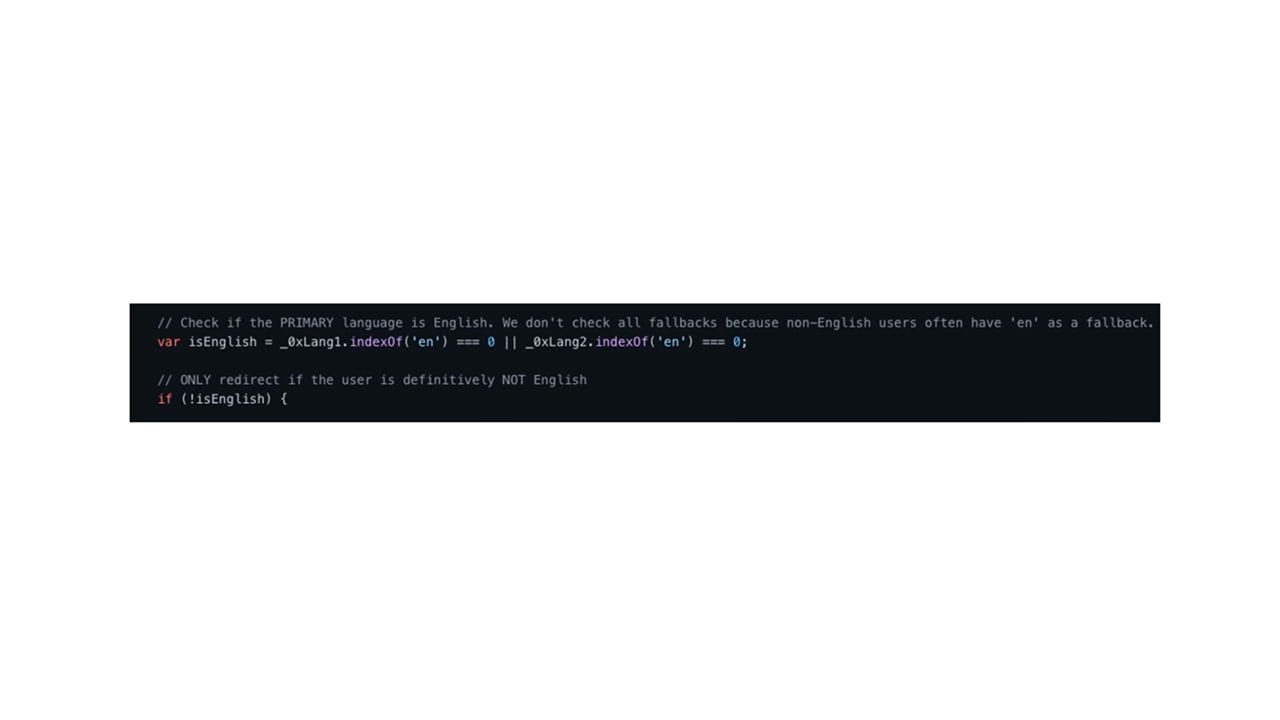
One of the more interesting mechanisms observed is locale-aware behavior.
The extensions inspect browser language settings and dynamically alter behavior based on the result.
While English-speaking users received benign dashboards or harmless functionality, users operating within non-English locales could instead be redirected toward external infrastructure (Figure 2).
This approach provides several advantages:
Reduced exposure to researchers
Lower likelihood of detection during store review
Selective victim targeting
Inconsistent behavior across environments; that is, the same extension can appear completely harmless in one environment while behaving very differently in another
Before performing any meaningful actions, the extensions attempt to determine whether they are being observed.
Many malicious browser extensions face the same challenge: They must survive automated marketplace reviews, security scanners, and researcher analysis.
These samples address that challenge through a series of lightweight anti-analysis checks.
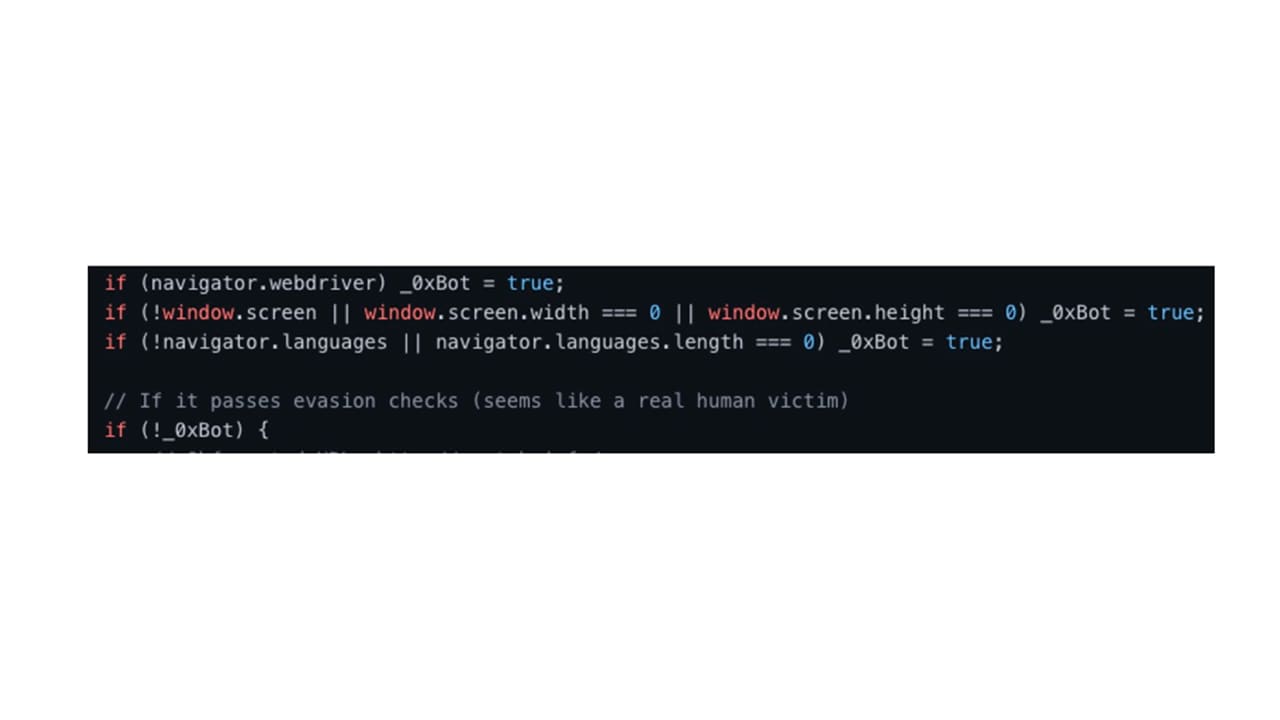
navigator.webdriver check
The first detection mechanism checks JavaScript navigator.webdriver.
This property is commonly set to true when browsers are controlled through automation frameworks such as:
Selenium
Puppeteer
Playwright
ChromeDriver
Many security sandboxes and automated review environments expose this value, making it a common detection technique.
Screen resolution validation
The extensions also inspect screen dimensions. Many virtualized or headless environments expose unrealistic screen values or incomplete display information. Legitimate user systems typically provide realistic resolutions such as 1920x1080.
Missing or abnormal values may cause the extension to classify the environment as suspicious.
Language availability checks
Another validation step examines JavaScript navigator.languages.
The extension expects a populated language array. Certain automation frameworks, hardened privacy environments, and analysis sandboxes may expose an empty or missing language list. When this occurs, the environment may be flagged as nonhuman (Figure 3).
After environment and locale validation, the extensions determine whether a redirect should occur.
Rather than embedding destination URLs directly within the source code, some samples construct them dynamically at runtime.
Character-by-character URL construction
In some samples, the destination URL is intentionally assembled character-by-character at runtime. Rather than storing the full destination directly within the code, individual fragments are combined dynamically before redirection occurs.
This technique serves several purposes:
Reduces visibility during static analysis
Makes automated detection more difficult
Obscures destination infrastructure
Complicates signature creation
While not highly sophisticated from a malware perspective, this technique remains effective against basic scanning mechanisms.
Two different realities
The most interesting aspect of the campaign is not any individual evasion technique but the way they work together.
As shown in Figure 4, the workflow effectively creates two separate versions of the same extension.
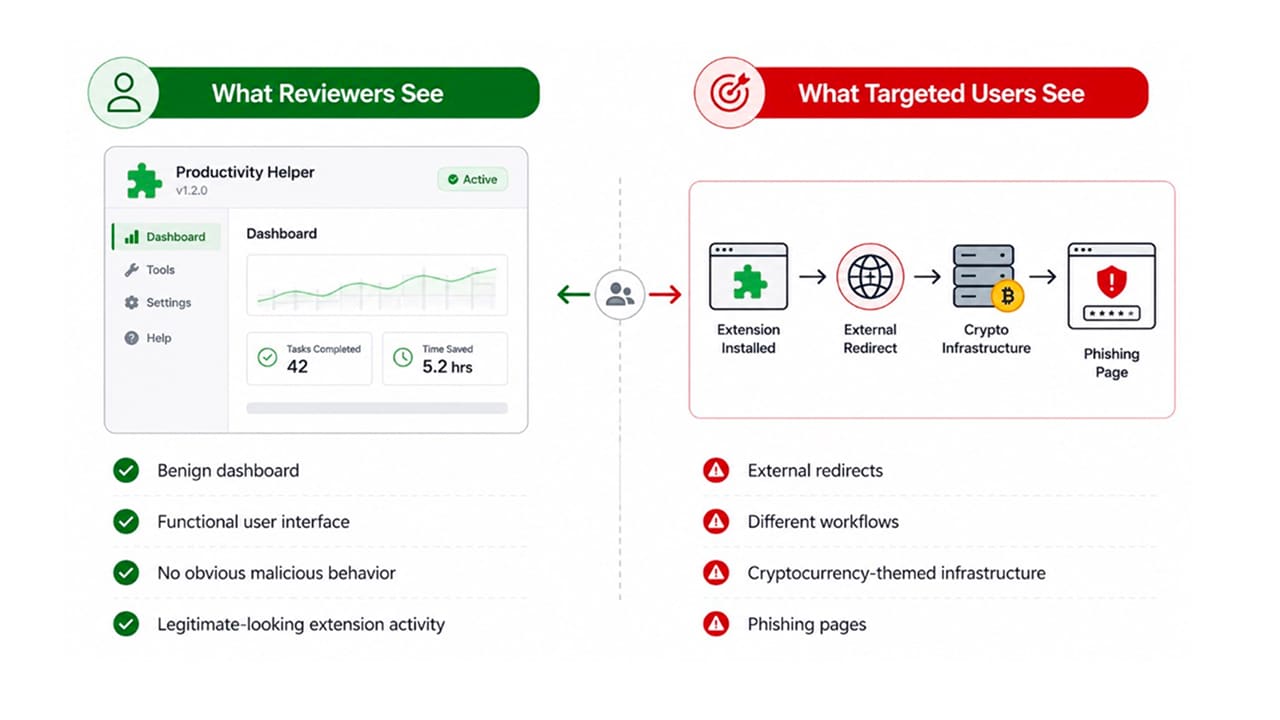
This split-behavior model has become increasingly common among malicious browser extensions and mirrors techniques historically associated with malware loaders and evasive endpoint threats.
Another unusual characteristic emerged during source code analysis.
Several samples contain extensive inline comments explaining implementation details, execution flow, and developer intent. The comments are highly descriptive and significantly more verbose than what is typically observed in threat actor tooling.
In some cases, entire functions are accompanied by explanatory text that resembles the output commonly produced by modern AI-assisted development platforms and agentic coding tools.
While coding style alone is insufficient for attribution, the samples exhibit characteristics that are increasingly associated with AI-generated or AI-assisted software development.
Whether the operators relied on AI to accelerate development, generate boilerplate functionality, or assist with extension creation, the result is the same: a framework that can be replicated, modified, and deployed at scale with relatively little effort.
Ironically, the attackers may have automated part of the process of automating trust.
Domain registration patterns provide additional evidence linking the various extensions to a single operation.
Domains associated with individual extensions were often registered shortly before the corresponding extension appeared in browser marketplaces. As shown in Figure 5, across multiple websites, LayerX researchers observed:
Nearly identical content
Shared design templates
Reused infrastructure
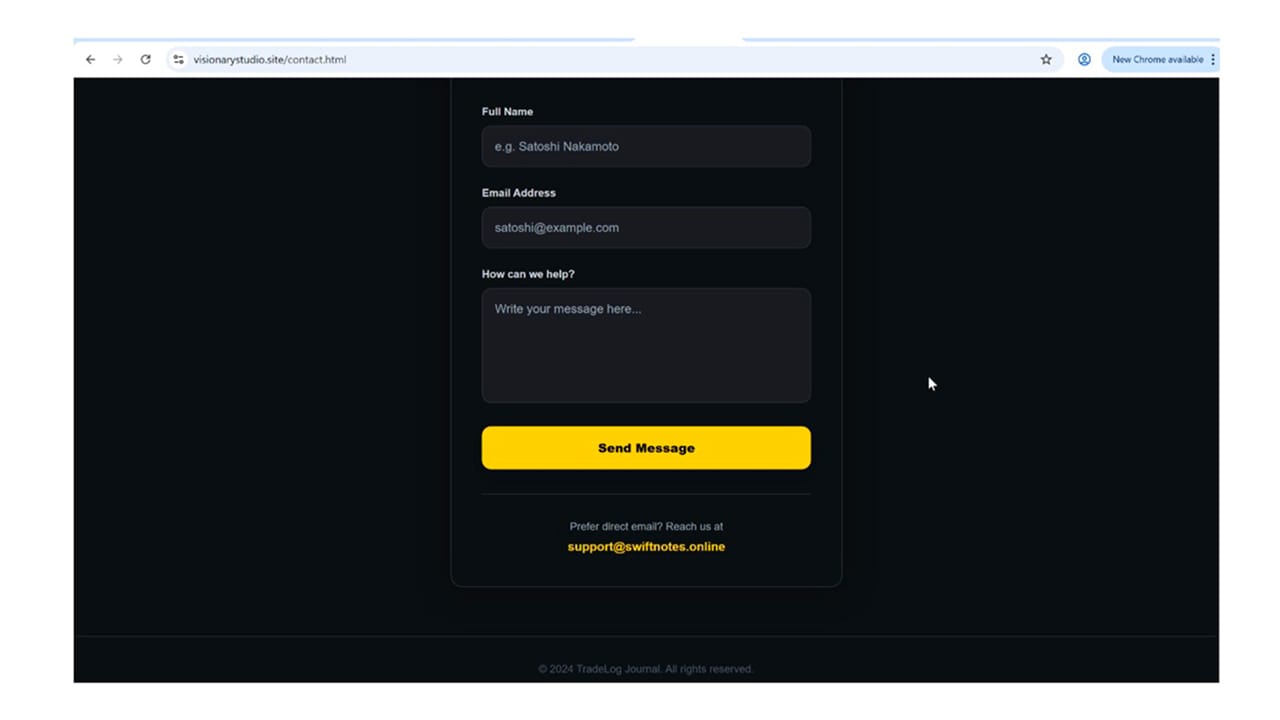
Overlapping contact information
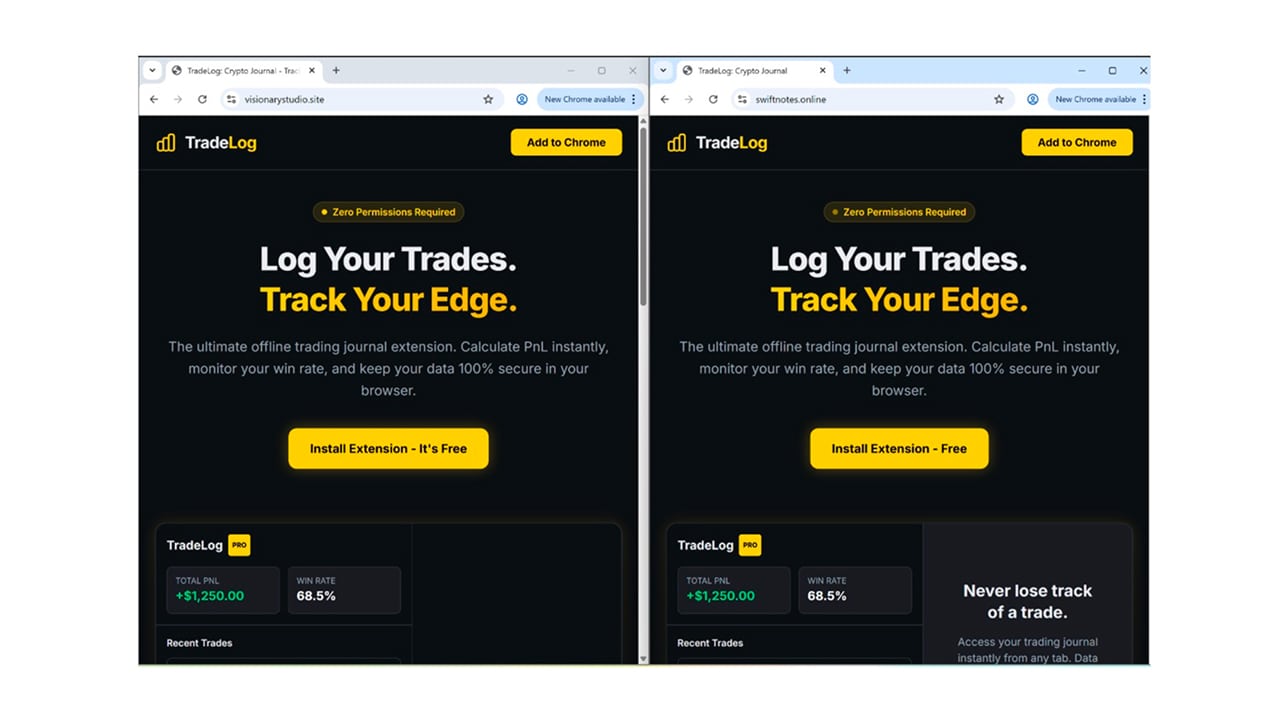
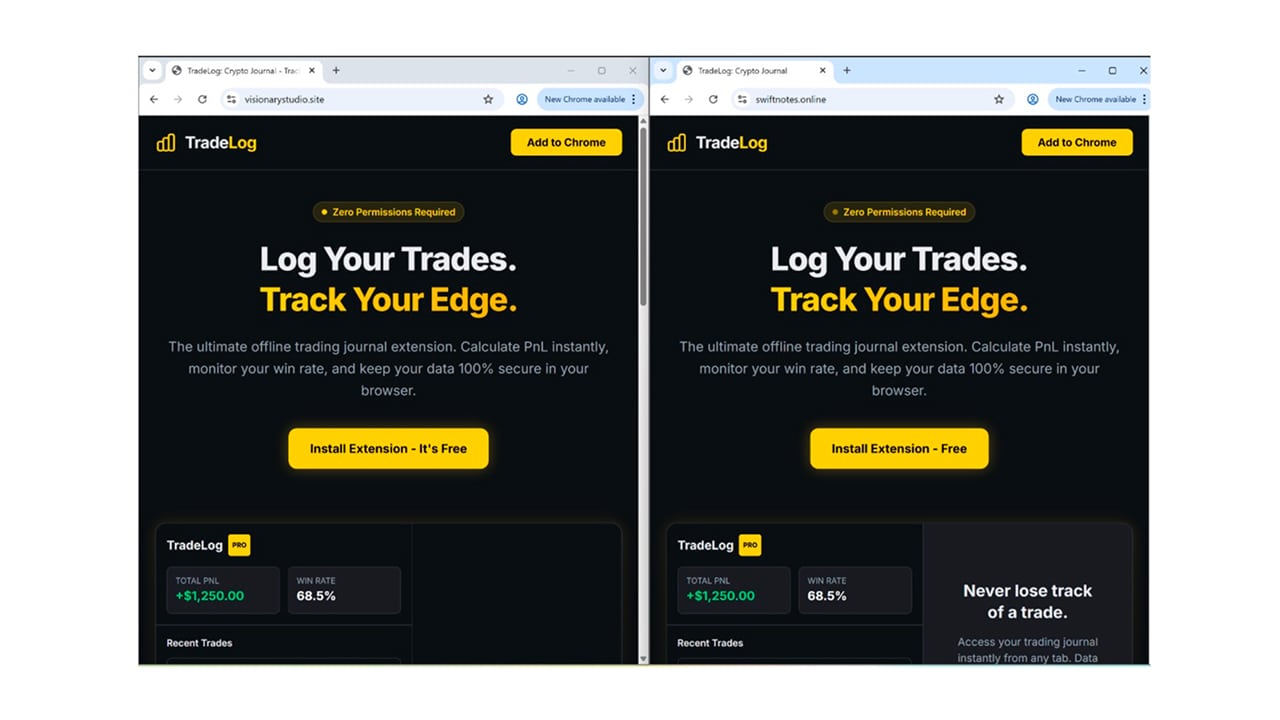
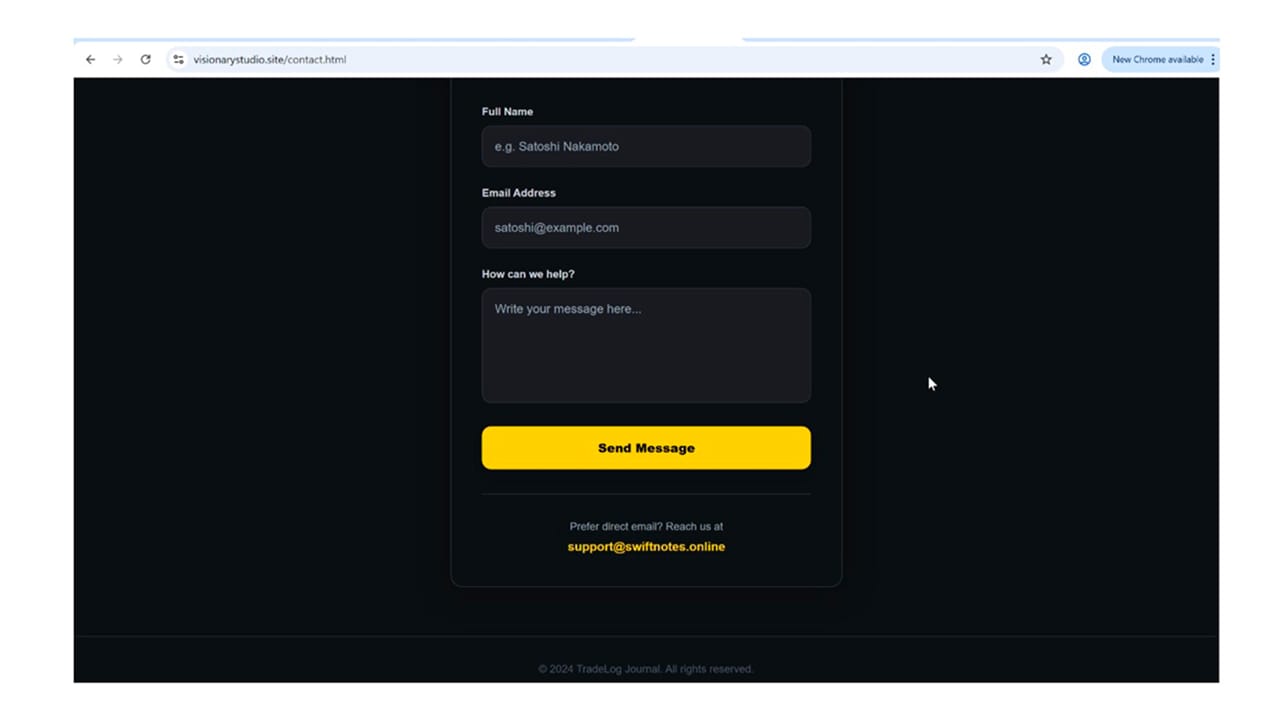
In several cases, support email addresses listed on one website pointed to infrastructure associated with another supposedly unrelated extension (Figure 6). These overlaps strongly suggest centralized ownership and operation.
Notably, much of the infrastructure remains active despite the removal of numerous extensions. This suggests that the operators retain the ability to rapidly launch new extension identities while reusing existing back-end resources.
While analyzing the redirect infrastructure, the LayerX researchers also observed several domains leading to cryptocurrency wallet phishing pages.
Victims were instructed to enter recovery phrases under the guise of wallet verification or account restoration. Once submitted, attackers gained full control over the associated wallets.
The phishing destinations appear to represent one monetization path rather than the defining characteristic of the campaign. The more significant finding is the framework itself: a reusable ecosystem capable of establishing trust through deceptive publisher identities, selectively redirecting users, and delivering attacker-controlled content after installation.
In other words, the infrastructure appears designed to outlive any single extension, domain, or phishing page.
The cryptocurrency phishing pages observed during this investigation are not what make the campaign notable. Wallet phishing infrastructure appears every day. What makes this operation interesting is the method used to acquire victims.
Rather than impersonating software vendors, financial institutions, or cryptocurrency services, the operators leveraged the reputations of well-known public figures to create legitimacy at the point of installation.
Warren Buffett never published these extensions. John Paulson didn’t either. But their names certainly helped distribute them.
This campaign serves as a reminder that users rarely evaluate software directly. More often, they evaluate trust signals that surround the software.
Browser extensions continue to gain access to sensitive workflows, authentication sessions, and organizational data. As that access grows, attackers are increasingly targeting not only technical controls, but the assumptions users make before they click “Install.”
Sometimes the weakest link isn’t the browser. It’s the shortcut in our brains that says, “I’ve heard that name before. It must be legitimate.”
ID | Name | Installs | Publisher name | Persona |
|---|---|---|---|---|
mgbkajajjhgmhchoajmomhcdmlndkofc | Crypto Dashboard & Calculator | 13 | Thomas Bulkowski | Technical Analysis Researcher & Chart Pattern Authority |
dmnhoegpldfpfmfoignpmapmbffgkalj | SwiftNote | 6 | Warren Buffet | Value Investing Pioneer |
bdfeblcackbiefgceemmcklcgjmmemal | PrivacyMode for Crypto | 25 | Rabby Wallet | — |
ejbieagijpeanlkmjlpdbincpoecfifo | Zynapse | 6 | frank zappa | Musician, Composer & Creative Innovator |
fcnpdjodobbplilcehceeiihdbkaohhp | Z-Toolbox | 0 | Mike Novogratz | Macro Investor & Cryptocurrency Pioneer |
dpohdmekaccegbjbfgnpidkhcmcakhkb | WorkFlow OmniPad
| 0 | Thomas Bulkowski | Technical Analysis Researcher & Chart Pattern Authority |
mmbpjfigdeidddpkhpgbpoafiaefbkha | MetaMask Extension
| 279 | Consensys Software Inc. | — |
ellfpjminfaokagphnohegiifhlccbkm | OmniTool Pro
| 8 | Mike Novogratz | Macro Investor & Cryptocurrency Pioneer |
lkgmpcehbonlcpoemnakmamjfpfdakfa | GhostPad
| 6 | Peter Lync | Legendary Fund Manager & Growth Investing Expert |
gdfamnmplbehddebboejkohaognhphnd | crypto privacy mode
| 18 | Phantom Wallet | — |
jodgpofgbnifpjpikmagibgcfiipkgkb | NexusFlow Sidebar
| 6 | Warren Buffet | Value Investing Pioneer |
comglfkbkcippbiheejbaimphjngliab | OmniFlow Pro
| 3 | Bill Lipschutz | Forex Trading Legend |
pfgpfmdiepmhhhkpnciogjhccppbcfhk | OmniFlow Sidebar
| 6 | frank zappa | Musician, Composer & Creative Innovator |
ochcpafcpkkocmlegiiaikfekjngjbif | NovaClip: Productivity Workspace | 2 | Warren Buffet | Value Investing Pioneer |
cpaldpbeoonkiloiilchpeecafcjooad | OmniPass: Secure Generator | 0 | Warren Buffet | Value Investing Pioneer |
pdbkpnbkalelbdngijdaejgapfeciahc | TaskMaster: Smart Todo | 8 | carol harmer | Technical Analyst & Professional Trader |
doholgnkopeogjamiklibcmbofnhckdm | TradeLog: Crypto Journal | 0 | Thomas Bulkowski | Technical Analysis Researcher & Chart Pattern Authority |
jiopaphnoebconjcblfkljoedjlplhbd | TradeLog Pro: Crypto Tracker | 6 | Andy Krieger | Legendary Currency Trader |
amfamndhbbiaafhpclielacfailgflbi | CryptoTab - Pro Dashboard | 0 | Austin Netzley | Options Trader & Market Educator |
ibhbpdmaejlapiadekfdmlklaojbkemb | Trust-Wallet: Secure Notes & Timer | 148 | John Paulson | Hedge Fund Manager & Event-Driven Investor |
pfonmpmfmkbamnpckphpghoagglnenad | Safepal-Wallet: Secure Notes & Timer | 6 | Steven Cohen | Hedge Fund Manager & Market Strategist |
cealpkapgiobhiafgnmgjkaeifcleabm | Focus Time Tracker
| 38 | danielshubner1987@gmail.com | — |
bhfnifoebenbpbnlmaddnkniocoaagfg | Trust-Wallet: Secure Notes & Timer | 17 | Trust-Wallet | — |
mbmcpcnfbpcmlcbankfgnecmmhjkeapb | imToken: Secure Local Toolkit | 8 | Marco Stubnere | — |
elfbigacoidmjleehfjhgkahdndopcfj | Trust-Wallet: Secure Notes & Timer | 22 | josephlubinee@gmail.com | (Joseph Libun) Canadian-American entrepreneur and one of the co-founders of Ethereum |
gijdlcgcmadappinmgdgiihiepcgboaf | Trust-Wallet: Secure Notes & Timer | 7 | nm666157@gmail.com | — |
dkkiccfndjjicfhjaoeeeiobbibnidmg | TimeForge
| 44 | daniel schneider | Founder of SPX capital |
epkgheklficclfoflikjbhcfdfgccoab | Trust PDF Swift - Convert & Edit | 5 | Raul Whitworth | — |
idfihpinagmbpjoonfkekcnflihfibeg | Secure Password Generator Pro | 21 | kazol0079 | — |
iddfomgididbjilmmhannjkklpocjbdd | Trust-Wallet: Crypto & Bitcoin
| 42 | Software INC | — |
dbencngeccmgjbindcldfpcmlckkpnlc | DeFi Asset Manager Pro
| 3 | Trust-Wallet | — |
hiomcdgildjfmbabbiofclfechnfmlmn | Text Case Converter Pro
| 17 | The Wallet Inc | — |
z-toolbox.online
swiftnote.online
swiftnotes.online
swiftnotespro.online
visionarystudio.site
ghostpad.site
chromerabbypro.com
crytab.info
timeanddate.homes
novahomesiu.site
aikuiachuhai.site
extensionwebchrome.space
webwextension.store
focustimetracker.blogspot.com
airdrop.investments
imtokensecurelocaltoolkit.blogspot.com
ctrackerpro.sbs
tru.airdrop.investments
timeforge-concentration.blogspot.com
trustpdfswift.blogspot.com
generpassword.com
tworkai.com
defassetmanagerpro.store
marlist.online
ismailbelgari@gmail.com
franeckileonard91@gmail.com
yancerdtic@gmail.com
miled6324@gmail.com
pitshopping1@gmail.com
vargasyassine89@gmail.com
montanifamcharitable@gmail.com
rosettemujani28@gmail.com
ismailvax62@gmail.com
houssame9095@gmail.com
bicharahassan22@gmail.com
lidrisberso@gmail.com
ayabozan9@gmail.com
haserhyuirt@gmail.com
agrikamili1@gmail.com
danielshubner1987@gmail.com
contact@isreal-laad.com
marco.9glz@gmail.com
josephlubinee@gmail.com
nm666157@gmail.com
danielschneider01968@gmail.com
horststubner1959@gmail.com
kazol0079@gmail.com
hetthatroi040@gmail.com
ananielhembrom6953@gmail.com
| Tactic | Technique |
|---|---|
Execution | LX4.004 — Malicious URL |
Execution | LX4.005 — Create tab |
Defense evasion | LX7.003 (T1140) — Code obfuscation/deobfuscation |
Defense evasion | LX7.011 (T1036) — Masquerading |
Defense evasion | LX7.020 (T1497) — Virtualization/Sandbox Evasion |
Discovery | LX9.003 (T1082) — System information discovery |
Security professionals, enterprise defenders, and browser developers should take the following actions:
Audit extensions within managed environments, especially those installed outside of policy controls
Adopt runtime monitoring approaches that focus on extension behavior after installation, rather than relying solely on marketplace validation
Deploy behavior-based extension monitoring technologies to detect unauthorized network activity or suspicious Document Object Model (DOM) manipulation
Strengthen runtime monitoring and enforcement, not just install-time review, to detect post-installation behavior changes driven by back-end infrastructure

© 2026 Akamai Technologies