

Background

Your DNS Is Hiding in HTTPS — This Is Why It Matters

September 02, 2026 by Jagdish Mohite and Achuth Pillai

Share

Key takeaways

DNS over HTTPS (DoH) is now a core privacy control, encrypting DNS queries inside HTTPS to prevent interception, manipulation, and mass surveillance.

The same encryption that protects users also masks defenders. DoH makes DNS traffic look like normal web traffic and bypasses legacy DNS and network security controls focused on port 53.

Simply blocking DoH is not a sustainable strategy as operating systems and browsers increasingly default to encrypted DNS, and privacy expectations keep growing.

The right approach is to take back control of DoH.

Encrypted DNS (DoT, DoH, DoQ): Essential privacy, new visibility gaps

DNS over TLS (DoT) and DNS over HTTPS (DoH) were introduced as Internet Engineering Task Force proposed standards in May 2016 and October 2018, respectively, to address the surveillance and spoofing risks of unencrypted DNS. The key difference between them is where they operate: 

  • DoT uses its own dedicated port (853), making it straightforward to identify and monitor. 

  • DoH operates entirely within port 443 — the same port used by every website and app — making it nearly invisible within ordinary HTTPS traffic and hard to block or inspect without disrupting legitimate browsing.

A third protocol, DNS over QUIC (DoQ), rounds out the picture. The  newly published SP 800-81r3 from the National Institute of Standards and Technology (NIST) now formally groups DoT, DoH, and DoQ together as “encrypted DNS,” noting that DoQ runs over its own dedicated UDP port (853) — distinct from DoT’s TCP port 853. 

DoQ adoption still trails the adoption of the other two protocols, but the same visibility problem applies: Once a query leaves the plaintext port 53 path, legacy monitoring won’t see it.

With strong privacy comes security challenges

All three protocols provide strong privacy, but this design also creates security challenges. These protocols protect users from prying eyes while giving attackers a very convenient place to hide.

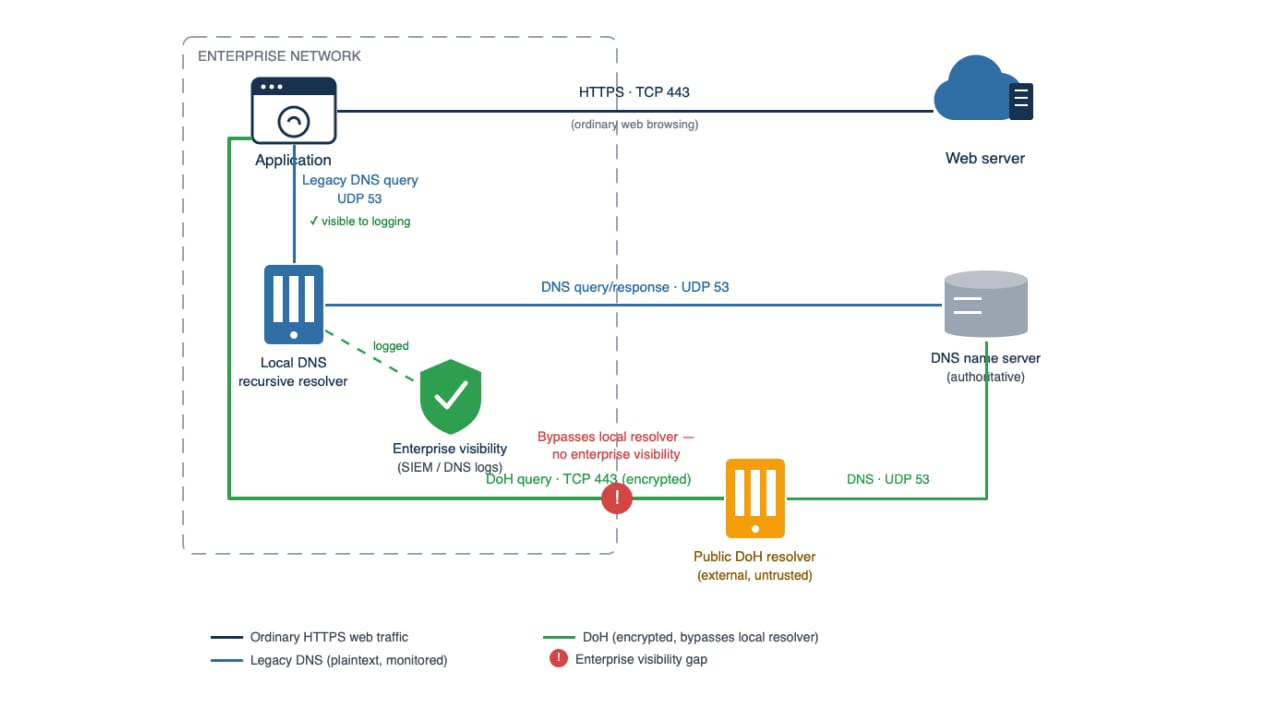
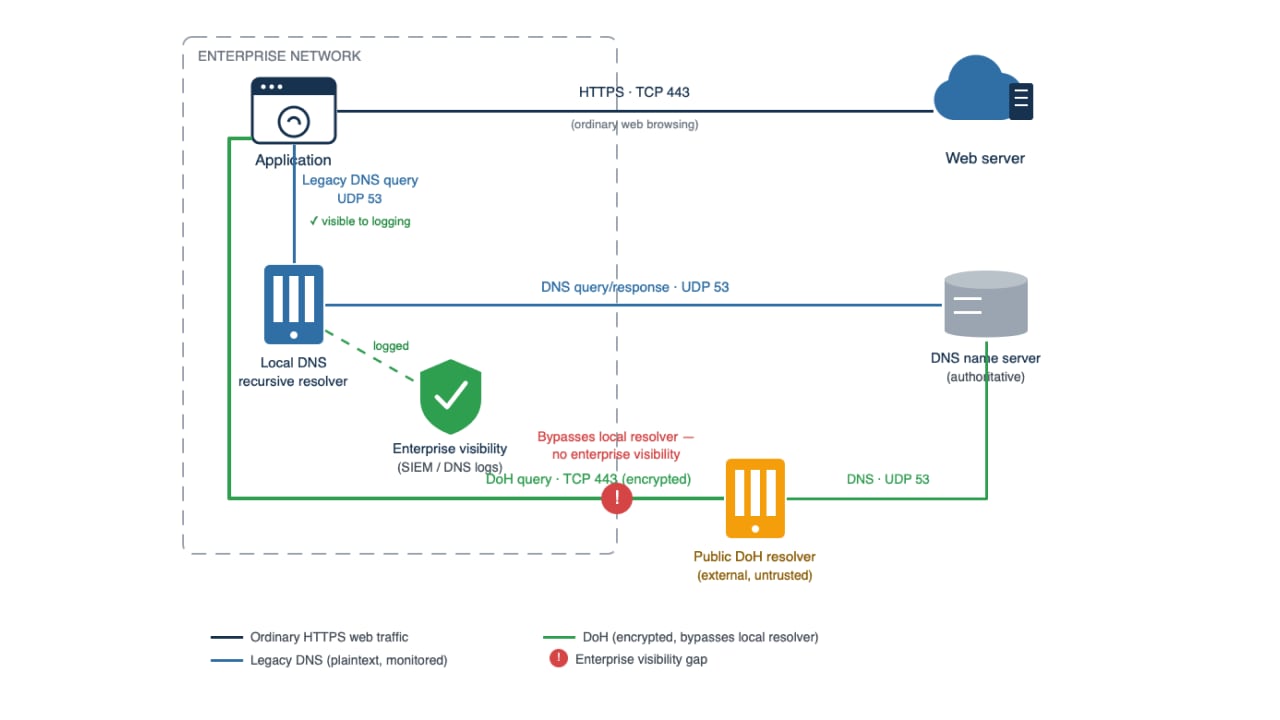
DoH traffic to public or third-party resolvers is the hardest case, since the encryption and the appearance of ordinary web traffic combine to create a dangerous visibility gap — one that bypasses traditional DNS controls and on-premises detection tools that focus on port 53 (Figure).

How DoH lets an application bypass the enterprise DNS resolver

How adversaries abuse DoH

Threat actors can abuse DoH in three ways:

  1. Turning DoH into a stealth command and control channel

  2. DNS tunneling 2.0: Exfiltration over DoH

  3. Bypassing DNS-based security, content filtering, and visibility

Turning DoH into a stealth command and control channel

Instead of resolving command and control (C2) domains via classic DNS on port 53, modern malware embeds a DoH client and talks to public resolvers like Google or Cloudflare over HTTPS/443. 

Godlua, a Lua-based backdoor, was one of the first to do this: It retrieves an initial URL from redundant sources — hard-coded values, Pastebin, or GitHub descriptions — then downloads and runs subsequent Lua scripts to locate its C2 domain name, and finally uses DoH to securely and secretly resolve the final C2 server’s IP address. Hiding that last step inside normal HTTPS traffic made it difficult for traditional network security monitoring to detect or block.

PsiXBot provides another well-documented example: It sends its C2 queries as encrypted DoH requests to Google’s public resolver (dns.google) to resolve its C2 domain. Because those lookups are hidden inside HTTPS, they bypass enterprise DNS logs and any tool that only inspects plaintext DNS traffic.

Three outcomes of turning DoH into a stealth C2 channel make it attractive to attackers:

  1. Lookups blend in with normal web browsing because they share the same port.

  2. Most DNS visibility comes from enterprise resolvers or protective DNS logs, plus gateways that can see plaintext port 53 traffic. Switching to an external DoH resolver bypasses both.

  3. Because corporate resolvers never touch the requests, blocklists, RPZ rules, and domain-based controls never get a chance to work.

DNS tunneling 2.0: Exfiltration over DoH

DNS tunneling encodes data — like credentials, files, and tokens — inside DNS queries sent to an attacker-controlled domain. Over plaintext DNS, defenders can often catch this through unusual behavior (high-frequency lookups, long labels, repeated requests) or by inspecting the payload itself for high-entropy patterns. 

DoH raises the identification difficulty: The data is still encoded in the query, but the query is now wrapped inside HTTPS to a resolver that often looks like ordinary web traffic, so port 53 tunnel detectors never see it. Research shows many plaintext-DNS tunneling detectors are ineffective against DoH-based exfiltration unless they analyze HTTPS metadata and behavior instead.

For example, a traditional tunneled query like dGVzdGRhdGE=.attacker.com sent over port 53 often stands out because of its length, entropy, or frequency. Wrapped in a DoH request to an external resolver, that same query can blend into normal encrypted traffic — unless the resolver is unauthorized and blocked outright, or defenders add behavioral detection on top.

NIST’s SP 800-81r3 flags the same signals for DNS-based exfiltration: abnormal query volume from a single host, shifting query patterns, high-entropy or oddly formed query names, and lookups tied to known-malicious domains. It also notes that tools that passively observe DNS traffic lose this visibility once DNS is encrypted, unless configured as a proxy or forwarder — which reinforces that better architecture, not just better signatures, is the real fix.

Bypassing DNS-based security, content filtering, and visibility

Much of the DoH abuse story isn’t about sophisticated malware, it’s about control drift in environments that are unmanaged, partially managed, or inconsistently enforced. On fully managed browsers, IT can usually disable browser-selected DoH or force approved resolvers; the real problem appears when applications bypass the system resolver, devices roam outside enterprise control, or policy is incomplete.

Encrypted DNS to third-party resolvers means that:

  • Internal DNS filters, RPZ rules, and custom blocklists are ignored.

  • DNS logs in your SIEM no longer reflect reality — users are resolving domains you never see.

  • Content filtering and compliance controls fail silently, potentially exposing your organization to regulatory violations or data breaches.

Attackers typically abuse DoH in one of two ways: malware ships its own DoH client (or uses standard HTTP libraries) to talk directly to an external endpoint, or — in more serious browser-compromise cases — a malicious extension abuses the browser’s privileged network access. Either way, once outbound HTTPS is allowed, they’ve quietly stepped outside your DNS control plane.

Exploiting secure-by-default client behavior

As Windows 11, major browsers, and mobile platforms increasingly default to encrypted DNS — sometimes auto-upgrading to DoH/DoT when they detect a capable resolver — adversaries can simply ride along. 

If an environment doesn’t explicitly control where DoH is allowed to go, malware can piggyback on the same resolvers the OS or browser already uses and blend into legitimate traffic. Features meant to protect users from ISP snooping become a free, stealthy layer for adversaries inside enterprises that haven’t modernized their DNS architecture.

This is increasingly policy, not just technology: NIST’s SP 800-81r3 notes that the U.S. government now requires Federal Civilian Executive Branch (FCEB) agencies’ DNS infrastructure to use encrypted DNS wherever technically supported — a sign that encrypted-by-default DNS is becoming a baseline expectation. This makes “just block DoH” an even less viable strategy. 

Organizations that don’t adapt risk operating with incomplete intelligence: They may be unaware of which domains their endpoints are resolving, which users are bypassing content policy, and which systems may already be talking to attacker infrastructure.

How to detect and stop DoH abuse

For enterprises, the question isn’t whether encrypted DNS should exist — it’s whether encrypted DNS is under your control. Legitimate DoH/DoT traffic should go only to designated enterprise resolvers; everything else, especially direct public-resolver access from managed endpoints, should be disabled, blocked, or investigated.

Securing DNS traffic requires a structured approach that moves from initial traffic mapping to active threat hunting. Enterprise security teams can implement this protection in three strategic phases: 

  1. Regaining visibility into encrypted DNS
  2. Looking for detecting patterns and using threat hunting playbooks
  3. Architecting “controlled DoH” instead of blocking it

Regaining visibility into encrypted DNS

You can’t defend what you can’t see. Use firewall, proxy, or NDR logs to identify endpoints that are making HTTPS connections to known DoH providers via visible metadata; for example, destination IPs, SNI/proxy-log hostnames, and policy telemetry. 

With TLS inspection you can go further and look for DoH-specific paths like /dns-query; without TLS inspection, you generally see destination and session metadata but not the DNS payload itself.

Correlate DNS and HTTPS logs

The best DNS visibility in most enterprises comes from the approved corporate resolver or a protective DNS service. That’s where you can see which clients resolve which domains and where you can apply threat intelligence policy. National Security Agency (NSA) guidance is explicit: Enterprise DNS traffic, encrypted or not, should go only to the designated resolver, with everything else disabled or blocked. 

A managed endpoint using that approved path shows up in your resolver logs; one talking directly to an external DoH provider instead will go quiet there, even though your firewall, proxy, SWG, or NDR can still show the HTTPS connection.

A practical hunting workflow includes: 

  • Starting with resolver logs to see which client IPs use the approved path 

  • Reviewing outbound HTTPS metadata for those same clients 

  • Flagging any making repeated connections to known DoH providers — Google’s 8.8.8.8/8.8.4.4/dns.google, Cloudflare’s 1.1.1.1, and similar — with little or no matching activity at the corporate resolver 

That mismatch is usually your first sign that an endpoint has moved beyond the enterprise DNS control plane. It’s not a complete detection strategy, but it’s a fast way to catch obvious bypasses.

Centralize everything in your SIEM

CISA and NIST guidance align here: Treat DNS as a high-value telemetry source and log it centrally. NIST’s newly finalized SP 800-81r3 recommends integrating DNS logs with other system logs to correlate device and user activity and recommends always retaining queries tied to malicious or unauthorized domains even when routine traffic is trimmed. Feed DNS, firewall, and SWG logs into one place so you can write detection content for DoH patterns.

Looking for detection patterns and using threat hunting playbooks

Once you have visibility, you must hunt for behaviors, not just signatures. Look for:

  • Hosts talking to unapproved DoH resolvers. Legitimate DoH should go only to designated enterprise resolvers or an approved protective DNS service; endpoints reaching any other DoH service are suspicious by default because they’re stepping outside the approved DNS control path.

  • High-frequency, low-volume HTTPS sessions. This is not automatically malicious — it may be normal if the traffic is going to an approved enterprise resolver. But the same pattern becomes suspicious when it originates from an unexpected host, such as a back-end server, or when it targets a nondesignated external provider. The abuse signal is the combination of frequency, source role, and destination, not request size alone.

  • Single-destination DoH behavior. A client talking almost exclusively to one known DoH provider hostname, or a small set of associated IPs, suggests a hard-coded resolver rather than normal browsing behavior. TLS inspection can confirm this directly via /dns-query requests.

  • EDR process-to-network anomalies. A mismatch between what a binary normally does and the encrypted DNS destinations it contacts — unsigned or newly seen binaries, unusual command-line tools, nonbrowser processes hitting known DoH providers — can be a stronger indicator of abuse than network metadata alone.

Architecting “controlled DoH” instead of blocking it

To stop abuse sustainably, you need a three-step protective DNS design that embraces encrypted DNS but forces it through your control plane.

Step 1: Allow only your chosen DoH/DoT/DoQ resolvers

CISA and NSA guidance recommends that if you enable DoH, only allow traffic to designated resolvers and block everything else at the firewall/SWG. NIST’s SP 800-81r3 gets specific about how, since each protocol hides differently: 

  • DoT is easiest to block via its dedicated TCP port 853 

  • DoH is harder since it shares TCP port 443 with ordinary TLS — NIST recommends RPZs to block known DoH server domains plus firewall rules against public DoH IPs 

  • DoQ should be blocked at UDP port 853 — NIST also recommends mobile device management to stop users from manually configuring a nonapproved encrypted DNS service on their own device

Step 2: Configure OS and browsers to use your enterprise DoH

  • Windows 11: Use Group Policy to set known DoH servers or disable opportunistic DoH upgrades

  • Chrome/Edge: Deploy policies via enterprise management to specify allowed DoH providers

  • Firefox: Set network.trr.mode and network.trr.uri via enterprise policy to control DoH behavior

These actions stop browsers from silently switching to public resolvers and bypassing policy.

Step 3: Deploy a DNS security layer

  • Apply threat intelligence, domain risk scoring, and machine learning to DNS queries 

  • Block malware, phishing, and tunneling domains in real time

  • Expose rich DNS logs and APIs for your SIEM and SOAR

For remote workers and BYOD scenarios in which you can’t control the full network path:

  • Deploy lightweight agents or ZTNA solutions that enforce DNS policy regardless of location by blocking unauthorized public DNS/DoH services while preserving logging and threat intelligence checks

  • Use DNS-layer security services that follow the user, not the network perimeter

  • Implement certificate-based authentication for enterprise DoH endpoints to prevent unauthorized resolver use

Where Akamai fits: Turning DoH back into a control point

Many organizations recognize the need for controlled, encrypted DNS but lack the resources or expertise to build this architecture from scratch — which is where purpose-built solutions can accelerate implementation while maintaining security rigor. 

Akamai Secure Internet Access Enterprise doesn’t replace firewalls, proxies, EDR, or SIEM; it complements them by acting earlier in the kill chain at DNS resolution, reducing the number of bad connections that ever reach web or endpoint controls, extending protection to off-network users, and feeding high-value DNS threat telemetry into the rest of the security stack.

Controlled DoH/DoT endpoints

Encrypted DNS is still allowed — just not on the endpoint’s terms. Devices are steered to Akamai-approved DoH/DoT paths while public DoH providers are blocked to stop policy bypass. That way, users keep the privacy benefits of encrypted DNS, security teams keep centralized logging and enforcement, and malware that tries to hard-code Google, Cloudflare, or other public resolvers loses a simple path to resolve C2 infrastructure.

Detection and response workflow

All DNS/DoH queries can be logged in Akamai’s portal and exported to your SIEM, enabling pre-emptive blocking using Akamai threat intelligence, threat hunting for DoH patterns, and automated response via SOAR or Akamai’s APIs.

Comprehensive threat protection

Secure Internet Access Enterprise offers a controlled DoH architecture by centralizing encrypted DNS, blocking unauthorized DoH endpoints, and inspecting queries with global threat intelligence. It provides Zero Trust DNS with shadow IT access controls and a unified agent that blocks untrusted DoH and DoT endpoints, as well as QUIC ports. The solution also includes protective DNS with domain filtering, allowing only specific traffic to trusted Akamai DoT servers.

Taking back control of DoH

DoH is here to stay, and that’s not necessarily a bad thing — when used correctly, it protects DNS from exposure or tampering by ISPs, public Wi-Fi, and other intermediaries. 

But inside an enterprise, the real issue isn’t whether DoH exists; it’s who controls it. Unmanaged DoH can quietly push DNS activity outside the organization’s security path: visibility drops, content filtering weakens, and attackers gain a convenient way to hide C2 traffic, tunneling, and policy bypass inside normal-looking HTTPS sessions.

The way forward isn’t to thoughtlessly block everything — the solution is to make encrypted DNS work on your terms: steer managed endpoints to approved resolvers, block or tightly monitor every other path, and keep DNS and HTTPS telemetry feeding your logging, detection, and hunting workflows.

With a controlled approach supported by Secure Internet Access Enterprise, organizations can keep the benefits of encrypted DNS without sacrificing the visibility and policy enforcement the blue team depends on. When handled properly, DoH stops being an attacker’s hiding place and becomes a trusted, managed control point in your security architecture.

About the Author(s)

Jagdish Mohite

Jagdish Mohite

Jagdish Mohite is an experienced cybersecurity professional with 20 years of experience working for Akamai as a Principal Security Consultant. He holds a Master’s degree in cybersecurity from Purdue Global and has multiple certifications, including CFE, OSCP, OSWP, CRTP, CEH, CISSP, CHFI, CISA, and PMP.


Achuth Pillai image

Achuth Pillai

Achuth Pillai is a Product Manager in Akamai's Enterprise Security Group. He has spent his entire career in technology, with roles in network and services engineering, customer solution support, and product management.
